Home / Dual subtitles Chrome extension
Dual Subtitles Chrome Extension for YouTube & Netflix
LiveSubtitles for Chrome puts two subtitle lines under any video in your browser — the original and a translation into your language. Click a word to see what it means, save it for Anki, and when a video has no subtitles at all, translate its audio live. Dual subtitles and word lookups are free, with no daily limit and no account.
Add to Chrome — it's freeWorks in Google Chrome, Microsoft Edge and Brave. From the makers of the Live Subtitles app for Windows, Mac, iPhone and Android.

What the extension does
Two subtitle lines on every video
The original line stays on top, the translation sits right under it, in a style you choose: font, size, colours and position. The extension reads the subtitles the site already has — YouTube's uploaded and auto-generated captions, Netflix and Prime Video subtitles, the tracks of online course players and most HTML5 video — and translates each line as it appears. The video language is detected automatically; translation goes into 39 languages. Prefer your own file? Load an .srt or .vtt subtitle file onto any video.
Click a word to learn it
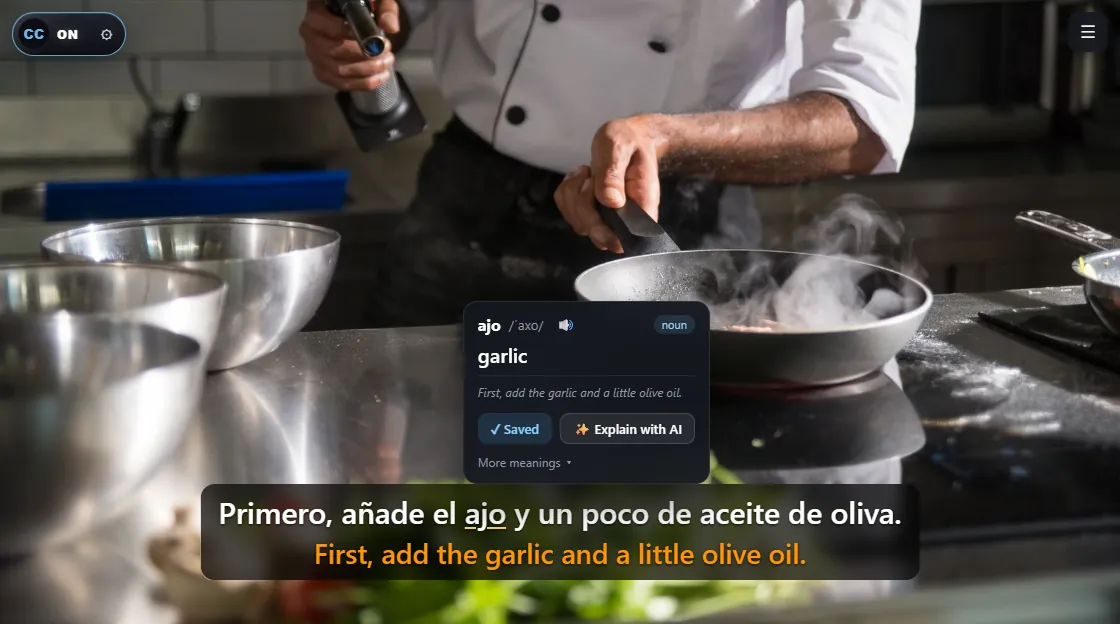
Hover or click any word in the subtitles and a card opens with the translation in this context, dictionary meanings, pronunciation and an example. Drag across several words to translate a whole phrase or idiom. If something still doesn't make sense, Explain with AI breaks down the grammar, the idiom or the slang in your own language. While you listen, the word being spoken lights up, so your ear and your eyes stay on the same place.
An interactive transcript next to the video

Open the transcript to see the whole video as text, line by line with translations. Search it, click a line to jump back to that moment, and use the study keys: A previous line, S repeat, D next line, Q pause after every line. It is the fastest way to work through a dense lecture or a scene you only half understood.
Live translation when there are no subtitles

Plenty of video has no subtitles at all: live streams, small channels, recordings on news sites, web calls. Press Live and the extension listens to the audio of the current tab, recognises the speech and shows the original with a translation in real time. On Google Meet, Zoom, Teams and other calls in the browser it offers Live by itself instead of showing an empty subtitle box. Live comes with 10 free minutes to try.
My Words and Anki export
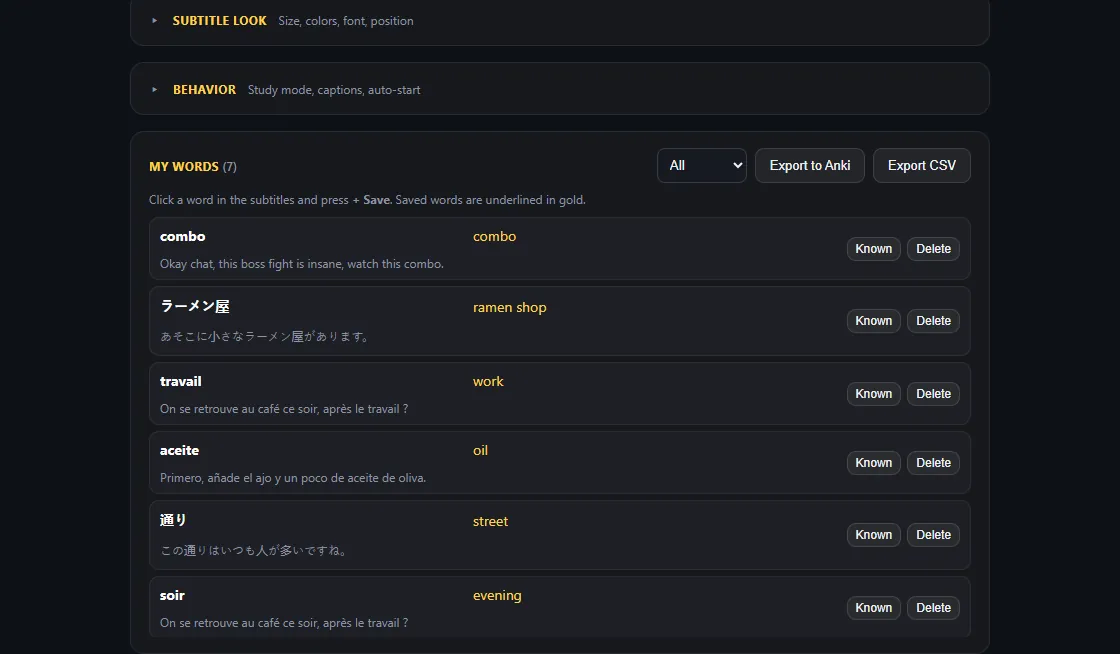
Every word you save keeps the sentence it came from. Saved words are underlined in gold the next time they appear in subtitles, you can mark them as known, and the whole list exports to Anki or a CSV spreadsheet with one click — real phrases from real videos instead of a textbook list.
Where it works
- YouTube — regular videos with uploaded or auto-generated captions, plus the full transcript of a video. See also YouTube dual subtitles.
- Netflix, Prime Video, Disney+, Max — turn on subtitles in the original language in the player, and the translation appears under them. More in Netflix dual subtitles.
- Online courses and talks — course players, TED, Vimeo and most sites built on standard HTML5 video with a subtitle track.
- Your own files — load an .srt or .vtt file onto any video in the browser.
- Video without subtitles, live streams and web calls — with Live, which translates the tab's audio.
If a site isn't worth it, switch the extension off just for that site from the toolbar popup; it stays on everywhere else.
How to install: 3 steps, one minute
- Add the extension. Open LiveSubtitles in the Chrome Web Store and press Add to Chrome. In Microsoft Edge, allow extensions from other stores when asked and install from the same page.
- Pick your language. The welcome page suggests your browser's language as the translation language. Change it if you want, and pin the icon to the toolbar.
- Open a video. The original and the translation appear under it by themselves. No subtitles on this video? Press Live.
Free and Pro
| Feature | Free | Pro / Live |
|---|---|---|
| Dual subtitles on YouTube, Netflix and other sites | Yes, no daily limit | Yes |
| Subtitle translation into 39 languages | Yes | Yes |
| Click-a-word translation, phrases, pronunciation | Yes, no daily limit | Yes |
| Interactive transcript and study keys | Yes | Yes |
| Own .srt / .vtt files, subtitle style | Yes | Yes |
| AI explanations of grammar and idioms | 3 a day | Unlimited (Pro) |
| My Words and Anki / CSV export | Up to 50 words, no export | Unlimited, with export (Pro) |
| Live translation of tab audio | 10 minutes to try | 20 hours a month (Live plan) |
The first 7 days include everything, no card needed. If you never press Live and don't need Anki, you may never need to pay.
Extension or desktop app?
Live Subtitles started as an app for Windows and Mac, and the app is still the right tool for some jobs. The short version: the extension is for video in the browser and for learning words; the app is for any sound on the computer.
| Chrome extension | Live Subtitles app | |
|---|---|---|
| Where it works | Video in Chrome, Edge, Brave | Any program: browsers, the Netflix and YouTube apps, VLC, games, Zoom and Teams desktop apps |
| Where the subtitles come from | The site's own subtitles; Live for the rest | Always from the audio, with AI speech recognition |
| Learning tools | Word cards, AI explanations, transcript, Anki | Transcript export |
| Your microphone | No | Yes — subtitles for your own speech too |
| Platforms | Desktop browsers, including Linux and ChromeOS | Windows, macOS, iPhone, Android |
| Free use | Dual subtitles and word lookups without limits | Free minutes, then a subscription |
Many people use both: the extension for evening series on Netflix and for vocabulary, the app for calls in desktop Zoom and for games. See real-time translation of any audio on PC for what the app does.
How it compares to other dual-subtitle extensions
Dual subtitles in the browser are a well-known idea: Language Reactor, Trancy and Immersive Translate all do a version of it, and if one of them already works for you there is no reason to switch. What LiveSubtitles does differently:
- No account, no sign-in. Install it and it works.
- Free means free. Dual subtitles and word lookups have no daily limit, and they don't stop after a trial.
- Video without subtitles is covered. Live translates the tab's audio, so a stream or a call doesn't leave you with nothing.
- Not just two sites. Besides YouTube and Netflix it works on Prime Video, Disney+, Max, course players and generic HTML5 video.
For a wider comparison, including desktop tools, see Language Reactor alternatives and the best dual subtitle apps.
Privacy
There is no account. Settings and saved words are stored in your browser. Subtitle text is sent to our server only to translate it and is not tied to you; the audio of a tab is used only while Live is switched on, only for that tab. The extension doesn't log which sites you visit. Anonymous usage statistics can be switched off in the settings. Questions: ext@live-subtitles.com.
Add to Chrome — it's freeFAQ
Is the extension free?
Yes. Dual subtitles, subtitle translation and word lookups are free with no daily limit and no account. Pro adds unlimited AI explanations, unlimited saved words and Anki export; the Live plan adds hours of live audio translation. The first 7 days include everything.
Does it work on Netflix?
Yes. On Netflix, Prime Video, Disney+ and Max the extension reads the subtitles the service shows and adds a translated line under each one. Turn on subtitles in the original language in the player; the extension takes it from there.
What if a video has no subtitles?
Press Live. The extension listens to the audio of the current tab, recognises the speech and translates it in real time. It also works for live streams and web calls in Google Meet, Zoom or Teams in the browser. Live comes with 10 free minutes; after that it is part of the Live plan.
Does it work in Microsoft Edge, Brave or Firefox?
It works in Google Chrome and in Chromium browsers that install from the Chrome Web Store, such as Microsoft Edge and Brave. There is no Firefox or Safari version; on those browsers use the Live Subtitles desktop app, which works with any sound on the computer.
Do I need an account?
No. Settings and saved words stay in your browser. Caption text is sent to our server only to translate it, and tab audio is used only while Live is switched on.
Does my Live Subtitles app subscription include the extension?
No, the extension has its own free tier and its own Pro and Live plans. Most people never need to pay for it: dual subtitles and word lookups are free.