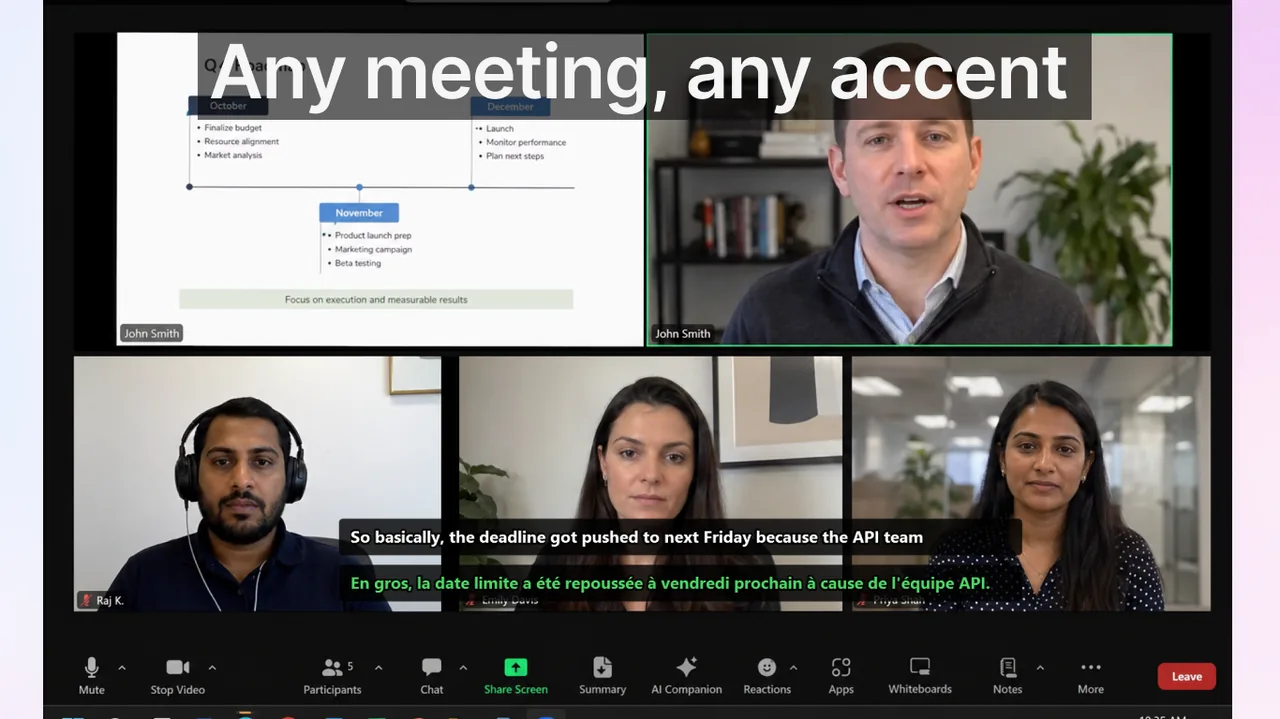
Teams almost always reach for Zoom live captions after hitting a concrete operational pain point: a critical decision that three people interpreted differently, a client call where an action item got lost, or an onboarding session where a non-native speaker nodded along without actually tracking the content. The goal is not “nice subtitles on screen.” The goal is zero communication loss — and that requires treating captions as an operational system, not a feature toggle. This playbook gives you that system: from which meetings to target first, to the exact facilitator behaviors that maximize caption usefulness, to the four KPIs that prove rollout success within a month.
Contents
- Why Zoom live captions need a rollout plan
- Step 1 — Identify the highest-cost meetings first
- Step 2 — Set the meeting standard that makes captions work
- Step 3 — Facilitator checklist (before, during, after)
- Step 4 — Technical setup in Zoom (admin and host settings)
- Step 5 — Four KPIs for a 4-week rollout
- Step 6 — Handling hard cases and escalation rules
- Comparison: Zoom captions vs. Teams and Meet
- FAQ
- Final takeaway
Why Zoom live captions need a rollout plan
Enabling Zoom captions takes about ninety seconds for an admin. But simply turning on the feature delivers only a fraction of the possible benefit. In practice, teams that enable captions without any process change report modest improvements — they see captions on screen, but participants still talk over each other, use abbreviations the speech engine cannot parse, and skip the verbal recap that turns real-time text into a confirmed decision.
A structured rollout changes that. It aligns the technology with meeting behavior so that captions capture what actually matters: decisions, owners, deadlines, and blockers. Zoom's built-in auto-transcription covers a single language. If your team spans multiple languages or accents, pairing Zoom with the Live Subtitles app for Windows adds real-time translated captions alongside the source audio — useful when engineers are on one continent and clients are on another.
Step 1 — Identify the highest-cost meetings first
Not every meeting needs captions enabled on day one. Prioritize by the cost of misunderstanding. A weekly 1:1 status check has a low cost if one item is miscaptured — the follow-up Slack message fixes it in two minutes. A contract negotiation call or a quarterly OKR setting session has a very high cost if a decision gets misunderstood — realignment takes days and affects multiple teams.
Score your recurring meetings on two axes: (a) how many people are affected by a misunderstanding, and (b) how expensive is the correction. Start with meetings that score high on both:
- Customer and partner calls — wording in these calls affects trust, legal standing, and commercial outcomes. Even a single misheard number or condition can set expectations that are painful to walk back.
- Cross-functional planning sessions — product, engineering, sales, and operations use different vocabularies. Captions create a shared written layer that persists when the call ends.
- Global standups with mixed language backgrounds — non-native speakers often hesitate to ask for clarification in a fast-moving standup. Captions let them read along and verify without interrupting the flow.
- Onboarding and process-definition sessions — these establish mental models. A new hire who misses a detail about process ownership creates confusion that reappears weeks later during the first handoff.
- Incident and post-mortem calls — high-stress, fast-paced, heavy use of technical jargon. Every action item needs to be unambiguous.
Step 2 — Set the meeting standard that makes captions work
Caption quality is a direct function of speech quality. A facilitator who allows crosstalk, uses heavy jargon without context, or rushes through action items will get a transcript that is technically accurate but operationally useless. Establish lightweight norms before your first captioned meeting:
- One speaker at a time for decisions. Crosstalk is the single largest source of caption errors. For casual chat it does not matter. For a decision moment, enforce a brief pause before the next person speaks.
- Explicit sentence structure for commitments. “We will ship this by Friday” captions and reads far more cleanly than “yeah so we should probably try to have that done end of week or so.” Train speakers to make commitments in subject-verb-deadline format.
- Spell out proper nouns and acronyms once. The first time a team name, project code, or client name appears, say it fully. “APAC” may be a standard internal acronym but it means nothing to a new participant or to a speech engine that has not been trained on your glossary.
- Repeat the decision sentence before moving to the next agenda item. This takes ten seconds and eliminates the most common post-meeting ambiguity. The facilitator says: “So the decision is: X. Does everyone confirm?” The caption records that sentence verbatim.
- Use a shared document for action items in real time. Captions are ephemeral — they scroll off screen. Someone should paste each confirmed action into a shared doc or the Zoom chat during the call, not after.
Step 3 — Facilitator checklist (before, during, after)
Before the call
- Enable Zoom auto-captions by default in the recurring meeting settings. Do not leave this as opt-in for each participant — defaults drive adoption far more reliably than optional features.
- If the meeting has participants who speak a language other than the host's, open the Live Subtitles app on the Windows machine that is running Zoom. Select source and target languages before joining.
- Distribute a short agenda that includes the expected outputs for each block (decision, information-only, brainstorm). This primes participants to listen for what they need to confirm.
- Designate a note-taker who will capture decisions in the Zoom chat or a shared doc — separate from the facilitator role if possible.
During the call
- Open with a thirty-second briefing: “We're using live captions today — please speak at a normal pace, one person at a time for decisions.”
- After any dense technical explanation, pause and ask for a visible confirmation: “Does this make sense — quick thumbs up or nod?” The pause also helps the caption engine catch up on a fast passage.
- Before closing an agenda item, read the decision aloud in one sentence. Ask the note-taker to paste it in chat. This takes fifteen seconds and prevents the most expensive post-meeting scenarios.
- If a participant signals confusion (raised hand, “wait” in chat), stop immediately and rephrase. Non-native speakers will often stay silent rather than interrupt — watch for signs of disengagement.
- When multilingual nuance is critical — legal language, financial figures, product specifications — use the dual-subtitle mode available in Live Subtitles: source language plus translation on screen simultaneously. This lets each participant cross-check the meaning in their stronger language.
After the call
- Send the decision summary within one hour using the format: [Topic] → [Decision] → [Owner] → [Deadline]. Four fields, no ambiguity.
- For the first two weeks, count the number of clarification messages (Slack DMs, follow-up emails) that arrive in the 24 hours after each captioned meeting. This is your baseline for KPI tracking.
- Review any caption errors involving team-specific terms — product names, project codes, internal roles — and add them to a shared pronunciation/glossary guide for future meetings.
- Ask non-native participants a single pulse question: “On a scale of 1–5, how well did you follow the full meeting today?” This is your participant confidence score.
Step 4 — Technical setup in Zoom (admin and host settings)
If you manage the Zoom account, configure these settings in the Zoom Admin portal before the rollout begins:
- Account Settings → Meeting → Closed Captioning → Enable: turn this on at account level so all hosts inherit it.
- Auto-generate captions: enable this sub-option so hosts do not need to manually start captions each meeting.
- Save captions: enable if your compliance or legal team needs post-meeting transcripts. Note that this generates a full transcript file, not just the rolling caption stream.
- Third-party captioning token: if you integrate Live Subtitles or another translation layer, this is the token field used to pipe the translated text into the Zoom caption stream.
- Webinar auto-captions: enable separately under Webinar settings — it is a different toggle from meeting captions.
For host-level control during a live call: Participants panel → More → Enable Auto-Transcription. Participants can toggle captions for themselves via the CC button at the bottom of the meeting window.
Step 5 — Four KPIs for a 4-week rollout
Without measurement, rollouts tend to stall after the initial enthusiasm. These four metrics are quick to collect and directly reflect whether captions are reducing communication loss:
- Clarification load. Count “what did we decide?” or “can you clarify X from yesterday's call?” messages per meeting, per week. This is the clearest signal of whether decisions are landing. Target: 30–50% reduction by week 4.
- Decision latency. Measure the time from meeting end to confirmed written next actions (the decision summary is sent and acknowledged). Target: under one hour for all high-priority meetings by week 3.
- Participant confidence score. Single post-meeting question to non-native speakers, 1–5 scale. Aggregate by week. Target: average above 4.0 by week 4 (baseline is often 2.5–3.0 before structured captions).
- Repeat-meeting rate. Track meetings that had to be rescheduled or followed up because alignment was not reached in the original call. Even a single avoided repeat meeting per week represents hours of recovered productivity across a team.
Run a five-minute retrospective at the end of week 2 and week 4 with facilitators. Ask: what worked, what caused confusion, what should change? Adjust facilitator norms based on the answers.
Step 6 — Handling hard cases and escalation rules
Captions are excellent for normal meeting flow but require additional protocol when the stakes are especially high. Define escalation rules for these categories:
Legal and contractual language
Never rely on a single captioned pass for pricing terms, contract conditions, liability clauses, or SLA commitments. Use the triple-confirmation protocol: (1) caption records the statement, (2) the speaker verbally confirms the key number or condition, (3) the note-taker posts the exact sentence in chat before moving on. Send a follow-up email within four hours summarizing the commercial terms discussed.
Technical specifications with precise numbers
Speech engines occasionally mishear numerals — “fifteen” and “fifty” are a classic pair. For any engineering spec, capacity figure, or financial number, follow the verbal statement with the figure typed in Zoom chat: “As I said: 15 GB, one-five.” This eliminates transcription-based numeric ambiguity entirely.
Cultural and language gaps
When participants span multiple language backgrounds, idioms and indirect speech are the largest source of misalignment. If someone says “we should look at this more carefully,” that might mean “this is blocked” in one culture and “this looks fine but needs a review pass” in another. When in doubt, ask the speaker to rephrase as a direct action: “Can you say that as: we will do X by Y?” Captions capture that reformulation accurately.
For cross-language teams, the Live Subtitles app for Windows adds real-time translation at the OS level — the translation appears independently of Zoom's subtitle stream, so participants see both the original and the translated caption without cluttering the Zoom UI.
Comparison: Zoom captions vs. Teams and Meet
Zoom, Microsoft Teams, and Google Meet all offer native auto-captions. The practical differences matter for rollout decisions:
- Zoom: strongest standalone caption reliability for English; good speaker attribution; captions tied to the Zoom session only — no cross-app support.
- Microsoft Teams: tightly integrated with Microsoft 365; supports caption saving to stream; better for organizations already in the Microsoft ecosystem. See the Teams Captions Playbook for a parallel guide.
- Google Meet: real-time translation to English from a growing list of languages as a paid Workspace feature; strong for browser-first workflows. See the Google Meet Live Captions Playbook for details.
For a side-by-side comparison of all three platforms, read Google Meet vs Zoom vs Teams: Translated Captions.
For teams that use more than one platform, Live Subtitles works at the Windows audio layer — it picks up any audio from any app (Zoom, Teams, Meet, or a browser-based call) and delivers captions in the language of your choice. This is its core advantage over platform-native tools, which are locked to their own ecosystem.
FAQ
Should Zoom captions be optional or default in recurring meetings?
Default-on delivers far better adoption than opt-in. When captions require a manual action each session, a significant share of participants will simply not bother, creating inconsistent behavior across the team. Set captions to auto-start at the account or meeting level and let participants who prefer to disable them do so — the friction for opting out is much lower than the friction for opting in.
Do live captions replace meeting notes?
No — they complement them. Captions improve in-call comprehension and reduce in-the-moment misunderstanding. But a scrolling caption stream is not a structured record: it does not highlight decisions, does not assign owners, and disappears from view as the conversation moves forward. You still need explicit decision notes in owner-deadline format, sent within an hour of the meeting ending.
How quickly should we expect measurable results?
Most teams see a meaningful drop in clarification load within the first two weeks — typically 20–30% — once facilitators adopt the decision-repeat behavior consistently. Full results (50%+ reduction) usually materialize by week 4 when meeting standards are embedded. The participant confidence score improves fastest for non-native speakers because captions give them a written anchor during fast-paced discussion.
What if our team uses Zoom but some participants join from mobile?
Zoom captions work on iOS and Android clients. The CC button appears in the meeting controls on mobile the same way it does on desktop. The caption experience on a small screen is more limited — text size is fixed and participants cannot reposition the caption window — but the text itself is identical to the desktop stream. For multilingual meetings, the translated overlay from Live Subtitles only runs on Windows and is visible to the Windows participant; mobile participants still see the standard Zoom native captions.
How do we handle accents that the caption engine struggles with?
The fastest improvement comes from slowing down slightly and using shorter sentences, especially for decision statements. For recurring participants with strong accents, consider using the Zoom captions language setting that best matches their English variety (if available). Supplementary translation tools like Live Subtitles use a different speech recognition pipeline and can sometimes perform better on certain accent profiles. Test both and measure which produces fewer post-meeting clarification requests from that participant.
Final takeaway
Zoom live captions deliver real operational value when they are deployed as a process — not just a feature. The technology is the easy part. The lasting gains come from facilitator discipline: explicit decision sentences, single-speaker moments, post-meeting summaries in owner-deadline format, and consistent KPI tracking across the four-week rollout. Teams that commit to this approach consistently report fewer post-meeting clarifications, faster decision confirmation, and higher meeting satisfaction from non-native participants.
If your team spans multiple languages or time zones, extend the system with a translated-caption layer. The Live Subtitles app runs on Windows alongside Zoom and delivers real-time translated subtitles independently of Zoom's native caption stream — meaning you get both the original and the translation on screen simultaneously, for any language pair. Download it from the Download free
and run it in parallel with your next Zoom call to see the difference immediately.Related Articles
Improve Meeting Clarity
Use live captions and dual subtitles to keep multilingual meetings accurate and efficient.
Download free