Microsoft Teams Captions Strategy: Manager Playbook
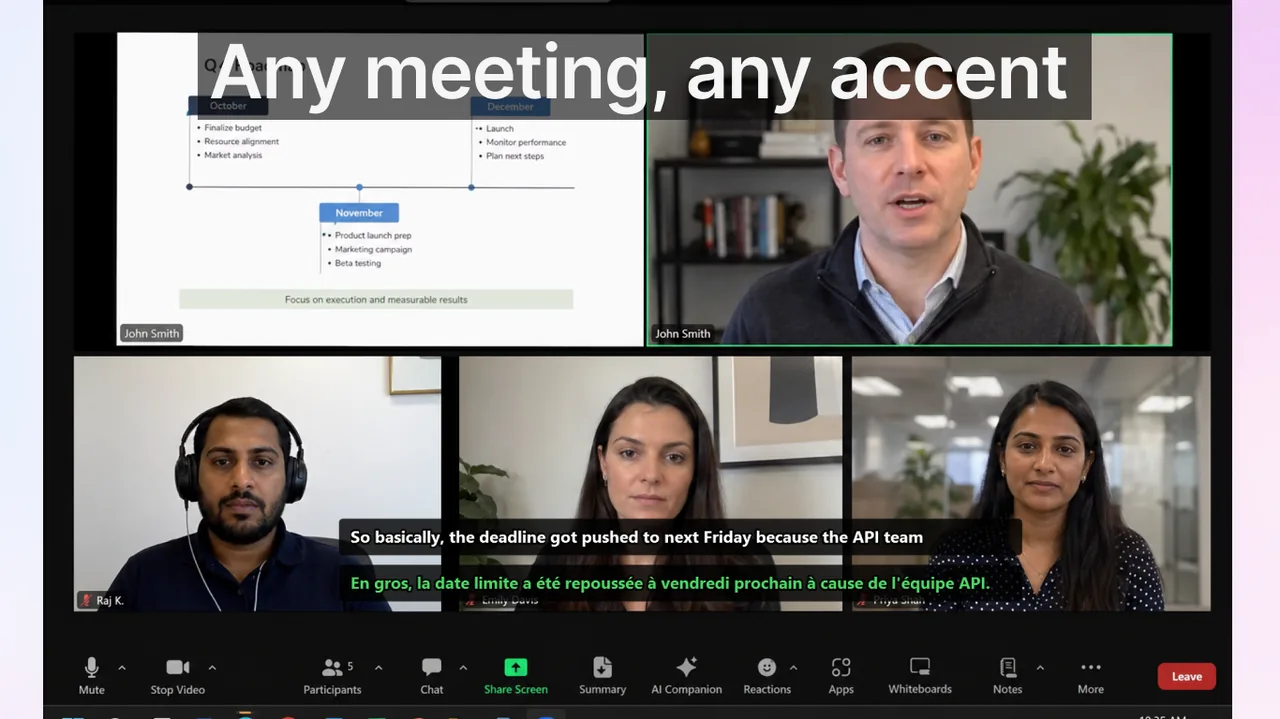
Managers usually evaluate Microsoft Teams captions after seeing recurring coordination failures: unclear owners, duplicated tasks, and long recap threads. Every distributed team has experienced the same sequence — a call ends, three people walk away with three different interpretations of the decision, and the real work only begins once everyone has traded clarification messages for the next 90 minutes. The root cause is rarely a technical problem; it is a governance gap. The strongest outcomes come when captions are implemented as a deliberate process decision, not as an optional personal setting that each employee discovers by accident.
This playbook is built for managers who want measurable results within four weeks and a sustainable framework that scales beyond a single team.
Contents
- Why Microsoft Teams Captions Are a Business Tool, Not a Convenience Feature
- Establishing Your Objective Before Rollout
- Four-Phase Rollout Sequence
- Operational Standards That Determine Outcome Quality
- KPIs for Leadership Review
- Risk Register and Mitigation Strategies
- Extending the Workflow Beyond Native Teams Captions
- Template: Manager Communication for Caption Rollout
- Frequently Asked Questions
- Summary: The Manager's Responsibility in Caption Rollout
Why Microsoft Teams Captions Are a Business Tool, Not a Convenience Feature
Live captions in Teams transcribe speech into on-screen text in near real-time, with latency typically under two seconds. That alone reduces the cognitive load of listening in a second language, following a fast speaker, or staying oriented in a noisy environment. But the business case goes further than accessibility.
- Decision traceability: Captions create a scrollable record of what was said during the meeting. Participants who need to confirm an owner or deadline can scan back without asking someone to repeat themselves.
- Non-native speaker confidence: Research consistently shows that employees who are not native speakers of the meeting language contribute less when there are no visual aids. Live captions reduce the penalty for imperfect listening comprehension and improve voluntary participation rates.
- Async-friendly hand-offs: When a caption transcript exists, colleagues in different time zones can review the key exchange points without attending the live session — reducing unnecessary meetings scheduled purely for catch-up.
- Reduced repeat meetings: Ambiguous verbal decisions are the most common reason a topic gets re-opened in the next standup. When captions make language visible and searchable, teams resolve ambiguity during the meeting itself rather than creating a follow-up loop.
Establishing Your Objective Before Rollout
Captions address several different problems, and the configuration and measurement strategy differs depending on which problem you are solving. Before touching any setting, pick one primary business objective for the first 30 days. Secondary objectives can be layered in later.
Objective A: Reduce post-meeting clarification workload
This is the most common starting point for teams running three or more recurring calls per week. Baseline measurement: count the number of messages that begin with phrases like “Just to confirm…”, “What was decided about…”, or “Could you resend the action items?” in the week before rollout. Track the same count for four weeks after rollout. A 25% reduction is a realistic first-month target.
Objective B: Increase participation in multilingual calls
This is the right objective for teams spanning two or more language regions. Baseline measurement: use Teams meeting attendance reports and speaker contribution data (available via Teams admin center under Analytics & Reports > Meeting usage) to establish how many distinct speakers contribute in a typical session. Track whether the number of unique contributors increases after enabling captions. Even a 10-15% increase in the first month represents a meaningful shift in team dynamics.
Objective C: Shorten decision-to-action time
Relevant for sprint teams, product reviews, or client-facing calls where every day of delay has a cost. Track the gap between when a decision is made in a meeting and when the assigned owner takes the first documented action (a Jira ticket update, a commit, a sent email). Teams that use structured caption workflows tend to close this gap because the decision moment and its owner are captured in text during the meeting, not reconstructed afterwards.
Objective D: Improve onboarding consistency for global hires
New employees in distributed companies are often lost in their first weeks because spoken context — team norms, project history, technical jargon — is passed verbally and never documented. Caption-based meeting records give new hires a searchable archive of real decisions and real language, accelerating time-to-productivity in a way that static onboarding documents cannot replicate.
Four-Phase Rollout Sequence
A phased rollout takes six to eight weeks but dramatically reduces resistance and avoids the “we tried captions and it felt weird” outcome that happens when the feature is switched on organisation-wide without preparation.
Phase 1: Technical baseline (days 1–3)
Before scheduling the pilot, verify the technical environment. Open Teams Admin Center and confirm that live captions are enabled at the policy level: go to Meetings > Meeting policies > your assigned policy > Audio & video section and confirm that “Live captions” is set to “Not disabled” or “Enabled.” If your organisation uses Microsoft 365 Education or Government tenants, some caption features require an add-on licence — confirm this with your IT administrator before communicating any timeline to the team.
Next, test personally. Join a test meeting, speak for 60 seconds, and verify that captions appear within 1–2 seconds with acceptable accuracy for your domain's vocabulary. If accuracy is poor for product or technical terms, create a shared glossary document that you will distribute in Phase 2.
Phase 2: Controlled pilot (weeks 1–2)
- Select 2–3 recurring meetings with stable participant lists. Weekly sprint reviews and project syncs work well. Avoid all-hands meetings or client calls for the pilot.
- Assign one facilitator per meeting who is responsible for keeping language precise, summarising decisions aloud before moving to the next agenda item, and producing a written recap using the caption content.
- At the end of each pilot session, the facilitator posts a three-line summary to the team channel: (1) what was decided, (2) who owns it, (3) deadline. This is non-negotiable during the pilot — it trains the habit that captions are a tool for capturing decisions, not a passive transcript service.
- Collect baseline metrics against your chosen objective during this phase.
Phase 3: Process integration (weeks 3–4)
- Standardise meeting structure across all recurring calls: opening context (two sentences), decision items, owners, deadlines. Publish this as a meeting template in Teams calendar.
- Share the domain glossary with all participants. Ask them to add terms they hear being misrecognised. A living glossary with 30–50 domain-specific terms can raise caption accuracy from around 85% to over 95% for typical technical topics.
- Add a one-line decision summary at each agenda checkpoint rather than waiting until the end. This creates natural caption anchor points and reduces the length of recaps.
- Introduce the three-line summary format to all facilitators, not just the pilot group.
Phase 4: Cross-channel consistency (weeks 5–8)
- Extend the caption standard to other platforms your team uses. If some calls happen on Zoom and some on Google Meet, the standard should apply there too. Inconsistency across platforms is the single most common reason caption adoption stalls after an initial pilot.
- For calls on non-Teams platforms, consider a dedicated caption tool that works system-wide rather than relying on each platform's native implementation. The Live Subtitles app for Windows provides real-time captions across any application — Teams, Zoom, Meet, browser-based tools — from a single interface, so the same workflow applies regardless of platform.
- Use one subtitle workflow for meetings, webinars, and training video review. Reducing the number of different tools and habits minimises cognitive switching costs and makes the standard easier to enforce.
Operational Standards That Determine Outcome Quality
Caption technology is a multiplier, not a replacement for clear communication habits. These standards, applied consistently, determine whether your caption rollout produces a 10% improvement or a 40% improvement.
Language discipline
- One decision per statement. “We will ship the updated API contract to the client by Friday — Alex owns this” is capturable and actionable. “We probably should sort out the API thing before the end of the week if possible” is neither.
- Explicit names, dates, and scope. Never let a pronoun stand in for a person in a high-stakes exchange. “She will handle it” is unusable in a recap. “Priya will update the spec document by Thursday EOD” is not.
- Convert “we should” into owner + deadline. This is the single highest-leverage habit change. Designate one person — the facilitator or the meeting organiser — whose job it is to interrupt vague commitments and convert them before the meeting moves forward.
- Close every meeting with a final readback. Spend the last two minutes having the facilitator read the captured action items aloud. This catches errors while everyone is still in the room and reinforces the norm that what was said in the meeting is what everyone is committed to.
Facilitator role definition
The facilitator is not the organiser and not necessarily the most senior person in the meeting. Their mandate is narrow: keep decision language precise, produce the three-line summary, and flag when an agenda item ends without a clear owner. Rotate the facilitator role across team members monthly. This distributes the skill and prevents the role from becoming a burden on one person.
Glossary maintenance
Assign one person per quarter to review the domain glossary, add new terms from recent projects, and remove deprecated terminology. A 45-minute quarterly review is sufficient for teams of 10–20. The glossary document should live in the same Teams channel where meeting recaps are posted, so facilitators can access it in one click.
KPIs for Leadership Review
Present these four metrics to leadership at the 30-day and 60-day marks. Avoid vanity metrics (caption activation rate, number of meetings with captions enabled) in favour of outcome metrics that are directly linked to business value.
- Clarification burden: Number of follow-up messages per meeting referencing a past session. Target: reduce by 25% in 30 days, 40% in 60 days.
- Action-item accuracy: Percentage of tasks from meeting recaps that are accepted by the assigned owner without correction. Target: above 90% by week four. If this is below 70%, the problem is language discipline, not caption technology.
- Participation equity: Ratio of unique speakers per meeting versus total attendees. In a 10-person meeting, a ratio below 0.5 (five or fewer people speaking) indicates exclusion, often language-barrier-related. Target: 0.7 or above within 60 days.
- Meeting cycle efficiency: Number of topics that return to the agenda in the next meeting because they were not resolved. Track per recurring meeting series. Target: reduce by 30% in 60 days.
Risk Register and Mitigation Strategies
Risk 1: Low adoption despite manager mandate
Cause: Enabling captions is perceived as optional because the policy is communicated but not enforced structurally.
Mitigation: Embed captions in the meeting template itself. When the meeting template requires a recap post to the team channel, the facilitator must use the caption content to produce it — which means captions must be on. Make the output (the recap post) the accountability mechanism, not the caption activation itself.
Risk 2: Accuracy complaints derailing the rollout
Cause: Teams' native live captions use general-purpose speech models that struggle with heavy accents, fast speech, and domain vocabulary.
Mitigation: Set expectations before rollout — live captions are 85–95% accurate under normal conditions, not 100%. Train facilitators to make explicit verbal corrections (“to clarify, that deadline is the 15th, not the 5th”) rather than relying on transcription perfection. For teams with heavy domain terminology, supplement with a tool that allows vocabulary customisation. Also see our comparison of Google Meet vs Zoom vs Teams translated captions for a detailed accuracy breakdown across platforms.
Risk 3: False confidence in ambiguous decisions
Cause: Participants assume that because something was said and captioned, it was understood and agreed. In reality, captions do not resolve ambiguity — they only surface it.
Mitigation: For high-stakes decisions (pricing changes, contractual commitments, incident response actions), require dual confirmation: a verbal readback during the meeting AND a written message in the team channel within 30 minutes. This two-channel confirmation is particularly important for cross-border teams where legal or regulatory implications may differ by region.
Risk 4: Caption fatigue
Cause: Participants begin ignoring the caption overlay after two to three weeks, reducing the attention benefit.
Mitigation: Captions are most effective in conjunction with structured meeting formats, not as a standalone tool. If participants are engaged with a decision-focused agenda, the captions serve as a real-time reference, not a distraction. Reduce caption-fatigue risk by keeping meetings short, focused, and structured — the caption tool cannot compensate for an unstructured three-hour session.
Extending the Workflow Beyond Native Teams Captions
Microsoft Teams' built-in live captions work well within the Teams ecosystem, but most organisations run meetings across multiple platforms simultaneously. A sales team may use Teams for internal calls and Zoom for client meetings. A distributed engineering team may use Teams for standups and Google Meet for vendor reviews. Native captions are siloed to each platform, which means your caption standard breaks every time someone switches tools.
The Live Subtitles app for Windows solves this by operating at the operating-system audio level rather than within a single application. It captures system audio in real time and renders captions in an overlay window that appears on top of any application — Teams, Zoom, Meet, browser-based webinar tools, or a recorded video being played back for async review. The same caption format, the same font size, the same keyboard shortcuts work regardless of which platform is active. This cross-platform consistency is the feature that makes the four-phase rollout described above viable without maintaining separate workflows for each tool.
For teams that use translated captions — where one participant speaks one language and another receives captions in a different language — the Live Subtitles app supports over 50 languages for real-time translation. This is particularly relevant for the Objective B rollout described above (increasing multilingual participation), where native-language captions may not be sufficient for participants working in their third or fourth language. For a detailed comparison of translation quality across platforms, see our article on Zoom live captions for international meetings.
Template: Manager Communication for Caption Rollout
Use this template when announcing the caption standard to your team. Customise the objective and timeline for your context.
Starting [DATE], we will enable live captions as a standard in all recurring [TEAM NAME] meetings. The goal is to reduce post-meeting clarification messages and ensure every decision has a documented owner and deadline before we move to the next agenda item. [FACILITATOR NAME] will produce a three-line recap in this channel after each session. Captions will be enabled by default when you join any meeting in our recurring series — you do not need to do anything to activate them. If you have questions or notice accuracy issues with specific terminology, post them in [CHANNEL] and we will update the glossary.
Frequently Asked Questions
Who should own caption adoption in Teams?
Ideally, a meeting operations owner or senior program manager with cross-team visibility. Without role ownership, usage becomes inconsistent across teams and the standard erodes within 6–8 weeks. If no formal role exists, assign ownership to the team lead for the first 90-day period and reassess at the quarterly review.
Can captions help if speaking habits are poor?
Only partially. Live captions amplify what is said — they do not improve it. A meeting where speakers use vague language, skip explicit owners, and never read back decisions will produce a poor caption-based recap no matter how accurate the transcription is. Captions are most effective as the final layer on top of structured meeting discipline, not as a substitute for it.
What is the best first KPI to present to leadership?
Start with clarification burden (post-meeting follow-up message count). It is easy to measure manually, requires no special tooling, and is directly linked to meeting quality. Once you have a 30-day baseline, it is straightforward to show a percentage reduction that leadership can map to saved engineering hours.
Does enabling captions affect meeting performance or recording quality?
No. Teams live captions are rendered client-side and do not appear in meeting recordings unless the recording was made with caption overlay enabled separately. Caption processing adds negligible latency to the Teams client. On machines with less than 4 GB of available RAM, there may be occasional rendering delays, but this affects the caption display only, not audio or video quality for other participants.
How do I handle participants who object to live captions on privacy grounds?
Microsoft Teams live captions are processed by Microsoft's speech-to-text service; the transcript is not stored permanently unless you also enable meeting transcription (a separate feature). Clarify this distinction when communicating the rollout. For regulated industries where even temporary processing is a concern, evaluate on-device caption tools that do not transmit audio to external servers.
What is the realistic timeline to see measurable improvement?
Most teams see a statistically meaningful reduction in clarification burden within 3–4 weeks, provided the facilitator role and the three-line recap standard are both in place from day one. Teams that enable captions without changing any meeting practices typically see no measurable improvement at all, because the problem is process rather than transcription.
Summary: The Manager's Responsibility in Caption Rollout
Live captions in Microsoft Teams are a high-leverage tool when treated as a process standard. The technology is reliable, the rollout is low-cost, and the KPIs are straightforward to track. What separates high-performing deployments from abandoned ones is manager behaviour: designating a facilitator, enforcing decision language standards, and reviewing metrics at 30 and 60 days.
The four-phase rollout — technical baseline, controlled pilot, process integration, cross-channel consistency — gives you a repeatable framework that applies to a five-person startup team and a 500-person distributed organisation equally. Start with one objective, measure it precisely, and build from there. The compound effect of cleaner meeting language, structured recaps, and cross-platform consistency compounds over quarters into a measurable reduction in coordination overhead — which is ultimately what allows distributed teams to execute at the speed of co-located ones.
Related Articles
Upgrade Team Communication
Use Live Subtitles on Windows for consistent real-time captions across Teams, Zoom, Meet, and every other platform — one tool, one workflow, zero switching costs.
Download from Microsoft Store