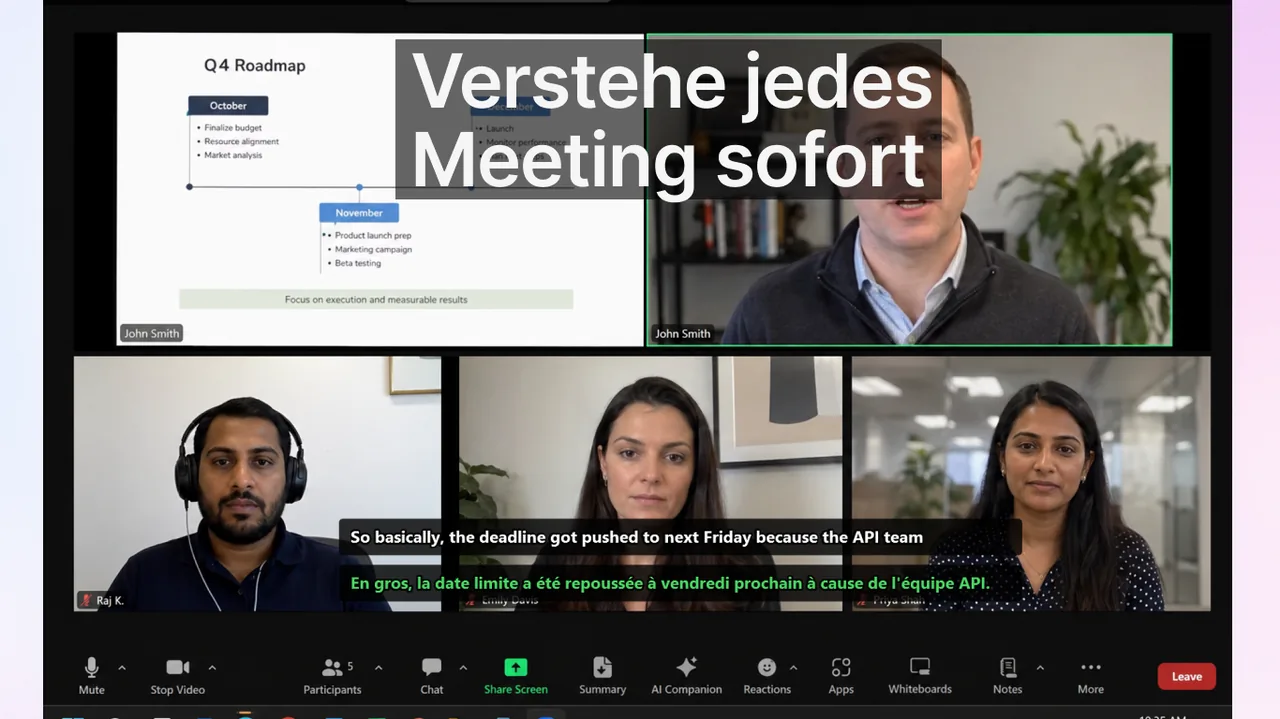
Teams mit Bedarf an übersetzten Untertiteln stehen meist vor einer praktischen Entscheidung: auf integrierte Untertitel je Meeting-Tool setzen oder einen einheitlichen externen Workflow für alle Kommunikationskontexte etablieren. Dieser Vergleich fokussiert auf operative Entscheidungen statt auf Feature-Marketing. Wer ein internationales Team führt, kennt das Muster: Eine Plattform deckt 69 Sprachen ab, eine andere nur 46, und die dritte verlangt eine komplizierte Admin-Freigabe, bevor überhaupt eine Zeile Text erscheint. Die reine Zahl der Sprachen ist dabei selten der entscheidende Faktor – wichtiger sind Governance, Nutzergewohnheiten und die Frage, in wie vielen unterschiedlichen Werkzeugen Ihr Team tatsächlich täglich kommuniziert.
In diesem Leitfaden vergleichen wir Google Meet, Zoom und Microsoft Teams nicht nach Funktionslisten, sondern nach dem, was im Betrieb zählt: Wie zuverlässig erscheinen Untertitel, wie aufwendig ist der Rollout, und ob ein plattformübergreifender Workflow am Ende günstiger ist als drei einzeln gepflegte native Lösungen. Am Schluss finden Sie ein konkretes Entscheidungsraster sowie eine Empfehlung je nach Teamtyp.
Inhalt
Marktüberblick (Stand: 18. Februar 2026)
| Plattform | Aktuelles relevantes Signal | Operative Bedeutung |
|---|---|---|
| Google Meet | Google meldete Unterstützung übersetzter Untertitel in bis zu 69 Sprachen (Update vom 24. Juni 2025). | Starke native Option für Teams mit Schwerpunkt auf Google Workspace. |
| Zoom | Zoom gibt Unterstützung für übersetzte Untertitel in 46 Sprachen an. | Gute mehrsprachige Basis, wenn Zoom Ihre primäre Meeting-Ebene ist. |
| Microsoft Teams | Übersetzte Untertitel sind verfügbar, in einigen Fällen gelten jedoch Richtlinien- und Umgebungseinschränkungen. | Vor einer breiten Einführung ist eine engere Admin-Rolloutplanung nötig. |
Die Tabelle zeigt: Keine Plattform ist pauschal „die beste". Google Meet bietet die breiteste Sprachabdeckung und ist für Workspace-zentrierte Organisationen die naheliegende Wahl. Zoom liefert eine solide mehrsprachige Basis, wenn der Großteil externer Calls ohnehin über Zoom läuft. Microsoft Teams kann inhaltlich mithalten, verlangt aber häufig zusätzliche Richtlinien- und Lizenzfreigaben, bevor übersetzte Untertitel flächendeckend funktionieren. Diese Unterschiede entscheiden weniger darüber, ob Untertitel verfügbar sind, sondern wie viel Aufwand der Rollout kostet.
Wo integrierte Untertitel ausreichen
Native Untertitel sind in vielen Fällen die richtige Antwort. Sie sind ohne Zusatzsoftware verfügbar, in den Datenschutzrahmen der Plattform eingebettet und für die meisten Nutzer mit einem Klick aktiviert. Setzen Sie auf integrierte Untertitel, wenn die folgenden Bedingungen zutreffen:
- Ihre Organisation ist auf eine einzige Meeting-Plattform standardisiert.
- Der Großteil der Kommunikation findet in geplanten Calls statt, nicht in gemischten Medien-Kontexten.
- IT-Admins können konsistente Meeting-Richtlinien durchsetzen.
- Compliance-Vorgaben erlauben keine externen Werkzeuge im Audio-Pfad.
In diesem Setup sind native Untertitel oft die reibungsärmste Wahl. Der Preis dafür: Sie binden sich an die Sprachabdeckung, die Genauigkeit und das Aktualisierungstempo eines einzelnen Anbieters. Sobald ein zweiter oder dritter Kommunikationskanal hinzukommt, kippt diese Rechnung schnell.
Wo ein einheitlicher app-übergreifender Workflow gewinnt
Die meisten internationalen Teams arbeiten nicht in einer einzigen App. Sie wechseln im Lauf eines Tages zwischen Meeting-Software, Webinar-Plattformen, Schulungsvideos und Voice-Chat. Jeder dieser Kontexte hat eine eigene Untertitellösung – oder gar keine. Ein plattformübergreifender Workflow lohnt sich, wenn:
- Teams nutzen Meet, Zoom und Teams parallel mit Kunden und Partnern.
- Untertitel werden auch in Webinaren, Schulungsvideos, Streams oder Voice-Chats gebraucht.
- Lern- und Kommunikations-Workflows sollen sich eine Routine teilen.
- Nutzer eine einheitliche Untertitel-Darstellung über alle Anwendungen hinweg erwarten.
Bei fragmentierten Kontexten wird das Tool-Wechseln zur wichtigsten Produktivitätskosten. Jede Plattform hat eine andere Tastenkombination, einen anderen Aktivierungsweg und eine andere Untertitelposition – und genau diese kleinen Reibungen führen dazu, dass Untertitel im Alltag schlicht nicht eingeschaltet werden. Ein konsistenter Untertitel-Workflow auf Systemebene, etwa über eine App wie Live Subtitles, reduziert diesen Overhead, weil dieselbe Routine in jedem Call, jedem Video und jedem Stream greift. Wie solche Echtzeit-Übersetzungswerkzeuge nach Anwendungsfall abschneiden, beschreibt unser Vergleich der Sprachübersetzung-Apps 2026.
Entscheidungsrahmen für Verantwortliche
Anstatt sich von Feature-Listen leiten zu lassen, sollten Verantwortliche eine strukturierte Bewertung in drei Schritten durchführen. Dieser Rahmen ersetzt das Bauchgefühl durch messbare Kriterien und hält die Entscheidung auch nach einem Plattformwechsel stabil.
Schritt 1: Reale Kommunikationskanäle erfassen
Planen Sie nicht anhand von Lizenztabellen, sondern anhand der tatsächlichen Nutzung. Zählen Sie wöchentliche Stunden pro Plattform und Inhaltstyp. Eine Organisation, die laut Lizenz „eine Teams-Firma" ist, verbringt in der Praxis vielleicht 40 Prozent ihrer externen Zeit in Zoom-Calls von Kunden. Erst dieser ehrliche Blick auf das Nutzungsprofil zeigt, ob native Untertitel den Großteil der Realität abdecken oder nur einen Ausschnitt.
Schritt 2: Erfolgskennzahlen festlegen
Definieren Sie vor dem Test, woran Sie Verbesserung erkennen. Reine Aktivierungsraten sagen wenig aus; aussagekräftiger sind Kennzahlen, die das Kommunikationsergebnis abbilden:
- Klarstellungsnachrichten nach Meetings
- Latenz von der Entscheidung bis zur Bestätigung der verantwortlichen Person
- Vertrauen der Teilnehmenden in mehrsprachigen Calls
- Anteil der Meetings, in denen Untertitel tatsächlich genutzt wurden
Schritt 3: Zweiwöchigen kontrollierten Rollout durchführen
Testen Sie ein Team nur mit nativen Untertiteln und ein zweites Team mit einem einheitlichen kontextübergreifenden Workflow. Halten Sie die Meeting-Typen identisch. Vergleichen Sie KPI-Deltas und skalieren Sie das Gewinnermodell. Zwei Wochen reichen in der Regel, um richtungsweisende Tendenzen zu erkennen, ohne dass sich Teilnehmende an Sondersituationen gewöhnen. Achten Sie darauf, beide Gruppen mit derselben kurzen Einführung auszustatten, damit Sie wirklich den Workflow und nicht das Onboarding messen.
Praxistipp
Dokumentieren Sie die Sprachpaare, die in Ihren Calls real vorkommen. Häufig sind es nur fünf bis acht Kombinationen – und alle drei Plattformen sowie eine externe App decken diese problemlos ab. Die Diskussion über „69 vs. 46 Sprachen" verliert dann ihre Bedeutung, und Sie können sich auf Zuverlässigkeit und Konsistenz konzentrieren.
Plattform-Setup im Detail
Bevor Sie sich festlegen, lohnt ein Blick auf die konkreten Aktivierungswege je Plattform – denn der Rollout-Aufwand unterscheidet sich erheblich.
Google Meet
Übersetzte Untertitel lassen sich pro Meeting über das Untertitel-Menü einschalten und stehen je nach Workspace-Edition zur Verfügung. Für Workspace-Administratoren ist die Freigabe meist unkompliziert, was Meet zur reibungsärmsten nativen Option für Google-zentrierte Organisationen macht.
Zoom
Zoom blendet übersetzte Untertitel als separate Spur ein und erfordert in vielen Plänen eine kostenpflichtige Aktivierung sowie eine Freischaltung im Kontoprofil. Wenn Zoom Ihre primäre Ebene für externe Calls ist, planen Sie die Lizenzierung früh ein. Eine ausführliche Schritt-für-Schritt-Anleitung finden Sie auf unserer Seite zu Zoom-Live-Untertiteln.
Microsoft Teams
Teams koppelt übersetzte Untertitel an Besprechungsrichtlinien und in einigen Umgebungen an Premium-Lizenzen. Das bedeutet: Die Funktion ist da, aber ohne saubere Admin-Vorbereitung sehen Endnutzer sie nicht. Details zur Einführung beschreibt unsere Übersicht zu Teams-Live-Untertiteln.
Umsetzungsrisiken im Blick behalten
Die meisten gescheiterten Untertitel-Rollouts scheitern nicht an der Technik, sondern an Organisation und Gewohnheit. Behalten Sie diese drei Risiken im Auge:
- Policy-Missmatch: Admins aktivieren Funktionen, aber Nutzer kennen den Workflow nicht. Eine zweizeilige Anleitung im Kalendereintrag wirkt oft mehr als ein langes Schulungsdokument.
- Kein Sprachprotokoll: überlappende Sprache zerstört den Wert der Untertitel. Vereinbaren Sie, dass jeweils nur eine Person spricht und Zwischenfragen über den Chat laufen.
- Keine Review-Schleife: Teams können Verbesserungen der Kommunikationsqualität nicht nachweisen. Ohne Vorher-Nachher-Messung versandet die Initiative nach wenigen Wochen.
- Genauigkeitsfalle: Fachbegriffe und Eigennamen werden falsch erkannt. Pflegen Sie ein kleines Glossar und sprechen Sie kritische Begriffe deutlich aus.
Wer verstehen möchte, warum Erkennungsfehler entstehen und wie sich die zugrunde liegende Technik verbessern lässt, findet Hintergründe in unserem Artikel dazu, wie KI-Untertitel funktionieren.
Praktische Empfehlung nach Teamtyp
Interne Single-Plattform-Organisation: Beginnen Sie mit nativen Untertiteln, optimieren Sie den Prozess und erweitern Sie bei Bedarf. Die native Lösung ist hier fast immer die wirtschaftlichste, weil kein zusätzlicher Werkzeug- und Schulungsaufwand entsteht.
Kundenseitige Multi-Plattform-Organisation: Priorisieren Sie zuerst Konsistenz zwischen den Tools und feinjustieren Sie dann pro Plattform. Eine systemweite App, die in Meet, Zoom und Teams identisch funktioniert, spart hier den größten Reibungsverlust.
Sprachenlernen plus Betrieb: Nutzen Sie einen Untertitel-Workflow, der auch außerhalb von Meetings funktioniert, um Kontextwechsel zu vermeiden. So lassen sich Calls, Schulungsvideos und privates Sprachtraining mit derselben Routine abdecken.
FAQ
Ist die Sprachanzahl das Einzige, was zählt?
Nein. Governance, Nutzerverhalten und plattformübergreifende Konsistenz wirken meist stärker als reine Sprachsummen. Eine Plattform mit 46 Sprachen, die zuverlässig genutzt wird, schlägt eine mit 69 Sprachen, die niemand einschaltet.
Können wir native und externe Workflows kombinieren?
Ja. Viele Teams nutzen native Untertitel dort, wo sie stabil sind, und behalten einen Fallback-Workflow für gemischte Umgebungen. Dieser hybride Ansatz ist in der Praxis oft die robusteste Lösung.
Wie schnell lässt sich Wirkung messen?
Die meisten Teams sehen bei konsistenter Nutzung innerhalb von 2–4 Wochen richtungsweisende KPI-Veränderungen.
Beeinflussen Untertitel die Audioqualität oder die Verbindung?
Native Untertitel laufen serverseitig und belasten die Verbindung kaum. Externe Lösungen verarbeiten den Ton meist lokal auf dem Gerät und haben damit ebenfalls geringe Auswirkungen auf die Bandbreite.
Was ist mit Aufzeichnungen und Transkripten?
Wenn Sie Calls nicht nur live untertiteln, sondern auch durchsuchbare Protokolle benötigen, lohnt ein Blick auf den Unterschied zwischen Echtzeit- und Batch-Verarbeitung in unserem Leitfaden, wie man Audio in Text umwandelt.
Quellen
- Google Workspace Updates – Meet translated captions
- Zoom captions and translated captions overview
- Microsoft Teams live captions documentation
- Windows live captions support page
Verwandte Leitfäden
Einen verlässlichen Untertitel-Workflow aufbauen
Kommunikationsreibung über Meetings, Schulungen und Echtzeit-Zusammenarbeit hinweg reduzieren.
Kostenlos laden