Discord and Twitch Subtitles: Real-Time Community Workflow
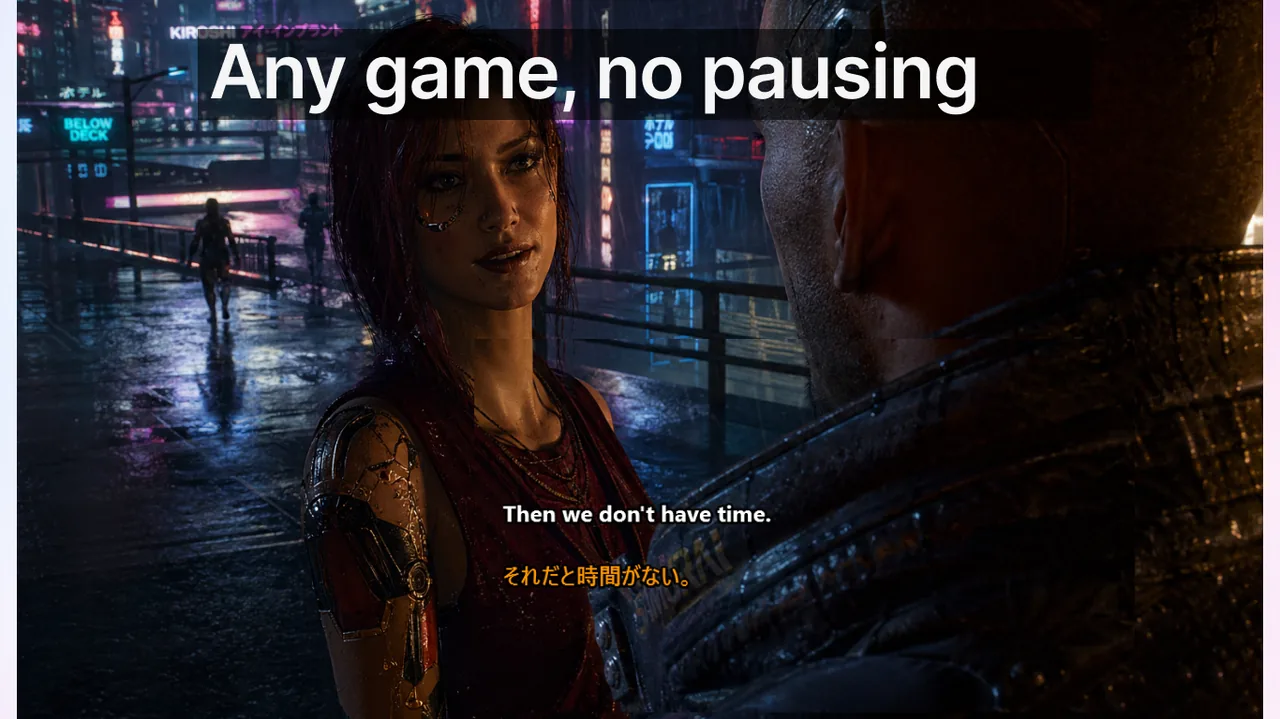
In Discord voice channels and Twitch streams, language is fast, overlapping, and context-heavy. A callout missed by one teammate can cost a ranked match; a slurred in-joke lost on an international viewer can cost a subscription. People search for Discord subtitles and Twitch subtitles not for convenience, but because they need to catch every word in real time — across accents, background noise, and six simultaneous speakers. This guide covers the complete operational workflow: hardware setup, software configuration with Live Subtitles, gaming squad protocols, streamer best practices, moderation use-cases, and measurable outcomes you can actually track.
Contents
- Why Voice-Heavy Platforms Need Real-Time Captions
- How Live Subtitles Works With Discord and Twitch
- Gaming Squad Protocols: Before, During, and After
- Streamer and Moderation Workflows
- Comparing Caption Approaches: Native Tools vs. Live Subtitles Overlay
- Measurable Outcomes: What to Track After Rollout
- Common Pitfalls and How to Avoid Them
- Frequently Asked Questions
- Final Takeaway
Why Voice-Heavy Platforms Need Real-Time Captions
Discord and Twitch share a common trait: audio is the primary communication channel, but the audience is rarely homogeneous. A typical competitive Discord server hosts players from at least four to six different countries. A mid-sized Twitch streamer (2,000–10,000 concurrent viewers) routinely sees 30–40% of chat messages in languages other than the stream's main language. These are not edge cases — they are the norm for any community that has grown beyond a local friend group.
Real-time captions address three distinct failure modes at once:
- Acoustic failure: bad microphone, network packet loss, or gaming headset compression makes speech unintelligible even to native speakers.
- Linguistic failure: non-native speakers miss idiomatic phrases, fast slang, or accent-heavy pronunciation under pressure.
- Cognitive overload failure: during high-stakes moments, the brain deprioritizes auditory processing. A text transcript provides a second channel that bypasses this bottleneck.
How Live Subtitles Works With Discord and Twitch
Live Subtitles (rated 4.7/5 on the Microsoft Store) is a Windows overlay app that captures system audio or microphone input, transcribes it locally in real time using on-device AI, and renders a transparent caption overlay on top of any application — including Discord, the Twitch dashboard, or a game running in fullscreen. Unlike browser extensions or platform-native caption tools, it does not require the platform to support captions natively, works across all voice sources simultaneously, and adds no perceptible latency to the audio itself.
Step-by-Step Setup for Discord Voice Channels
- Install Live Subtitles from the Microsoft Store. No account creation required.
- Open Live Subtitles and select System Audio as the input source. This captures all audio routed through your Windows sound device — including Discord voice output.
- In the overlay settings, choose a screen corner that does not overlap your minimap or HUD. Bottom-center works for most first-person games; top-right for strategy games where the minimap occupies the bottom-left.
- Set font size to at least 18pt so captions are readable during fast-paced action without requiring eye focus shifts.
- Enable speaker differentiation if your squad has more than three players — this labels each transcribed line with the speaker's color-coded tag, matching Discord's voice indicator.
- Join your Discord channel and start a session. Captions appear within 0.3–0.8 seconds of speech onset, fast enough for tactical calls.
Step-by-Step Setup for Twitch Streams
- On the streamer side, run Live Subtitles in microphone-input mode and enable OBS integration via the virtual camera or window-capture method. This embeds captions in your stream for viewers who have captions turned on in Twitch's player settings.
- On the viewer side, run Live Subtitles with system audio input while the Twitch stream plays in a browser. The overlay appears on top of the browser window, providing real-time captions regardless of whether the streamer has set them up.
- For multilingual audiences, combine Live Subtitles' transcription with its optional translation layer: set the display language to the viewer's preferred language, and captions appear already translated — turning a monolingual English stream into an accessible experience for Spanish, Japanese, or Portuguese speakers instantly.
Gaming Squad Protocols: Before, During, and After
The biggest mistake competitive teams make is treating subtitles as a passive accessibility tool rather than an active communication protocol. The following three-phase framework treats captions as a structured part of your team's operating procedure.
Phase 1: Pre-Session Vocabulary Alignment (5 minutes)
Subtitles are only as useful as the language they transcribe. Before queuing, spend five minutes aligning on:
- Zone names: pick one label per map area and use it consistently. If two players call the same spot “mid” and “connector,” captions will reflect the confusion rather than resolve it.
- Action verbs: commit to a short set — “push,” “hold,” “rotate,” “fall back,” “bait.” Avoid synonyms under pressure.
- Role tags: if your shot-caller says “IGL calls,” every player needs to know that means “execute immediately, no questions.”
- Callout priority signals: agree on a one-word prefix for urgent calls (e.g., “NOW: rotate B”) so captions surface critical information above noise.
Phase 2: In-Match Caption Discipline
When subtitles are running, a few behavioral rules dramatically improve their usefulness:
- Speak in complete tactical units, not fragments. “Rotate B, 30 seconds” is better than “B... maybe... 30.”
- Pause one second after high-stakes calls to let teammates read the caption and acknowledge — even a brief “on it” in text chat confirms receipt.
- Use subtitles as a secondary confirmation channel for calls made under gunfire or music. If you heard “rotate” but aren't sure you caught the full direction, glance at the caption instead of asking for a repeat mid-fight.
- Treat caption lag as a feature for post-call review: the 0.5-second delay means a caption often appears just after an action, helping you correlate outcome to call accuracy in your memory.
Phase 3: Post-Match Caption Review (10 minutes)
Live Subtitles can save session transcripts as plain text files. After a match, open the transcript and:
- Identify the 10 most frequently transcribed callout phrases — these are your team's real vocabulary, not the one you planned.
- Flag any callout that was transcribed incorrectly due to unclear pronunciation. These are your communication weak points.
- Remove ambiguous terms that appeared multiple times with inconsistent follow-up actions.
- Update your pinned Discord glossary and share it with the team before the next session.
Streamer and Moderation Workflows
Long-Form Stream Accessibility
A four-hour IRL or variety stream exhausts both the streamer's voice and the viewer's attention. Captions help in two concrete ways: they give viewers who joined mid-stream a way to catch context without scrubbing the VOD, and they reduce the cognitive load on the streamer because they no longer need to repeat themselves for viewers who missed a point. Streamers who have adopted permanent captions report a measurable drop in chat messages containing “what did you say?” or “can you repeat that” — typically 30–50% within two weeks of rollout.
Multilingual Community Management
For communities spanning Europe, Latin America, and Southeast Asia, captions with real-time translation are transformative. When a Spanish-speaking viewer sees English speech transcribed and translated simultaneously, they engage in Spanish-language chat threads in parallel — effectively running two communities on the same stream. Moderators benefit from this too: instead of guessing whether a flagged comment was a reaction to what was said 30 seconds ago, they can cross-reference the caption timeline and make faster, better-informed moderation decisions.
Moderator Incident Response
Moderation teams increasingly use caption logs to reconstruct voice incidents. If a streamer says something ambiguous during a heated moment, the caption transcript provides an objective record — useful both for internal reviews and for responding to platform reports. This is especially valuable for large communities where multiple moderators share shifts and cannot always be present in voice. See also our Microsoft Teams Captions: Practical Playbook for parallel moderation techniques in enterprise voice contexts.
Comparing Caption Approaches: Native Tools vs. Live Subtitles Overlay
Discord introduced its own experimental Live Captions feature for voice channels in 2024. Twitch offers manual captions for VODs but no real-time caption layer for live streams. How does the overlay approach compare?
- Discord native captions: available only on desktop, English-only in beta, no transcript export, requires both sender and receiver to opt in at the channel level.
- Twitch native captions: available only on VOD playback, not live. Requires manual upload or third-party integration by the streamer.
- Live Subtitles overlay: works on any audio source, supports 100+ languages, provides transcript export, works for viewers without any action by the streamer, runs entirely on-device with no audio data sent to cloud servers.
The overlay approach is not a replacement for platform-native features — it is a complement that fills the gaps those features leave, especially for multilingual, multi-platform, or privacy-conscious users. For comparison with meeting platform caption tools, see our Google Meet vs Zoom vs Teams Translated Captions deep-dive.
Measurable Outcomes: What to Track After Rollout
If you are introducing captions to a community or streaming operation, measure these four indicators over a 30-day window:
- Retention delta: compare average watch-time (or session length in Discord voice) before and after caption rollout. A 10%+ improvement is typical for communities with more than 20% non-native speakers.
- Chat clarity index: count the number of “repeat that” / “what did you say?” messages per hour of stream or session. Target a 40% reduction within 30 days.
- Moderator response time: measure the time from a flagged incident to a moderation decision. Caption logs reduce this by eliminating the “I wasn't in voice” bottleneck.
- International participation rate: track the percentage of chat messages or voice participants from non-primary-language regions. A well-captioned stream typically sees this rise 15–25% within two months.
Common Pitfalls and How to Avoid Them
Pitfall 1: No Shared Terminology
Without a stable vocabulary, subtitles reflect inconsistent language and compound rather than resolve ambiguity. Fix this before the first captioned session, not after several frustrated matches.
Pitfall 2: Activating Captions Mid-Crisis
Subtitles should be part of your standard pre-session checklist — not something you scramble to enable after a miscommunication has already damaged a ranked game or a live broadcast moment. Teams that treat captions as emergency fallback get far less value than those that run them from session start.
Pitfall 3: Wrong Overlay Position for Your Game
A caption overlay placed over the minimap, ability bar, or kill feed actively hurts performance. Spend ten minutes in a custom lobby testing overlay position before your first captioned ranked game. Most overlay tools, including Live Subtitles, allow per-application position profiles — set one for each game you play.
Pitfall 4: Ignoring Speaker Identification
In a five-player squad, undifferentiated captions become a wall of text. Enable speaker labels from the start. Color-coding by speaker (matching Discord's per-user voice indicator colors where possible) makes it possible to parse five simultaneous talkers at a glance. For streaming accessibility, see also our guide on real-time captions for live events.
Pitfall 5: Neglecting the Transcript Archive
The post-session transcript is one of the most underused features in caption workflows. Teams that review transcripts weekly iterate on their communication vocabulary three to four times faster than those who only use captions passively during sessions.
Frequently Asked Questions
Q: Are Discord and Twitch subtitles only useful for non-native speakers?
A: No. They provide equal value for native speakers in high-noise environments, for players with auditory processing differences, for anyone using low-quality audio hardware, and for sessions where multiple people speak simultaneously. The tactical clarity benefit in competitive gaming is largely independent of language background.
Q: Do captions increase stream latency or affect performance?
A: The transcription in Live Subtitles runs entirely on-device using a local AI model. There is no network round-trip for caption generation. Typical transcription latency is 300–800ms — fast enough for tactical calls and transparent enough for viewers. CPU usage is under 3% on a mid-range modern processor.
Q: Will captions disrupt stream energy or immersion?
A: Not when positioned correctly. Most viewers adapt to a caption overlay within two to three sessions. Streamers who run captions consistently report that new viewers actually expect them and engage more deeply because they don't miss context while multitasking. The adjustment period is short; the long-term retention benefit is persistent.
Q: How do we onboard new community members using captions?
A: The most effective approach combines three elements: a pinned glossary in your Discord server (updated from transcript reviews), a brief onboarding voice session where captions are enabled so new members can see the vocabulary in action, and a first-session buddy system pairing new members with veterans who model clean callout discipline.
Q: Can Live Subtitles work with OBS or streaming software?
A: Yes. The overlay can be captured as a window source in OBS, XSplit, or Streamlabs, giving you full control over whether captions appear in the stream output, in your local monitor only, or both.
Q: Is my audio data private?
A: Live Subtitles processes all audio locally on your device. No audio is sent to external servers. This is critical for competitive gaming environments where voice strategy is sensitive, and for content creators who need to comply with platform terms around third-party data sharing.
Final Takeaway
Discord and Twitch subtitles are not a single feature you enable once — they are a communication infrastructure that rewards deliberate process design. The teams and creators who see the largest gains share three habits: they align on vocabulary before sessions, they run captions as a default rather than an emergency tool, and they mine transcript archives to continuously improve how they communicate. Combined with a reliable overlay like Live Subtitles, that process turns real-time captions from a nice-to-have into a genuine competitive and community advantage.
Related Articles
Use Live Subtitles in Every Voice Context
One overlay app for gaming callouts, multilingual streams, meetings, and media. Runs on-device, no audio data leaves your PC.
Download from Microsoft Store — Free