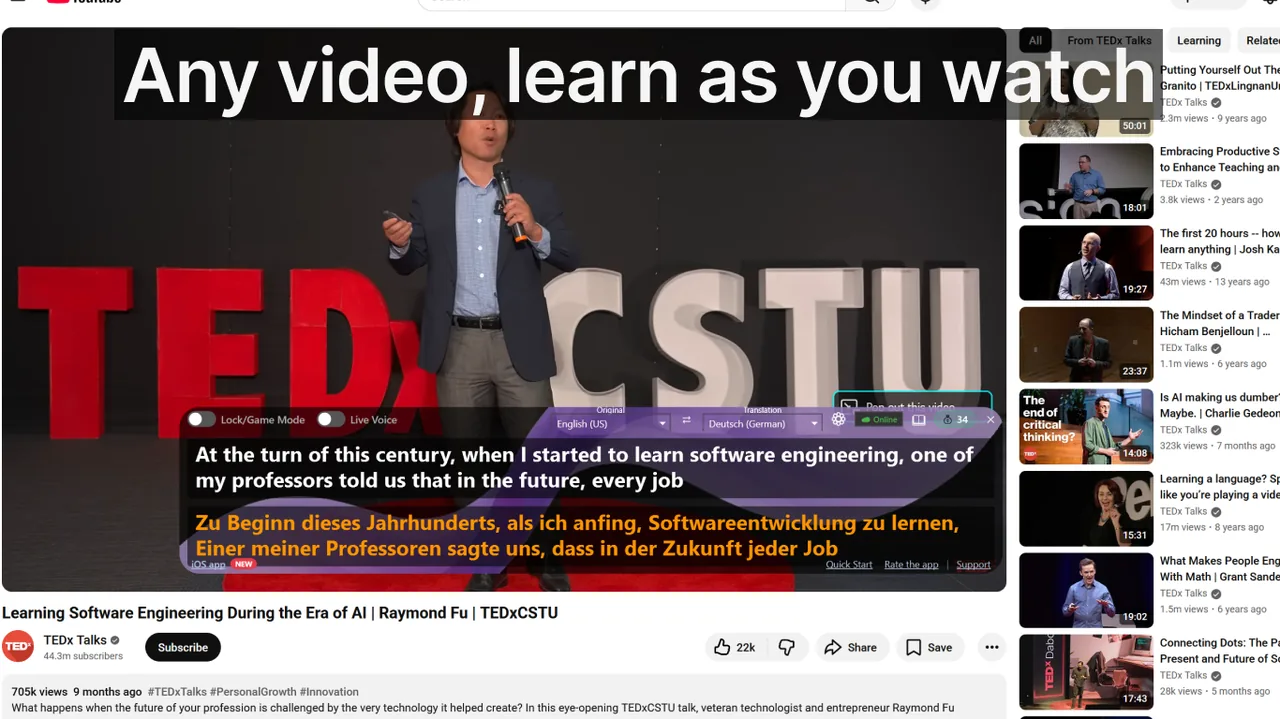
Learning a language through videos with dual subtitles is one of the most evidence-backed self-study methods available. You get simultaneous exposure to authentic speech, reading in the target language, and a safety net of translation — all at once. Yet most learners plateau after a few weeks, frustrated that their progress has stalled despite hours of screen time. The culprit is almost never the method itself. It is a handful of predictable, fixable mistakes that quietly undermine every session. This guide names all nine of them, explains why each one is harmful, and gives you concrete strategies to eliminate each one starting today.
Contents
Why Dual Subtitles Work — When Used Correctly
Before diagnosing the mistakes, it helps to understand the mechanism. Dual subtitles work because they exploit two distinct cognitive pathways simultaneously:
- Phonological loop: You hear the spoken word in its natural prosody — the stress, rhythm, and linking that textbooks never capture.
- Visual word form area: You read the same word in the target language, which links sound to orthography far faster than audio-only input.
- Semantic scaffold: The mother-tongue translation beneath each line removes comprehension anxiety, which keeps your working memory free to notice grammar patterns rather than frantically decoding meaning.
Research published in Language Learning & Technology found that learners using simultaneous dual-subtitle input retained 34% more new vocabulary after 24 hours compared to a subtitles-only group. But that retention advantage evaporates if you fall into the traps below.
The 9 Mistakes That Kill Your Progress
Mistake 1 — Reading Only the Translation Line
This is the single most common failure mode. Your eyes instinctively drop to the familiar language because it requires zero effort. Over time, the foreign-language line becomes wallpaper: present but invisible.
The result is that you are essentially watching content in your native language with a foreign-language watermark. Listening comprehension never develops, because your brain has never been asked to work.
Mistake 2 — Treating Every Word as Equal
Not all vocabulary is worth stopping for. Learners often pause to look up low-frequency words — architectural jargon in a fantasy series, brand names in a cooking show — while letting high-frequency connectors and modal verbs slide by without study. This is an enormous misallocation of attention.
Mistake 3 — Ignoring Phrasal and Idiomatic Meaning
Subtitle translation engines — and even professional human translators — frequently convert idioms into their native-language equivalents rather than translating word-for-word. This means the English phrase "blow off steam" may appear in the target subtitle as a culturally equivalent expression that shares no vocabulary. If you map the foreign phrase to its literal gloss without noticing the idiomatic structure, you will misuse it in production.
For example, a learner reading Spanish subtitles may see "echar una mano" translated as "help out" and conclude that "echar" always relates to helping. It does not — it means "to throw" in most contexts.
Mistake 4 — Never Rewatching Difficult Segments
Streaming platforms encourage forward motion. The autoplay feature is engineered to keep you consuming, not studying. As a result, even motivated learners let dense dialogue scenes pass by in real time, telling themselves they will "look it up later." Later never comes.
Studies on spaced repetition show that a single exposure to a new word gives roughly 5–10% long-term retention. You need 10–20 exposures across multiple sessions for a word to move into passive vocabulary, and 30+ for active recall. If you watch a scene once and move on, most of the new language in it will be gone within 48 hours.
Mistake 5 — Skipping the Speaking Component
Dual subtitles are an input method. They build receptive skills — listening and reading — very efficiently. But many learners never convert that input into output: speaking and writing. The result is a common plateau where you can understand a film but freeze when someone speaks to you directly, because your brain has never been forced to produce the language under time pressure.
Mistake 6 — Choosing Content That Is Too Hard Too Soon
Advanced native-speed content is motivating in theory — you are "watching real TV" — but demotivating in practice when comprehension drops below 60%. The cognitive load of decoding unfamiliar phonology, rapid speech, slang, and cultural references simultaneously overloads working memory. Learners either lean entirely on translation (Mistake 1) or give up.
The optimal zone, sometimes called i+1 after linguist Stephen Krashen, is content where you already understand roughly 80–85% of the language. The remaining 15–20% provides the challenge that drives acquisition without triggering overload.
Mistake 7 — Studying Inconsistently
Two hours on a Sunday and nothing for five days is dramatically less effective than 20 minutes every day. Language acquisition depends on repeated neural activation. When gaps between sessions stretch beyond 48–72 hours, the Ebbinghaus forgetting curve erases a significant portion of what you learned in the previous session before your next review.
Mistake 8 — Using Machine-Translated Subtitles Without Verification
Auto-generated subtitles from YouTube's speech-to-text, or machine-translated subtitle files from download sites, can contain significant errors — mispunctuated sentences, wrong word boundaries in agglutinative languages, and culturally nonsensical translations. Studying from a subtitle that says "let's table this" when the speaker said "let's discuss this" teaches you the wrong phrase permanently.
Mistake 9 — Never Reviewing What You Captured
Many learners diligently write new words into a notebook or save screenshots of subtitle lines, then never open that notebook again. Vocabulary acquisition without review is pure waste: the act of writing creates a feeling of learning without any actual retention, a phenomenon called fluency illusion.
Building a Sustainable Dual-Subtitle Study Plan
Once you have eliminated the nine mistakes above, the next challenge is structuring your sessions so that each one builds on the last. Here is a practical weekly template for a B1-level English learner watching 30-minute episodes:
Daily Routine (20–30 minutes)
- SRS review (5 min): Clear your Anki or Quizlet deck from the previous session.
- Viewing — Pass 1 (10–12 min): Watch half an episode with dual subtitles, stopping at unfamiliar phrases and tagging them.
- Shadow segment (5 min): Pick one 60-second scene and shadow it three times aloud.
- Add new cards (3–5 min): Enter tagged words into SRS before closing the app.
Weekly Review (Sunday, 45 minutes)
- Rewatch the full episode from the week without subtitles — assess how much you now understand.
- Write five sentences using five of the new words you learned this week, in context.
- Record yourself reading one dialogue scene aloud; compare your pronunciation to the native speaker.
Choosing the Right Content for Your Level
Content selection is a leverage point that most learners undervalue. The table below gives actionable recommendations by CEFR level:
- A1–A2: Dubbed children's animation (Peppa Pig in English, Dora the Explorer), beginner YouTube channels with manual captions, simple documentary series with slow narration (Planet Earth with English subtitles works well for visual learners).
- B1: Scripted sitcoms with studio audience (Friends, Modern Family), travel vlogs by non-native speakers who speak clearly, true-crime documentary series (slow pacing, clear narration).
- B2: Drama series with complex dialogue (The Crown, Succession), TED Talks in your specialist domain, documentary journalism (Vice News, DW Documentary).
- C1–C2: Unscripted long-form interviews (Lex Fridman Podcast, Hot Ones), stand-up comedy specials, live news broadcasts, academic lecture recordings.
For learners focused on professional or technical English — online meetings, webinars, international calls — see our article on using Live Subtitles in professional settings for setup tips and live-subtitle workflows tailored to the workplace. You can also use Live Subtitles with Zoom to practice comprehension in real meetings while still having a translation safety net.
How Real-Time Subtitle Tools Fit Into the Method
Traditional dual-subtitle approaches were limited to pre-recorded content with existing subtitle files. Real-time caption tools have expanded the method to cover any audio source: live classes, conference calls, podcasts without transcripts, and even in-person conversation through a microphone.
Live Subtitles for Windows uses on-device speech recognition to transcribe any audio playing on your PC — or captured by a microphone — and overlays a translated line beneath in real time. This means you can:
- Watch a live YouTube stream with dual subtitles that no subtitle file could provide.
- Follow a Zoom meeting in English while seeing a real-time translation, then gradually reduce your reliance on it as your comprehension improves.
- Listen to a podcast in your target language and see the transcript appear word by word, allowing you to pause and replay at will.
The app has a 4.7-star rating from 351 reviews on the Microsoft Store, and can be downloaded for free to try with any content you are currently using for study.
For a broader look at how subtitle tools compare and which scenarios each suits best, see our overview of subtitle types and what to choose for different learner levels.
Frequently Asked Questions
How long should I study with dual subtitles each day to see results?
Consistency matters more than duration. Twenty focused minutes every day — with the nine mistakes above eliminated — will outperform two unstructured hours on weekends. Most learners see measurable improvement in listening comprehension within 6–8 weeks of daily 20-minute sessions.
Should I use subtitles in my native language or in the target language for the translation row?
At A1–B1, native-language translation in the lower row is more efficient because it eliminates comprehension bottlenecks. At B2 and above, switching the translation row to a closely related language (e.g., Spanish if you are learning Italian) adds an extra acquisition layer and better mimics real immersion conditions.
Is it bad to use auto-generated YouTube captions?
For widely-spoken languages (English, Spanish, French, German), YouTube's auto-captions have improved dramatically and are generally accurate enough for learning at B1 and above. For languages with complex morphology or tonal systems, error rates are higher. Always cross-check unusual phrases against a reference dictionary before adding them to your SRS deck.
What if I understand almost nothing on the first pass?
This is a clear signal that the content is above your current level (see Mistake 6). Do not push through — switch to easier material. Frustration is not learning. You should understand at least 60% of the dialogue from context and audio alone, even before reading the subtitles, for the method to work effectively.
Can dual subtitles replace a formal language course?
They complement it powerfully but do not replace it. Dual-subtitle immersion is excellent for vocabulary acquisition, listening comprehension, and natural syntax. It is weaker for explicit grammar instruction, speaking practice, and writing production. Pair it with a structured course or a conversation tutor for the most efficient path to fluency.
Conclusion
Learning a language through videos with dual subtitles is genuinely one of the most efficient self-study methods available — when you use it deliberately. The nine mistakes covered here — from passive translation-reading to inconsistent scheduling — are all curable with a small shift in habits. Implement the Three-Pass Method, commit to daily SRS review, shadow dialogue segments aloud, and match your content to your actual level. Within two to three months of consistent practice, you will likely find your listening comprehension advancing faster than it ever did through textbook study alone.
If you want to extend the method beyond pre-recorded content to live video, meetings, and any audio source on your Windows PC, try Download free — it overlays real-time transcription and translation on any application, turning every audio moment into a learning opportunity.
Related Articles
Try Live Subtitles for Free
Get dual subtitles, real-time speech recognition and translation in any application. Works with YouTube, Netflix, Zoom, and 50+ other apps.
Download free