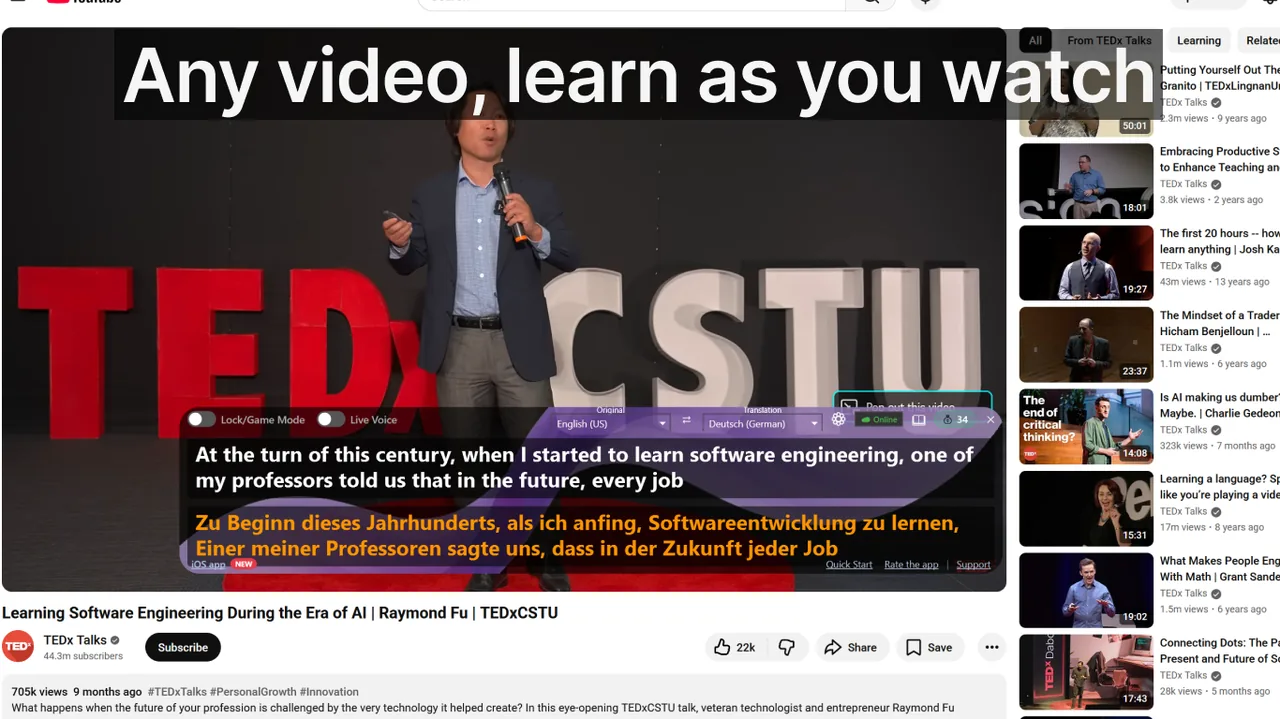
Every language learner who watches foreign-language video eventually hits the same wall: which subtitle track should be on screen? Native-language subtitles keep you comfortable but train you to ignore the spoken audio. Target-language subtitles push you toward real immersion but can feel overwhelming if your vocabulary is thin. Dual subtitles — showing both tracks simultaneously — sit somewhere in the middle, and for many learners they represent the fastest path to fluency. This guide breaks down exactly when each approach works, why, and how to implement it practically — no matter whether you are a complete beginner, a confident intermediate, or an advanced speaker chasing near-native comprehension.
Contents
- Why Subtitle Choice Affects Acquisition Speed
- Native-Language Subtitles: The Right Tool for Beginners
- Dual Subtitles (2 Sub): The Accelerator for Intermediates
- Target-Language Subtitles: Full Immersion for Advanced Learners
- Subtitle Strategy by Proficiency Level — Quick Reference
- Choosing Content: Genre and Pacing Matter as Much as Subtitles
- Real-Time Subtitle Tools: Extending the Method Beyond Pre-recorded Video
- Common Mistakes That Kill Progress
- Building a Weekly Practice Schedule
- Frequently Asked Questions
- Putting It All Together
Why Subtitle Choice Affects Acquisition Speed
Stephen Krashen's Input Hypothesis argues that learners acquire language fastest when they encounter input that is just slightly above their current level — what researchers call "i+1". Subtitle choice is one of the most powerful ways to adjust that input level. A 2019 study published in Language Learning & Technology found that intermediate learners who watched 30 minutes of foreign-language TV with target-language subtitles recalled 28% more new vocabulary after one week than those who used native-language subtitles. The mechanism is straightforward: when the written word matches the spoken word, your brain maps sounds to spellings in real time, reinforcing phonological and orthographic representations simultaneously.
That said, the study also noted a ceiling effect — learners below A2 level showed no benefit from target-language subtitles and actually reported higher anxiety, which suppresses learning. This is why a level-appropriate strategy matters more than any single rule like "always use the target language".
Native-Language Subtitles: The Right Tool for Beginners
At the A1–A2 level (roughly 0–200 hours of study), your working vocabulary is too small to process both the audio stream and unfamiliar written words simultaneously. Native-language subtitles serve a crucial scaffolding function: they offload comprehension onto your strongest language so your brain can devote limited cognitive resources to noticing recurring sounds, intonation patterns, and common phrases in the audio.
How to get the most from native subtitles
- Pause and repeat: When you hear a phrase that sounds almost familiar, pause, rewind, and listen again before reading your native translation. Train yourself to guess meaning before confirming.
- Count known words: If you recognize more than 5–6 words per sentence in the audio, it is likely time to upgrade to dual or target-language subtitles.
- Choose slow-paced content: Documentaries, cooking shows, and travel programs have clearer diction and shorter sentences than fast-dialogue dramas. Subtitle lines are shorter and easier to parse.
- Anki the audio, not the subtitles: Screenshot the subtitle line, but record yourself imitating the speaker's pronunciation for your flashcard. Memory for spoken patterns is what matters at this stage.
Pros
- Zero cognitive overload — you follow the story without stress.
- You can watch authentic, high-level content from day one.
- Listening exposure accumulates even when vocabulary is minimal.
Cons
- Eyes lock onto the subtitle track; audio becomes background noise.
- Progress stalls if you never graduate to a harder subtitle mode.
- Informal spoken contractions ("gonna", "wanna", "dunno") rarely appear in formal subtitle translations.
Dual Subtitles (2 Sub): The Accelerator for Intermediates
Dual subtitles display the target language on one line and your native language on a second line below it. The format is especially popular in South-East Asia — Indonesian learners search for "film sub indo" by the millions each month — but the technique is effective for any language pair. At B1–B2 level you can process roughly 60–80% of a typical sentence in the target language. Dual subtitles let you verify that 60–80% on the top line and quickly decode the remaining 20–40% from the bottom line, keeping you in the story rather than pausing every few seconds.
The "look-away" drill
One concrete technique that maximises dual-subtitle gains: cover the bottom (native) line with a piece of paper or a browser stylesheet. Try to understand the top line alone. Only reveal the bottom line if you are genuinely stuck after two replays. Research at the University of Leuven found this selective-use strategy produced 40% more vocabulary retention than reading both lines passively on every subtitle.
Grammar comparison — a free bonus
Dual subtitles reveal sentence structure differences that grammar books explain in the abstract but rarely illustrate with natural speech. Japanese learners, for instance, immediately see that the verb always comes last; Spanish learners notice adjective placement differs from English; German learners spot the verb-second rule in real declarative sentences before they have even studied it formally.
Pros
- Maintains comprehension while pushing target-language reading.
- Enables live grammar comparison without stopping playback.
- Reduces dictionary look-up pauses to near zero.
- Suits intermediate learners of any language pair.
Cons
- Screen real estate shrinks — subtitles may cover facial expressions.
- Risk of always defaulting to the native line instead of working from the target language.
- Not all streaming platforms support dual subtitle rendering natively.
Target-Language Subtitles: Full Immersion for Advanced Learners
Once you reach B2–C1, the goal shifts from comprehension to automaticity. You need to stop translating in your head and start thinking in the target language. Target-language subtitles — where the on-screen text matches the spoken audio — serve this purpose perfectly. Reading and hearing the same phrase in the same language forces your brain to build a direct association between sound and meaning, bypassing the mother-tongue "relay station" that slows fluent speakers down.
Three techniques for advanced subtitle use
- Shadow the subtitle: Read the line aloud at the same speed as the actor, matching rhythm and stress. This is a pronunciation exercise disguised as subtitle viewing.
- Dictation replay: Mute the audio, read only the subtitle, then play the audio with subtitles hidden and write down what you hear. Compare the two. Gaps reveal your weak phonemes.
- Register hunting: Mark any phrase that sounds informal, slangy, or idiomatic. Native speakers use a register that textbooks rarely teach — subtitles at this level expose thousands of these phrases per month of regular viewing.
Pros
- Maximum immersion — no native language on screen.
- Trains automatic reading and listening simultaneously.
- Exposes authentic colloquial register unavailable in textbooks.
Cons
- Comprehension drops sharply if used below B2 level.
- Unfamiliar vocabulary still requires a dictionary — but now you must look up the target language, not a translation.
- Poorly timed or auto-generated subtitles are more disruptive here than at lower levels.
Subtitle Strategy by Proficiency Level — Quick Reference
| CEFR Level | Hours of Study | Recommended Mode | Primary Goal |
|---|---|---|---|
| A1–A2 (Beginner) | 0–200 h | Native-language subtitles | Listening exposure, sound-mapping |
| B1–B2 (Intermediate) | 200–600 h | Dual subtitles (2 sub) | Vocabulary, grammar comparison |
| C1–C2 (Advanced) | 600 h+ | Target-language subtitles | Automaticity, register, fluency |
Choosing Content: Genre and Pacing Matter as Much as Subtitles
The subtitle mode is only half the equation. Pairing the right content genre with the right subtitle strategy compounds your results significantly.
- Beginners: Animated shows and children's programming (e.g., "Peppa Pig" in French or German) use simple, high-frequency vocabulary and clear diction. Native-language subtitles here give you maximum audio exposure with minimum confusion.
- Intermediates: Sitcoms, reality TV, and travel documentaries work best. Dialogue is conversational, pacing is moderate, and cultural references are rich. Dual subtitles let you decode idiomatic phrases on the fly.
- Advanced: Political dramas, crime thrillers, and stand-up comedy are ideal. These genres feature fast speech, complex vocabulary, and regional accents — precisely the input that pushes C1 learners toward C2.
Real-Time Subtitle Tools: Extending the Method Beyond Pre-recorded Video
Pre-recorded content with subtitle files is a controlled environment. But language is ultimately live — meetings, podcasts, live streams, and phone calls don't come with subtitle files. This is where real-time subtitle tools change the equation entirely.
Real-time speech recognition tools can transcribe any audio your computer's microphone or system audio picks up, displaying the words on screen as a live subtitle overlay. The Live Subtitles app for Windows takes this further: it recognises speech in over 50 languages and translates it on-screen in real time, essentially generating live dual subtitles for any application — Zoom calls, YouTube Live, Netflix, Twitch streams, and even local video files.
For language learners this is transformative. You can watch a Spanish podcast on YouTube with live English translation appearing beneath the speaker's words, or join a German Zoom webinar and read your native-language transcription in real time. The same level-appropriate logic applies: beginners benefit from live translation (native-language mode), intermediates can switch off translation and read the live target-language transcript only (target-language mode), and advanced learners can use the transcript purely to catch fast speech they missed audibly.
Live Subtitles is available on the Download free
— rated 4.7 stars across 350+ real reviews — and works system-wide without browser extensions or per-app setup. See also how to use live captioning tools for professional meetings for a workflow-focused guide.Common Mistakes That Kill Progress
Even learners who understand the theory often make avoidable errors that slow their results. The five most common:
- Staying on native-language subtitles indefinitely. After roughly 200 hours, native subtitles become a crutch. The audio becomes wallpaper. Force yourself to switch to dual subtitles even when it feels uncomfortable — discomfort is the signal that acquisition is happening.
- Passive reading without active listening. Moving your eyes across the subtitle line without actually attending to the spoken audio trains reading, not listening. Practice "audio-first" by trying to understand the utterance before the subtitle appears.
- Choosing content that is too difficult. Comprehensible input requires you to understand at least 70–80% of the content. A C1-level political drama is not appropriate immersion content for a B1 learner, regardless of subtitle mode.
- Looking up every unknown word. Dictionary breaks interrupt flow and reduce the total input volume you accumulate. Note unknown words; look them up after the episode, not during.
- Ignoring auto-generated subtitles' errors. Streaming platform auto-captions can be 85–95% accurate but still produce errors. Reading a wrong subtitle word while hearing the correct spoken form actually creates interference. Always prefer curated subtitles when available.
Building a Weekly Practice Schedule
Consistency beats intensity for language acquisition. A practical weekly schedule for an intermediate learner targeting 5–7 hours of subtitle-assisted viewing:
- Monday / Wednesday / Friday (45 min each): Dual-subtitle viewing, "look-away" drill on native line. Record 5–10 new phrases in a vocabulary journal.
- Tuesday / Thursday (30 min each): Target-language subtitles only on content you have already watched once with dual subtitles. Reactivate known vocabulary in a harder mode.
- Weekend (60–90 min): Native-language subtitles on something entirely new and slightly above your level — a complex drama or documentary. Pure listening enjoyment; no vocabulary journal required.
This rotation exposes you to roughly 5.5 hours of subtitle-assisted input per week — the threshold several acquisition researchers cite as the minimum for measurable monthly progress.
Frequently Asked Questions
Can I switch subtitle modes mid-episode?
Yes, and it is actually encouraged. Many advanced learners watch the first 10 minutes of an unfamiliar episode with dual subtitles to calibrate to the accents and vocabulary, then switch to target-language only. There are no rules — experiment and monitor your comprehension score.
Do dual subtitles work for every language pair?
Yes, but the visual complexity varies. For languages with non-Latin scripts (Japanese, Arabic, Korean, Chinese), having two different scripts on screen simultaneously can look crowded. In practice, learners of these languages often find dual subtitles more useful because seeing the romanised or translated line next to the original script accelerates script acquisition.
How long before I can drop native-language subtitles entirely?
Research suggests most A2-to-B1 transitions happen between 100 and 250 hours of structured input. A practical test: if you can follow a documentary in the target language with target-language subtitles and understand the main point of every paragraph without pausing, you are ready to remove the native-language safety net.
What about no subtitles at all?
Subtitle-free viewing is the final stage and is appropriate only at C1+ level with familiar content genres. Research consistently shows that even advanced learners retain more vocabulary per hour when a target-language subtitle is present versus no subtitle. The audio alone provides less memory-encoding signal than audio + matching text. Remove subtitles gradually: first drop the native line (dual to target-language), then experiment with 10-minute subtitle-free stretches at C1 level.
Putting It All Together
The research and practical experience converge on a clear progression: native-language subtitles lower the entry barrier and build listening exposure for beginners; dual subtitles turbocharge vocabulary and grammar acquisition for intermediates; target-language subtitles push advanced learners into the automatic, unmediated comprehension that defines fluency. None of these modes is wrong — each is optimally suited to a specific stage of the journey.
The key is not to stay in any one mode longer than your proficiency warrants. Use the CEFR table above as a diagnostic. If content feels too easy on your current subtitle setting, step up. If you feel lost and stressed, step back. Subtitle mode is simply a dial you adjust to keep your input in the productive "i+1" zone — and with the right tools, that dial is always within reach.
For live, unscripted content beyond pre-recorded video, explore the real-time captioning workflow guide and the platform-specific tips at Zoom live captions to see how the same principles apply to meetings, webinars, and live broadcasts.
Related Articles
Try Live Subtitles for Free
Get dual subtitles, real-time speech recognition and translation in any application. Works with YouTube, Netflix, Zoom, and 50+ other apps — rated 4.7/5 on the Microsoft Store.
Download free