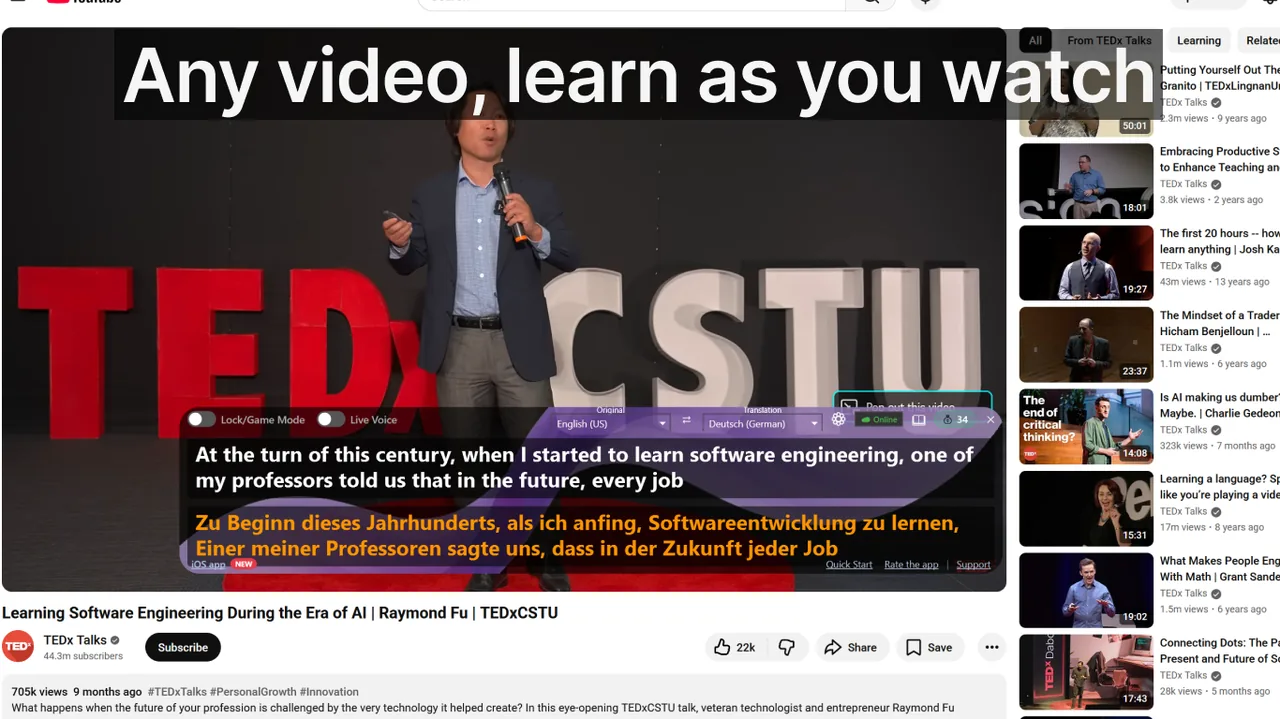
Watching videos in a foreign language is one of the richest language-learning environments you can create at home — but only if you engage with the audio in the right way. Plain subtitles in your native tongue let you follow the plot while your brain quietly ignores the target language entirely. Dual subtitles fix that: they place the original-language text and a translation on screen at the same time, forcing your eyes and ears to cross-reference both simultaneously. The result is faster vocabulary retention, sharper listening comprehension, and grammar patterns absorbed through sheer repetition — not textbook drills. This guide covers exactly how to make the method work, which tools support it, and how to build a daily routine around it.
Contents
- What Dual Subtitles Are — and Why They Work
- Choosing the Right Content for Your Level
- A Practical Step-by-Step Dual-Subtitle Routine
- Top Tools for Dual Subtitles in 2026
- How to Use Live Subtitles Alongside Your Target-Language Content
- The Most Common Mistakes — and How to Avoid Them
- Measuring Your Progress
- Dual Subtitles vs. Other Vocabulary Methods: A Quick Comparison
- Frequently Asked Questions
What Dual Subtitles Are — and Why They Work
Dual subtitles (sometimes called bilingual subtitles or 2sub mode) display two lines of text per utterance: the upper line in the target language, the lower line in your native language (or vice versa). When you hear an unfamiliar word, your eye drops to the translation for half a second and then returns — no pausing required, no app-switching, no disruption to the listening experience.
This technique maps to several well-documented learning principles:
- Comprehensible input (Krashen's i+1): You understand just enough context to decode slightly harder content. Dual subtitles raise comprehension to near 100%, making even B2-level content accessible to an A2 learner.
- Spaced repetition in the wild: A single 45-minute episode of a drama may expose you to the same high-frequency word 8–12 times in authentic sentences — better than any flashcard deck.
- Multimodal encoding: You hear the word, read it in the target language, and see its meaning in your own language — three simultaneous memory traces that are far more durable than any single-channel input.
- Sentence-level grammar absorption: Seeing how a sentence is structured in both languages at the same moment trains intuition for word order, verb conjugation, and collocations faster than explicit rule study.
Choosing the Right Content for Your Level
Not every video is equally effective. The content you choose dramatically affects your progress speed.
For beginners (A1–A2)
- Children's animated shows — Short sentences, exaggerated pronunciation, high word repetition. Try shows like Peppa Pig in Spanish or French.
- Reality TV cooking or travel shows — Concrete vocabulary, slow delivery, visual context for every noun.
- Dubbed children's films — You already know the storyline, which offloads cognitive load so you can focus on the language.
For intermediate learners (B1–B2)
- Sitcoms and daily dramas — Natural conversation speed, colloquial register, and idiomatic phrases. One season of a sitcom typically covers 2,500–3,000 unique words.
- Documentary series — Formal register, precise vocabulary, and narration that is slower than conversational speech.
- YouTube channels on topics you love — Because engagement matters: bored learners skim the translation and absorb nothing.
For advanced learners (C1+)
- News broadcasts and political talk shows — Complex syntax, technical vocabulary, and rapid speech.
- Stand-up comedy — The most culturally dense content type; puns and references expose subtle fluency gaps.
- At this level, try flipping the subtitle pair: put the target language translation on the bottom so you are reading in a language you know less well.
A Practical Step-by-Step Dual-Subtitle Routine
Passive viewing with dual subtitles gives moderate gains. An active routine doubles or triples them. Here is a 30-minute session structure used by polyglots who reach conversational fluency in under a year:
- First pass — flow viewing (10 min). Watch a 10-minute segment without stopping. Focus on understanding the story. Let your brain encounter new words naturally. Do not pause.
- Second pass — focused mining (10 min). Re-watch the same segment. Every time you see a word you don't fully own, pause, read both subtitle lines, say the target-language word aloud twice, and resume.
- Shadowing (5 min). Pick 3–5 sentences that contained a new word. Re-watch each sentence, then immediately mimic the speaker's intonation and rhythm out loud. This builds pronunciation and prosody at the same time.
- Retrieval practice (5 min). Close the video. Write down (from memory) 5 new words or phrases you encountered. Attempt a sentence with each. Check your notes against the subtitles.
Consistency is everything. 30 minutes daily beats a 3-hour weekend marathon — your brain consolidates language during sleep each night, so daily short sessions outperform irregular long ones.
Top Tools for Dual Subtitles in 2026
Language Reactor (formerly Language Learning with Netflix)
The most popular browser extension for dual subtitles. Works on Netflix and YouTube (Chrome/Edge/Firefox). Shows target-language and native-language subtitles simultaneously with hover-over dictionary lookups and one-click export to Anki. Free tier supports most features; a Pro tier unlocks saved word lists and phrase banks. Best for learners of European languages where Netflix subtitle quality is high.
Dualsub
Lightweight Chrome extension specifically for YouTube. Pulls any two available caption tracks and overlays them on the player. Especially useful for YouTube language channels that publish manual subtitles in multiple languages. No login required; completely free.
Lingopie
Subscription streaming platform built around dual subtitles for 8 languages (Spanish, French, German, Italian, Portuguese, Japanese, Russian, Korean). Every word in the target-language subtitle is clickable and added to a built-in spaced-repetition flashcard deck. The content library skews toward authentic short-form video and drama from native-speaking countries.
Live Subtitles (Windows app)
If you watch videos through any Windows application — a browser, a downloaded file in VLC, a Zoom call, a local stream — Live Subtitles overlays real-time speech-to-text captions directly on your screen with optional live translation into 50+ languages. Unlike browser extensions, it works on any audio source: Netflix in the browser, a locally downloaded movie file, a YouTube stream, even a live podcast. The captions are a floating window you can resize and reposition, making it easy to read alongside the video. You can Download free
and use it immediately without configuration — it listens to your system audio and generates subtitles in seconds. It pairs especially well with content that has no official subtitles at all, such as foreign-language podcasts or live streams.How to Use Live Subtitles Alongside Your Target-Language Content
Live Subtitles complements dedicated dual-subtitle tools by covering the gaps they cannot reach. Here is how to combine them effectively:
- Open your video in any player. Start Live Subtitles and set the translation target to your native language.
- If your player shows native-language subtitles (built-in), enable those — now you have two subtitle layers: the player's own track and the Live Subtitles floating overlay.
- For content with no subtitles at all (e.g., a foreign-language podcast YouTube stream), Live Subtitles provides the full dual experience on its own: real-time transcription of the spoken language plus translation.
- Use the app's font-size and position settings so the overlay sits just below the video frame — keeping both text layers visible without covering the picture.
The practical benefit: you are no longer limited to Netflix or YouTube. Any foreign film from a direct download, any foreign-language lecture on a university portal, any live event stream becomes a dual-subtitle learning session. See also our guide on setting up real-time subtitles for any video for a more technical walkthrough.
The Most Common Mistakes — and How to Avoid Them
Dual subtitles are powerful, but certain habits undermine the method entirely:
Measuring Your Progress
Language progress is notoriously hard to perceive day-to-day. Use these concrete benchmarks:
- Translation glance rate: At the start of a new show, note what percentage of sentences require a glance at the native-language line. Re-measure after 20 episodes. A drop from 40% to 15% is measurable evidence of progress.
- New-word rate: Keep a running count of words you mine per 10-minute segment. This number should drop over time for a fixed difficulty level — meaning your passive vocabulary is expanding.
- Speed tolerance: Try disabling the native-language subtitle for a 5-minute segment once a week. The point at which you feel comfortable doing this without anxiety is a clear fluency marker.
- Standardized tests: CEFR-aligned online placement tests (e.g., British Council's free assessment) give you an objective level every 2–3 months. Most consistent dual-subtitle learners report a half-level gain (e.g., A2 to B1) within 3–4 months of daily 30-minute sessions.
Dual Subtitles vs. Other Vocabulary Methods: A Quick Comparison
Dual subtitles are not the only tool — but they compare favourably for most learner profiles:
- Dual subtitles vs. flashcard apps (Anki, Duolingo): Flashcards offer precise spaced repetition but decontextualised practice. Dual subtitles offer rich context but no scheduling. The winning strategy combines both: use the video to encounter and understand a word, then add it to a flashcard deck for long-term retention.
- Dual subtitles vs. language exchange (iTalki, Tandem): Speaking partners are essential for productive skills but time-intensive to arrange. Dual-subtitle viewing scales to any schedule and can fill the 25 minutes between meetings.
- Dual subtitles vs. monolingual immersion (no subtitles at all): Pure immersion is most effective for C1+ learners. Below that level, comprehension drops too low to provide enough input. Dual subtitles are the pragmatic bridge that maintains comprehension while immersion ability develops.
Frequently Asked Questions
Q: Can dual subtitles make me dependent on the translation and stop me from thinking in the target language?
A: This is the most common concern, and research does not support the dependency fear for typical learners. The key is the gradual-fade strategy: once you recognise you understand most lines without the native-language text, start disabling it one episode at a time. Think of the translation line as scaffolding — helpful while you build the wall, removed once the wall stands on its own.
Q: Which language should go on top — the target language or my native language?
A: Standard practice places the target language on top because it aligns visually with the speaker's mouth on screen. Your native language on the bottom is a quick fallback glance, not the primary reading line. Most tools default to this arrangement.
Q: Does this work for languages with non-Latin scripts (Arabic, Japanese, Chinese, Korean)?
A: Yes, and it may actually be more valuable there, because script unfamiliarity slows reading without a translation anchor. For Japanese specifically, Language Reactor on Netflix shows furigana readings above kanji, making the target-language line accessible well before you have memorised all characters. Live Subtitles supports real-time transcription and translation for all of these languages.
Q: How many hours of dual-subtitle viewing do I need to reach B2?
A: The FSI (Foreign Service Institute) estimates 600–750 classroom hours to reach professional working proficiency (roughly B2) in a Category I language (Spanish, French, Italian). Dual-subtitle viewing time is not fully equivalent to structured instruction, but high-quality active viewing with the routine described above is generally rated at 60–70% of classroom efficiency. That means 900–1,200 hours of active dual-subtitle viewing — roughly 50 minutes a day for 3–4 years — could be sufficient for a Category I language. Category III–IV languages (Japanese, Arabic, Chinese) require roughly 2,200 FSI hours and proportionally more.
Q: What if the auto-generated subtitles are inaccurate?
A: YouTube's auto-captions average 85–92% accuracy for clear speech in major languages, which is sufficient for learning purposes — occasional errors actually test your listening comprehension. For cleaner subtitles, prefer content with manually uploaded captions (indicated by "CC" in YouTube). Live Subtitles uses on-device or cloud speech recognition tuned for continuous speech, which performs comparably to YouTube's best auto-captions in most conditions.
Related Articles
Try Live Subtitles for Free
Get real-time speech recognition and translation as a floating overlay on any Windows app — YouTube, Netflix, VLC, Zoom, and 50+ others. Perfect for dual-subtitle language learning on any content.
Download free