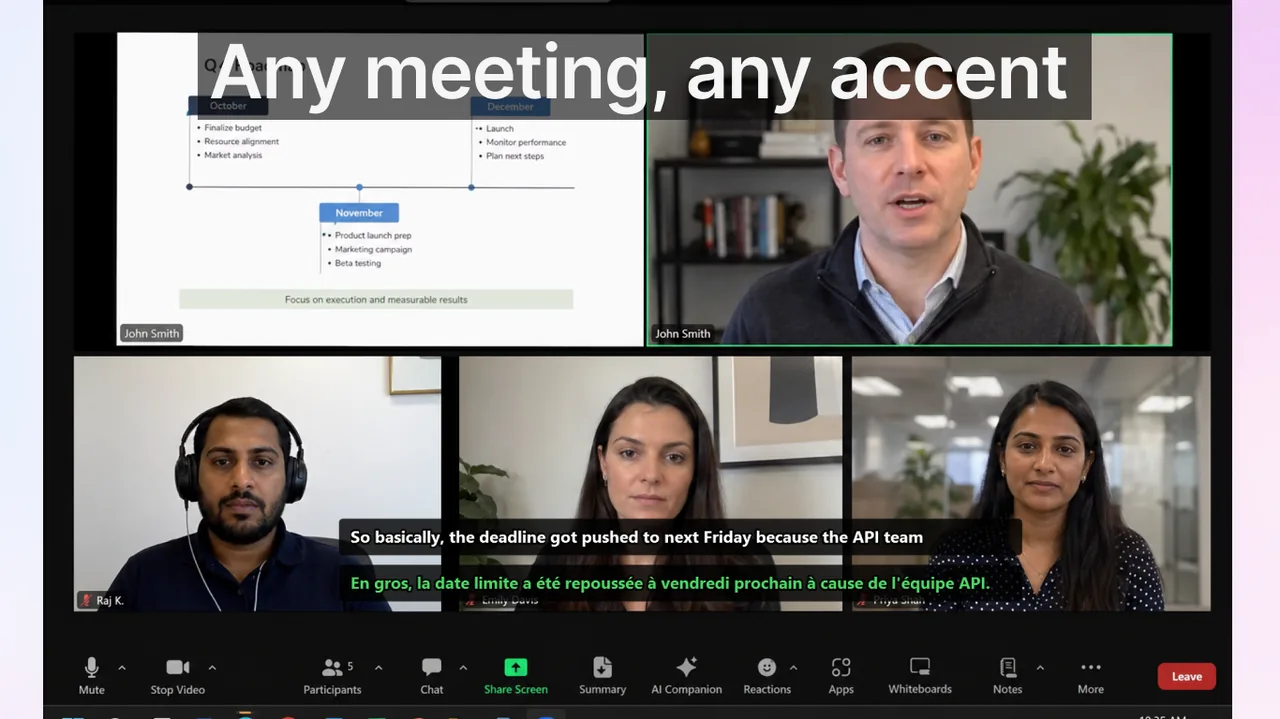
Searches for voice translation come from four very different needs: a one-on-one conversation, a multilingual work meeting, international travel, or watching media in a foreign language. The best tool for one of these is rarely the best for the others — and picking the wrong category wastes weeks of setup time. This 2026 guide cuts through the noise by matching real-time voice translation apps to the specific contexts in which they actually perform well.
Contents
Two Fundamental Workflows, Not One Category
Before comparing individual tools, it helps to understand that voice translation in 2026 divides into two operationally distinct pipelines. Getting the workflow wrong is the single most common reason users abandon a tool within days of installing it.
- Conversation workflow: short speaker turns, two or more participants, push-to-talk or voice-activity detection. Acceptable latency: under 1.5 seconds per turn. Typical contexts: face-to-face talks, customer support desks, tourist phrases at a market, medical appointments abroad.
- Broadcast (caption) workflow: one continuous speaker, listener reads a rolling translated caption. Acceptable latency: 1–4 seconds. Typical contexts: conference calls, lectures, online courses, streaming video, voice notes, YouTube or Netflix in a foreign language.
Most apps branded "voice translator" target the conversation workflow. Most apps branded "live captions" or "real-time subtitles" target the broadcast workflow. Evaluate every tool by matching it to your dominant context first — everything else is secondary.
2026 Tool Comparison at a Glance
| Tool | Primary workflow | Key strengths | Notable constraints |
|---|---|---|---|
| Google Translate (Conversation mode) | Conversation | Free, 133 languages, mobile-first, no account required | Mobile only; not designed for sustained multi-hour captioning; browser tabs drain battery |
| Microsoft Translator | Conversation + multi-device group sessions | Up to 100 devices in a shared session, business reliability, Azure-backed | Better in scheduled sessions than spontaneous turns; group setup adds friction |
| SayHi / iTranslate Voice | Conversation (travel) | Fast on-device turn-taking, intuitive split-screen UI, good offline bundles | No sustained broadcast mode; not useful for meetings or media |
| Apple Translate (Live Translation, iOS 26) | Conversation + AirPods-assisted travel | Tight OS integration, Personal Voice support, accessory playback | Apple ecosystem only; no Windows or Android path; limited to 20 languages |
| DeepL Voice | Meeting captioning (enterprise) | High translation quality in 31 languages, strong EU-language accuracy | Paid tier required for team use; narrower language roster than Google |
| Live Subtitles (Windows) | Broadcast — meetings, streams, media, system audio | Real-time captions and translation across any desktop app; works with Zoom, Teams, Meet, Netflix, YouTube, and all system audio sources simultaneously; 50+ language pairs | Windows desktop only; optimized for reading captions, not push-to-talk replies |
How to Choose by Real Use Case
Use Case A — Short Conversations and Travel
For travel or brief face-to-face exchanges, a phone-first conversation tool wins. Google Translate Conversation mode, SayHi, or Apple Translate all handle this well. The three things that matter most are: (1) how quickly it starts listening after you tap, (2) whether it works without a reliable cell signal, and (3) whether the translated voice output sounds natural enough for the other person to understand. Language depth and monthly subscription tiers are irrelevant. Test three scenarios before committing: a simple question, a price negotiation, and a longer multi-clause sentence. If the tool drops accuracy on the third test, keep looking.
Use Case B — Multilingual Meetings and Webinars
This is where conversation apps consistently fail. Meeting audio is different from tourist phrases: there are multiple speakers, domain jargon, background noise from remote microphones, and sessions that last 60–90 minutes. You need a tool that runs at the operating-system level — not inside a single meeting platform.
Zoom, Google Meet, and Microsoft Teams all ship native live captions, but their coverage and admin requirements vary significantly. A head-to-head comparison of Meet, Zoom, and Teams translated captions shows that Meet's translated captions require a Workspace addon; Teams' live captions need a Teams Premium license; Zoom's auto-translation is available on Business and above. A system-level caption layer that overlays on any active window is the lowest-friction option for teams that jump between platforms in the same day — and Live Subtitles for Zoom works exactly this way, covering whichever app is speaking without configuration per-platform.
Use Case C — Watching Foreign-Language Content
Dubbing is a bad proxy for comprehension. Dubbed audio eliminates the original prosody, timing, and emotional register that make language learners absorb vocabulary passively. A real-time caption translation — showing the source language line and your target language below it — preserves all of that. For Netflix, YouTube, and similar platforms, a tool that hooks into system audio and renders a floating caption overlay lets you follow any content in any language without relying on the platform's subtitle library, which often lags behind releases by months. See Language Reactor alternatives for Netflix and YouTube in 2026 for a full breakdown of overlay tools in this space.
Use Case D — Accessibility and Hearing Support
For users with hearing loss or auditory processing differences, captions consistently outperform voice output for three reasons: they are readable at any volume without earphones, they persist on screen long enough to re-read, and they work in noisy environments where voice playback is useless. The key requirement is system-wide caption support — not a single-app solution. A tool that captions microphone input, speaker output, and system audio from any app fills the gap that closed-captioning on individual platforms leaves.
Use Case E — Language Learning and Immersion
Voice translation can accelerate language acquisition when used as active input rather than a crutch. The most effective pattern: watch or listen in the target language, let captions run in the source language as a fallback, and only glance down when comprehension breaks. Studies in task-supported listening suggest that learners who read the source-language transcript as a safety net build vocabulary 30–40% faster than those who replay audio or use full translations. The practical setup is a two-line caption: target language on top, source language below in smaller type.
The Latency Problem Explained
Every voice translation pipeline has three sequential steps: speech-to-text (STT), neural machine translation (NMT), and output rendering. Each step adds latency. Here is where that time goes:
- STT: 200–700 ms for cloud-based engines. On-device models run 50–150 ms but sacrifice accuracy on accented speech and technical vocabulary.
- NMT: 80–300 ms for a modern transformer model via API. Longer for sentence-level models that wait for end-of-utterance before translating.
- Rendering: under 30 ms for caption overlay; 300–600 ms for text-to-speech voice output if enabled.
Total round-trip for a cloud-based captioning tool sits between 600 ms and 1.2 seconds under normal conditions. That feels instantaneous for meetings and media but noticeable in fast conversation. Tools that claim sub-200 ms total latency for cloud translation are either measuring only one step or using highly compressed on-device models with accuracy trade-offs.
Privacy and Data Routing in 2026
Voice data is sensitive. Every cloud-based translation tool routes audio — or at minimum audio transcripts — through a third-party server. Before deploying any tool in a professional context, confirm:
- Where transcription happens: on-device or cloud? If cloud, which region? EU AI Act compliance matters for European enterprise deployments.
- Retention policy: does the vendor store utterances for model training? For how long? Can you opt out?
- GDPR / HIPAA fit: medical and legal contexts have hard requirements. Neither Google Translate nor Apple Translate carries HIPAA BAA coverage in their consumer tiers.
- Network path: does the tool bypass your corporate VPN? If audio leaves the VPN tunnel, your IT team needs to know.
For most personal and informal business use, consumer tools are fine. For regulated industries, verify the vendor's DPA before routing any real conversation audio through it.
14-Day Setup Blueprint
Rather than installing five apps and running them in parallel, a structured two-week ramp produces a stable toolset faster:
- Day 1: Identify your dominant use case from the five listed above. Write it down. Do not optimize for secondary cases yet.
- Days 1–2: Install exactly one tool that matches the dominant use case. Resist the urge to install backups.
- Days 3–7: Use it in real conditions — not demos. Track three numbers daily: unrecognized phrases per session, times latency felt disruptive, times you switched to typing instead.
- Day 8: Review your notes. If the tool fails on one specific edge case (e.g., fails on travel but works well at work), add a single secondary tool for that edge case only.
- Days 9–14: Run both tools. By day 14, commit to the pair. Frequent switching after this point usually masks workflow problems, not tool problems.
What to Ignore in 2026 Marketing
- "100+ languages supported": language count rarely correlates with quality in the 5–10 language pairs a user actually needs. Run your specific source-target pair through a domain-relevant paragraph before relying on the headline number.
- "Offline mode": valuable for travel and data-roaming situations; completely irrelevant for meeting and media workflows where you are already on a broadband connection. Do not trade accuracy for offline capability unless travel is your primary use case.
- "AI-powered" or "neural translation": essentially every voice translation tool released since 2022 uses a neural model. It is no longer a differentiator. The real differentiators are: end-to-end latency, vocabulary calibration for your domain, and how the system handles overlapping speech or speaker diarization.
- "Free forever": most freemium translation tools impose session-length caps, language-pair restrictions, or API rate limits that surface only after you have integrated the tool into your workflow. Read the fair-use policy on the billing page before committing.
Frequently Asked Questions
Is voice translation accurate enough for business use in 2026?
Yes — for follow-along comprehension, meeting summaries, and clarification requests. Not yet at certified-interpreter quality for binding negotiations, legal depositions, or medical informed consent. Use it to track the conversation; confirm critical points in writing afterwards.
Should I use voice output or text captions?
Captions win in virtually every screen-present context: meetings, streams, video calls, language learning. Voice output wins in exactly one scenario: both participants need eyes-off, hands-free communication, such as walking through a market or driving. If you are in front of a screen, read the caption.
Do I need one tool that does everything?
No, and trying to find one usually ends in a mediocre experience across all contexts. Most power users settle on two: a mobile conversation app for travel and in-person situations, and a system-level captioning tool for desktop work. Adding a third tool rarely improves outcomes.
How many language pairs does a desktop captioning tool need?
For most international teams, you need deep accuracy on three to five pairs, not broad coverage of fifty. A tool that handles English–Spanish, English–German, and English–Mandarin with high accuracy in technical vocabulary is more useful than one that supports 100 pairs at tourist-phrase quality.
What happens when two people speak at once in a meeting?
Tools vary widely here. The best implementations pause and buffer overlapping speech, then emit two separate caption lines with speaker tags. Weaker implementations drop one speaker entirely. This is the most reliable differentiator to test before paying for a team subscription.
References
- Google Translate — official overview
- Microsoft Translator apps
- Apple — Translate text, voice, and conversations on iPhone
- Google Meet — translated captions support
- DeepL Voice — enterprise translation
Related reading
One captioning workflow for everything you watch and hear
Live Subtitles delivers real-time captions and translation across meetings, streams, and any Windows app — no per-platform configuration, no separate voice-translator app needed. Rated 4.7 stars by over 350 users on the Microsoft Store.
Download free