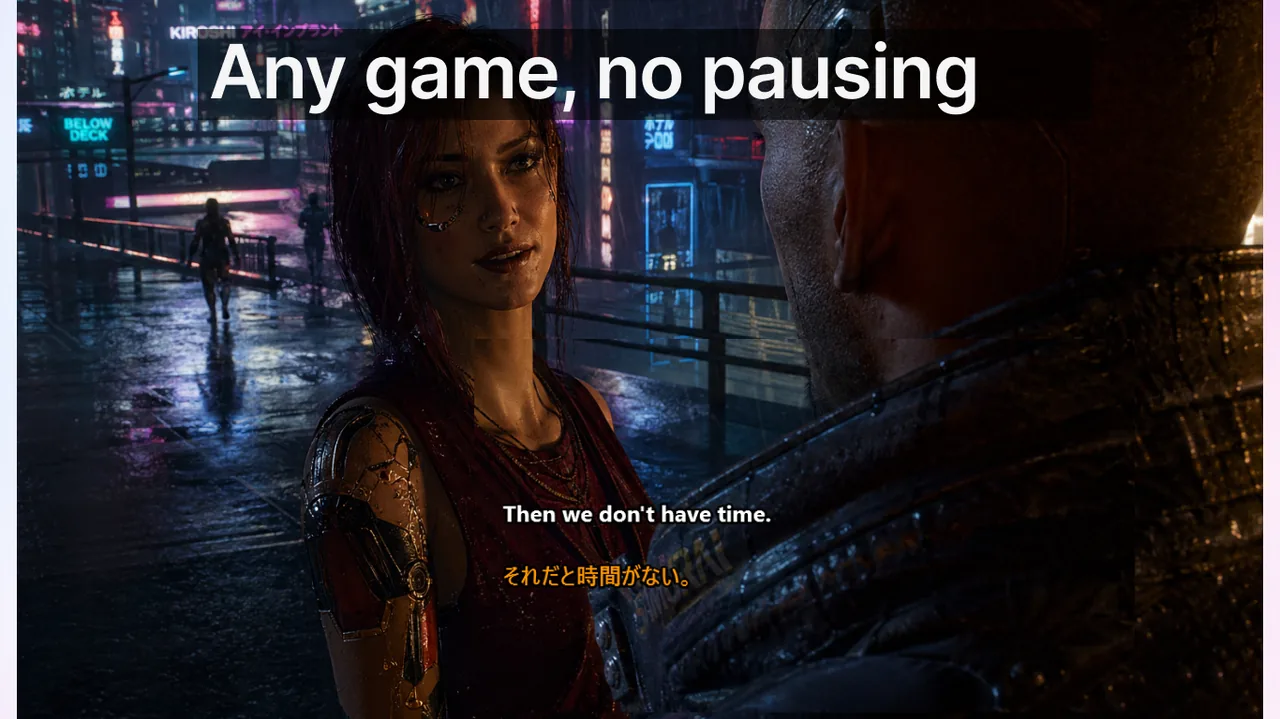
Live captions for streamers are a fundamentally different problem from adding captions to a Zoom call or a pre-recorded video. When you go live on Twitch, YouTube, Kick, or Discord, you simultaneously manage three audio sources — game audio, your microphone, and system sounds — plus at least three places where captions can land: an in-stream overlay every viewer sees, a native platform CC track viewers can toggle on or off, and a subtitle track baked permanently into your VOD. Pick the wrong workflow and your captions lag behind a clutch play, block the kill feed at the worst moment, or drop silently when your game audio spikes. This guide walks through every major option available in 2026 with specific setup steps, real numbers, and honest trade-offs so you can build a captioning stack that survives a six-hour marathon stream.
Contents
- Why Captions Matter for Streamers in 2026
- Understanding Your Three Audio Sources
- 2026 Streamer Caption Tool Comparison
- Choosing Your Workflow by Stream Format
- Step-by-Step OBS Setup for Stream Captions
- Caption Positioning and Visual Design
- Keeping Accuracy High During Long Streams
- Platform-Specific Considerations
- Accessibility Standards and Why They Apply to Streamers
- Frequently Asked Questions
- References
Why Captions Matter for Streamers in 2026
Accessibility compliance used to be the only reason streamers thought about captions. That calculus has shifted significantly. Research from Verizon Media and Publicis found that 80% of viewers are more likely to finish a video when captions are available, and Twitch's own growth data indicates deaf and hard-of-hearing viewers account for roughly 15% of the registered user base. Beyond accessibility, captions drive discoverability: YouTube indexes the text of your automatic caption track, meaning a captioned VOD becomes de facto transcribed content that can rank for long-tail search queries months after the live broadcast ends.
For multilingual streamers — a category that grew substantially after Twitch expanded its language directories in late 2025 — real-time translated captions can double the number of viewers who fully understand your content without any additional production work on your end. A streamer who speaks English but has a Portuguese or Japanese viewer segment can burn bilingual captions into OBS and serve both audiences simultaneously from a single stream.
Understanding Your Three Audio Sources
Your caption accuracy is capped by the quality and clarity of the audio source the transcription engine receives. Before choosing a tool, decide which source you need to caption:
- Microphone-only captioning reads your voice cleanly and ignores game audio, notifications, and background sounds. This is the right default for Just Chatting, IRL, podcast-style, and any format where your commentary is the primary content. It delivers the lowest end-to-end latency — typically 0.8 to 1.5 seconds — because the model processes a clean single-channel signal. Accuracy is highest here.
- System-audio captioning reads everything your computer outputs: game dialogue, NPC voices, sound effects, music, and your own mic if loopback is enabled. This is the best choice for narrative RPGs, visual novels, and watch parties where on-screen events need transcription. Latency is comparable to mic-only, but accuracy degrades when game sound effects dominate — explosions, dense music beds, and crowd noise all challenge ASR engines.
- Per-track OBS captioning routes each audio source to a separate OBS output track. You can send your mic to track 1 and game audio to track 2, then caption only track 1 while recording track 2 independently. This setup preserves per-speaker accuracy for collab and podcast streams and prevents the caption model from being confused by simultaneous overlapping voices.
2026 Streamer Caption Tool Comparison
Each approach has a different trade-off between viewer experience, setup complexity, and accuracy. Here is the current landscape:
| Tool | Where captions appear | Strengths | Limits |
|---|---|---|---|
| Twitch native Closed Captions | Twitch player only (viewer-toggled) | Built in, visible to all Twitch desktop and mobile viewers who enable CC; persists on VOD clips automatically | Requires CEA-608/708 subtitle data injected at encoder level; OBS does not do this natively; limited language coverage; most streamers cannot use this without a third-party plugin |
| YouTube Live automatic captions | YouTube player only (viewer-toggled) | Free, auto-generated for 60+ languages, persists on VOD and is indexed by YouTube search within hours of stream end | Typical live delay of 8 to 15 seconds — unusable for real-time viewer communication; accuracy drops on gaming jargon, fast speech, and overlapping audio |
| OBS overlay via Browser Source or Window Capture | Burned permanently into stream video output and recording | Captions appear identically for every viewer on every platform simultaneously; full CSS control over font, size, color, and position; works on Twitch, YouTube, Kick, and TikTok Live at the same time | Captions cannot be toggled off by viewers; permanently baked into any downloaded recording or VOD export |
| Live Subtitles desktop overlay (Windows) | Floating window on your screen; capturable by OBS as a Window Capture source | System-audio captioning plus real-time translation into 50+ languages; captures game dialogue and mic simultaneously; works across every streaming platform without platform-specific configuration | You must add a Window Capture source in OBS and deliberately position it in your scene layout; viewers only see captions when you explicitly share the window |
| Streamlabs or SE.Live caption widget | Browser-source overlay in OBS or Streamlabs | One-click setup inside Streamlabs; reasonable accuracy in quiet mic-only environments | Noticeably lower accuracy on system-audio sources; requires a paid Streamlabs Prime subscription for full feature access in 2026 |
Choosing Your Workflow by Stream Format
Just Chatting and IRL Streamers
Your voice is the primary content, so mic-only captioning with an OBS overlay is the correct default. Size the caption window at roughly 14 to 16 pt equivalent in your output resolution (standard 1080p60). Keep it in the lower third of your scene and avoid the bottom 8% of the frame where platform UI elements overlap. Twitch native CC is a reasonable theoretical backup but requires CEA-608/708 injection that most OBS setups cannot provide out of the box. Run a minimum 3-minute natural speech test before going live — some ASR models need a brief warm-up window to calibrate to your pitch and speaking rhythm, and your first 30 seconds of live content should not be spent teaching the model your voice.
Variety Gaming Streamers
Enable system-audio captioning so game dialogue is transcribed alongside your commentary. Before committing to this configuration, test across at least three different game genres: fast-paced shooters produce dense, overlapping audio events that degrade ASR accuracy significantly; open-world RPGs with clean character voice-over work well; racing games with constant high-frequency engine noise will likely force you back to mic-only. Lock the caption box to a position that does not overlap permanent HUD zones. Many streamers default to bottom-center, but stream donation alerts and chat overlays often compete for that space — consider top-right or bottom-left based on where your game places its minimap.
Multilingual and International Audience Streamers
If you stream in English but have significant viewer segments in Spanish, Portuguese, Japanese, or another language, use a captioning tool that supports simultaneous source and target language display. The Download free
supports over 50 translation target languages running live, so you can burn bilingual captions — English on the top line, translated text below — into OBS as a single Window Capture source. Viewers in any region see both lines without toggling anything. This delivers materially more value than YouTube's on-demand auto-translate, which only works post-stream.Podcast-Style and Co-Op Collaboration Streams
Multi-speaker streams benefit most from per-track audio routing in OBS. Assign each co-host's microphone to a separate audio track and, if your caption tool supports it, caption each track independently with speaker labels such as "[Alex]" or "[Jordan]" prepended to each caption line. If your tool only supports a single input channel, mix all mics to one track and accept that speaker attribution will be approximate. The critical rule: never let game audio share the same audio channel as your microphones in a multi-speaker setup — mixed sources are the primary cause of accuracy collapse in collab streams.
Step-by-Step OBS Setup for Stream Captions
- Separate your audio sources in OBS. Open Settings → Audio. Assign your microphone input to a dedicated track (e.g., Track 2 in advanced output mode). Assign game and desktop audio to Track 1. This prevents cross-contamination of sources before the signal reaches your caption tool.
- Install your caption tool. For system-audio captioning on Windows, Download free — it reads system audio output directly without requiring a virtual audio cable or additional driver setup.
- Add a Window Capture source in OBS. Select the caption tool's overlay window. Use Crop/Pad filters to remove any window chrome or borders. Resize and position the source within your scene so it falls in a visually safe zone that does not overlap your webcam frame, game minimap, or HUD health bar.
- Test to a private channel first. Stream to a hidden Twitch channel or a private YouTube Live broadcast. Watch the stream from a second device — your phone is ideal — and check end-to-end caption latency against your speech (target under 2 seconds), verify caption text does not clip outside the safe area at mobile screen sizes, and confirm game audio is not overwhelming the transcription accuracy.
- Check font size on mobile. A caption that looks readable at 1080p on a 27-inch monitor can become illegible on a 6-inch phone screen. Minimum recommended caption font size equivalent at 1080p output is 28 px. Anything smaller loses legibility on mobile viewers, who make up 30 to 40% of live stream audiences on most platforms.
- Configure scene-switch behavior. Decide whether captions should remain visible when you switch to a BRB or Starting Soon scene. Most streamers hide the caption source on non-gameplay scenes to avoid transcribing ambient room audio or dead air, which produces distracting placeholder text visible to arriving viewers.
Caption Positioning and Visual Design
Caption design for live streams follows different rules than broadcast television. Your viewers are simultaneously watching gameplay, reading chat, tracking donation alerts, and watching your face. The caption layer must sit somewhere that competes with none of those elements. Practical guidelines for 1920x1080 output:
- Avoid the bottom 10% of the frame. Streaming platforms overlay their own player UI in this zone, and viewers' attention drifts to alerts and chat in the bottom-right corner.
- Use a semi-transparent background behind text. Pure white text on bare gameplay video is unreadable during bright outdoor scenes or muzzle-flash moments in shooters. A dark pill or bar background at 65 to 75% opacity is the most reliable combination across all content types and game brightness levels.
- Limit display to two lines of text maximum. Three lines cover too much of the gameplay frame during critical moments; one line scrolls too fast for sentences over 10 words. Two lines gives enough context without occluding the action.
- Set a maximum character width of approximately 80 characters per line at 28 px font size in a 1920x1080 output. Lines longer than this force text to run uncomfortably close to frame edges on mobile viewers.
- Choose high-contrast color combinations. WCAG AA standard requires a contrast ratio of at least 4.5:1. White text (#ffffff) on a dark background (#0a0a0a at 70% opacity) yields a contrast ratio above 7:1, well inside the accessible range even for viewers with partial color blindness.
Keeping Accuracy High During Long Streams
AI speech recognition performs well at stream start but can degrade over multi-hour sessions as audio buffers accumulate and model state drifts. These mitigation steps keep accuracy consistent across a 6+ hour broadcast:
- Restart the caption tool every 90 to 120 minutes. Schedule this during natural breaks — between games, hydration breaks, or raid targets. Most tools reinitialize in under 10 seconds with no noticeable viewer interruption. This single habit eliminates the majority of latency drift complaints.
- Keep your microphone gain healthy in OBS. If your mic is consistently peaking above −3 dB, the ASR engine is receiving clipped audio, which reduces accuracy by 10 to 25% depending on how aggressively the signal clips. Target peaks in the −12 to −6 dB range for optimal transcription performance.
- Apply noise suppression before the caption source. OBS ships with NVIDIA RTX Voice integration and the open-source RNNoise filter. Apply one before the signal reaches your caption tool to strip keyboard clicks, fan noise, and background hum — all of which consume ASR compute budget without producing useful transcript text.
- Test after game genre switches. If you move from a quiet puzzle game to a battle royale mid-stream, monitor whether system-audio captioning accuracy has dropped under the increased audio density. Switching to mic-only mode mid-stream is a valid and quick fix — most tools let you change audio source without a full restart.
Platform-Specific Considerations
Twitch
Twitch's native CC system requires your broadcasting software to embed CEA-608 or CEA-708 closed caption data directly inside the video stream at encode time. OBS Studio does not support this natively. The open-source obs-captions-plugin can inject CEA-608 data but requires manual compilation and introduces a secondary failure point that can break your stream encoder if it crashes. The practical recommendation for most Twitch streamers is to skip native CC and use an OBS overlay — captions are visible to 100% of viewers without any configuration on their end, which is more inclusive than a toggleable CC track that most viewers do not know exists.
YouTube Live
YouTube generates automatic captions during broadcast with an inherent 8 to 15 second delay that makes them useless for real-time viewer interaction. Their real value is post-stream: YouTube processes and indexes these captions on the VOD within a few hours of stream end, making your content discoverable via text search for months afterward. For live viewer accessibility, a sub-2-second OBS overlay caption tool is substantially better than YouTube's native live CC. See our article on how AI-generated live captions work in 2026 for a detailed look at ASR architecture latency trade-offs.
Kick
Kick launched in 2023 and as of 2026 still offers no native closed caption feature in its player. An OBS overlay is the only viable option for Kick streamers who want accessible broadcasts. This platform gap makes desktop overlay captioning tools more valuable on Kick than on any other major streaming platform — there is no fallback.
Discord Stage Channels and Go Live
Discord's Go Live feature and Stage Channels have limited caption support. The desktop Discord client includes a speech-to-text accessibility option for the speaking user, but it only surfaces in the viewer's own client settings and does not persist or broadcast to other viewers. For community events hosted in Discord, a shared screen share of a captioning overlay window remains the most reliable approach. For a broader comparison of real-time voice captioning tools across team communication platforms, see our guide to live captions for remote teams.
Accessibility Standards and Why They Apply to Streamers
Accessibility is not just a viewer preference — it is increasingly a legal and platform policy consideration. The FCC's CVAA (21st Century Communications and Video Accessibility Act) applies to video programming distributed over the internet in the United States, and Twitch's Terms of Service reference compliance with applicable law. Enforcement against individual streamers is currently rare, but larger channels running brand partnerships and sponsorship deals are increasingly expected to document accessibility provisions. Consider these as a minimum baseline:
- Captions present for at least 95% of stream time when you are speaking
- Caption text at a minimum 14 pt equivalent at 720p output or larger
- Caption contrast ratio of at least 4.5:1 against the background (WCAG AA standard)
- No captions covering faces or critical gameplay information for more than 2 continuous seconds
For a broader look at live caption accessibility standards across education, enterprise, and media sectors, our article on AI-generated live captions in 2026 covers the current regulatory landscape and emerging platform policies in detail.
Frequently Asked Questions
Do Twitch viewers see my captions automatically?
Only if your encoder injects CEA-608/708 subtitle data into the video stream and viewers manually toggle the CC button in the Twitch player. Because most OBS setups cannot inject CEA-608 data natively, the vast majority of Twitch streamers use an OBS overlay instead — which every viewer sees without any action required on their end.
Will running live captions hurt my stream encoding performance?
On a modern mid-range CPU (Ryzen 5 7600 or Core i5-13600), a local AI caption tool adds roughly 3 to 8% additional CPU load. If you are already CPU-constrained encoding at x264 medium or faster on a 6-core machine, consider switching to GPU-accelerated ASR inference, using a smaller Whisper model variant, or offloading captioning to a secondary machine or phone via system-audio loopback.
Can I caption my stream in two languages simultaneously?
Yes. Tools that support real-time translation — including Download free — display source language text and a translated version side by side or stacked. Capture the overlay window as a single Window Capture source in OBS, then position both caption lines in your scene layout as one unit.
What is the minimum caption latency I can realistically achieve?
With a local Whisper-small or Whisper-medium model running on a modern GPU (RTX 3060 or equivalent), end-to-end latency from speech to on-screen text is typically 0.6 to 1.4 seconds. Cloud-based ASR services add network round-trip time and typically land at 1.5 to 3 seconds total. For live streaming, anything under 2 seconds is perceptually synchronous for most viewers.
Should I caption game audio or only my microphone?
Format determines the answer. Just Chatting, IRL, and commentary-heavy streams should caption mic only for maximum accuracy and lowest latency. Narrative game, visual novel, and watch-party streams benefit from system-audio captioning that captures on-screen dialogue. Avoid system-audio captioning for high-intensity shooters and racing games where non-speech audio dominates — ASR accuracy drops dramatically in those environments.
How do I make my YouTube VOD captions accurate for search indexing?
YouTube auto-processes captions and attaches them to your VOD within a few hours of stream end. You can download the auto-generated SRT file from YouTube Studio, correct errors manually in a subtitle editor, and re-upload the corrected track. YouTube indexes manually corrected captions with higher confidence than purely auto-generated versions, improving search ranking for your content over time.
References
- Twitch — Closed Captions documentation
- OBS Studio — official site
- YouTube Help — automatic captions for live streams
- FCC — Captioning of Internet Video Programming (CVAA)
Related reading
Stream captions that capture game audio AND your voice
System-audio captioning plus real-time translation into 50+ languages — capture the overlay in OBS and ship a fully captioned, multilingual stream in minutes.
Download free