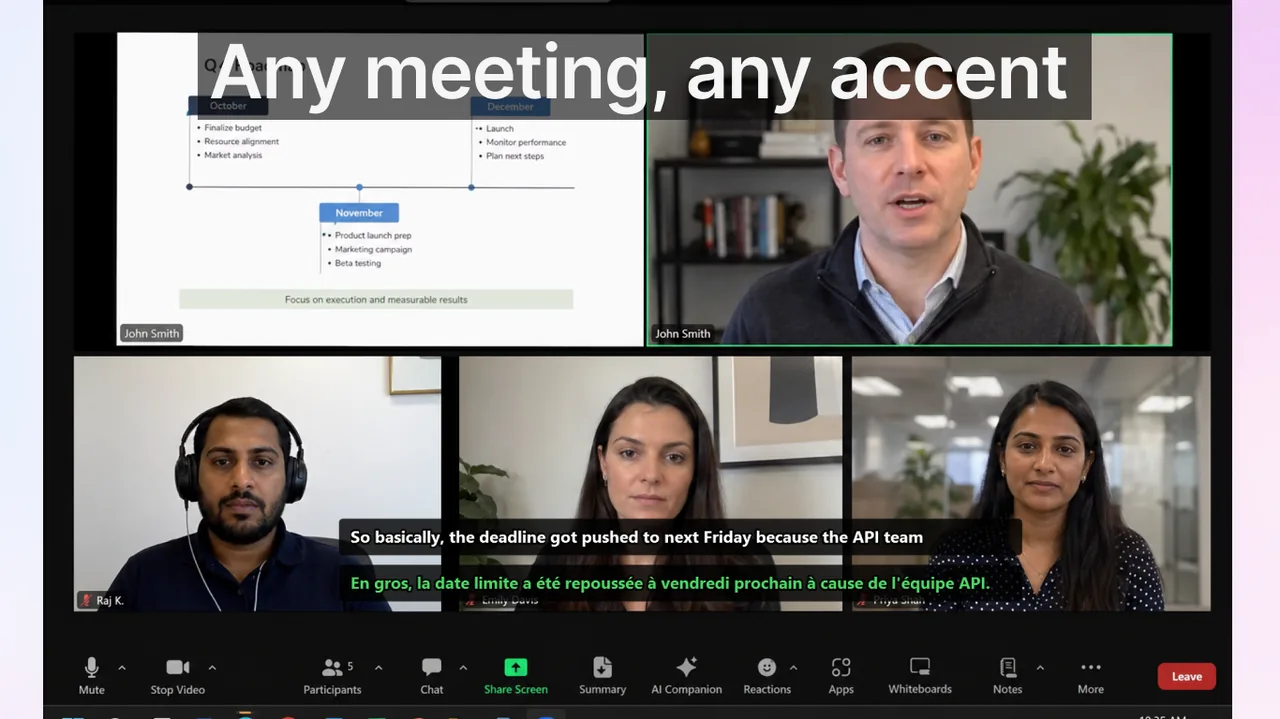
Live captions sound like a single feature, but in 2026 the term conceals at least three architecturally distinct systems: operating-system overlays that follow you across every app, browser-built captions scoped to a single tab, and per-app captions baked into platforms like Zoom or Teams. Picking the wrong layer is one of the most common productivity mistakes for anyone who relies on real-time text. This guide explains how the technology works, maps every mainstream option, and gives you a concrete decision framework so you can choose — or combine — them correctly.
Contents
- What live captions actually are (and what they are not)
- The ASR pipeline: five steps that happen 10–30 times per second
- Three architectural layers — and why the distinction matters
- 2026 comparison: which live captions to use when
- When each layer wins
- Accuracy: what the numbers actually mean
- Privacy: on-device vs. cloud captioning
- Step-by-step setup for the most common workflows
- Common myths about live captions in 2026
- Live captions for accessibility vs. language learning vs. productivity
- Frequently asked questions
- References
What live captions actually are (and what they are not)
Live captions are real-time automatic speech recognition (ASR) output rendered as on-screen text, typically within 1–3 seconds of the words being spoken. They are fundamentally different from:
- Pre-written subtitles: scripted captions prepared in advance for a specific video or film, word-perfect by definition.
- Closed captions (CC): a broadcast-television standard that embeds pre-synchronized caption data in a video stream.
- Machine-translated subtitles: subtitles generated offline from a completed transcript, not a live stream.
What makes live captions distinctive is that they are generated as audio arrives. The model never has the full sentence before it must start outputting text. That constraint shapes every engineering trade-off you will encounter: latency vs. accuracy, on-device vs. cloud, single-language vs. multilingual.
The 2026 generation of captioning engines is almost universally based on Whisper-architecture models — sometimes running entirely on-device for privacy, sometimes offloaded to a server cluster for speed on lower-end hardware. The practical result: most OS-level captioners today achieve 90–97% word accuracy on clean, single-speaker audio in English, dropping to 75–88% in realistic meeting conditions with multiple speakers and background noise.
The ASR pipeline: five steps that happen 10–30 times per second
Understanding the pipeline makes it far easier to diagnose why captions sometimes lag, hallucinate words, or fail entirely:
- Audio capture: the system taps a loopback device (system audio), a microphone, or a virtual audio cable. The quality of this capture dominates everything downstream. Lossy Bluetooth headsets and phone speakers introduce artifacts that no ASR engine can fully recover from.
- Voice Activity Detection (VAD): a lightweight classifier decides whether a 20–30 ms chunk of audio contains speech or silence. VAD errors are the leading cause of captions that randomly appear during music or refrigerator hum.
- Acoustic feature extraction: the raw waveform is converted to a mel-spectrogram — a compact numerical representation of which frequencies are present at which time.
- ASR decoding: the spectrogram passes through the neural model, which outputs a probability distribution over possible word sequences. Beam search selects the most likely path. This step costs the most compute and is where GPU acceleration matters.
- Post-processing: raw token sequences are converted to readable text with capitalization, punctuation, and number formatting. Many engines also run a lightweight language model here to smooth errors.
The rendering step — actually putting text on screen — is trivially fast compared to decoding. When captions feel slow, the culprit is almost always audio buffering or ASR decoding latency, not display rendering.
Three architectural layers — and why the distinction matters
The single most important concept in choosing a live-caption solution is the architectural layer at which captions are generated. Each layer has a fundamentally different scope:
- OS-level captions: the operating system routes system audio (or microphone input) through an ASR engine and renders a floating caption window outside any app's frame. Examples: Windows 11 Live Captions, macOS Live Captions, Android Live Caption. Crucially, these work across every app simultaneously — Zoom, Spotify, YouTube, your terminal emulator — without any per-app integration.
- Browser-level captions: the browser intercepts audio from a specific tab and captions it in an overlay tied to that browser window. Example: Chrome Live Caption. Scope is strictly tab-scoped; if you switch to a native desktop app, captions stop.
- App-level captions: the meeting or media app runs its own ASR, often with access to speaker identity and meeting metadata not available to OS-level captioners. Examples: Zoom Live Transcript, Microsoft Teams captions, Google Meet captions. These work only inside the respective app.
The practical consequence: if your day involves a Teams standup, then a Slack Huddle, then a YouTube tutorial, and then a podcast, only an OS-level or third-party cross-app captioner covers all four contexts. Any app-level solution drops out the moment you leave that app.
2026 comparison: which live captions to use when
| Provider | Layer | Strengths | Key limits |
|---|---|---|---|
| Windows 11 Live Captions | OS-level | Free, on-device, works across every desktop app, supports 60+ languages for display | Captions source language only (no translation); caption window not movable to secondary monitor on all configs |
| macOS Live Captions | OS-level | On-device (Apple Silicon), system-wide, tight OS integration | Requires macOS Ventura or later; language support narrower than Windows; Intel Macs need iCloud fallback |
| Android Live Caption | OS-level (Pixel-first) | Captions any phone audio on-device, instant activation from volume button | Mobile only; limited language support on non-Pixel Android; no desktop workflow |
| iOS Live Captions | OS-level | System-wide captions on iPhone 11+ running iOS 16+; on-device | English-only in most regions as of 2026; no translation layer |
| Chrome Live Caption | Browser-level | Works on any Chrome tab playing audio; no install; runs locally | Tab-scoped; English-only in many regions; misses native desktop audio |
| Zoom Live Transcript | App-level | Speaker labels, meeting transcript saving, multi-language captions if admin enables | Admin must enable; quality varies with plan tier; Zoom only |
| Microsoft Teams captions | App-level | Deep Microsoft 365 integration, speaker attribution, translated captions (some plans) | Microsoft 365 license required for translated captions; Teams only |
| Google Meet captions | App-level | Instant on, no setup, translated captions (Workspace plans) | Google Meet only; translation needs Workspace subscription |
| Live Subtitles | OS-level + dual-language | Cross-app captions across all Windows apps; real-time translation to a second language simultaneously; 50+ language pairs | Third-party install; Windows-focused (no native macOS build yet) |
When each layer wins
OS-level is the right choice when
You move between multiple apps during the day — morning standup in Teams, an afternoon of web research, an evening podcast or YouTube session. A single OS-level layer follows you through all of it. OS-level is also the correct choice for privacy-sensitive workflows: on Windows 11 and macOS, the ASR runs entirely on-device; audio never leaves your machine. This matters for healthcare professionals, legal teams, and anyone dealing with confidential conversations.
App-level is the right choice when
You spend most of your day inside one platform and that platform's captions are excellent. Zoom's transcript, for instance, associates captions with speaker names from the attendee list — something no OS-level captioner can do. Teams translated captions can render a German colleague's speech as English text simultaneously, which is a killer feature for international teams. If your admin has provisioned those features, use them — they are deeply integrated and require no extra install.
Browser-level is the right choice when
Your audio primarily lives in browser tabs: YouTube tutorials, web-based conference rooms, streaming video. Chrome Live Caption requires zero configuration and works immediately. For casual, browser-heavy use it is often the highest-value lowest-effort option.
A third-party cross-app layer wins when
You need something that native OS captioners do not provide: translation into a second language simultaneously displayed on screen, support for apps that have no built-in captions (Discord voice, OBS Studio, VLC, recorded lecture videos), or caption overlay pinned to a specific monitor position regardless of which app is in focus. This is the gap that Live Subtitles fills. It captions every Windows app and simultaneously translates to your chosen language — useful for language learners, ESL professionals, international meetings, and anyone whose workflow crosses multiple platforms in a single day. You can download it from the Download free
.Accuracy: what the numbers actually mean
Marketing claims of "99% accuracy" are technically true under ideal conditions — and misleading in practice. Here is what real-world accuracy looks like in 2026:
- Clean, single-speaker audio (headset mic, studio recording): 95–98% word accuracy. At this level, you will miss one or two words per paragraph. Comfortable for most accessibility needs.
- Two-speaker meeting, average home office: 85–92%. Sentences are fully comprehensible; occasional proper nouns or technical terms are mangled.
- Multi-speaker meeting with overlapping speech: 70–82%. Useful as a comprehension aid but not suitable for verbatim documentation without correction.
- Phone speaker playback or Bluetooth compression: 60–75%. Audio artifacts severely damage ASR quality regardless of how powerful the model is.
The consistent practical advice from these numbers: invest in audio quality before investing in a more powerful caption tool. A wired USB headset improves accuracy more reliably than upgrading between captioning services.
Privacy: on-device vs. cloud captioning
In 2026, the on-device vs. cloud distinction is more important than ever because live captions now process everything you say in real time. Key points:
- Windows 11 Live Captions runs on-device by default; Microsoft states that no audio data is sent to Microsoft servers.
- macOS Live Captions on Apple Silicon is fully on-device. Intel Macs fall back to iCloud processing, which means audio leaves the device.
- Android Live Caption (on Pixel) is on-device.
- App-level captions (Zoom, Teams, Meet) process audio on the vendor's cloud infrastructure. Check your organization's data processing agreements.
- Live Subtitles uses on-device ASR for the source-language recognition step; the translation step involves a secure API call.
For HIPAA-covered entities or organizations with strict data residency requirements, confirm the vendor's data processing agreement before deploying any cloud-based captioner in meetings that include protected information.
Step-by-step setup for the most common workflows
Workflow A: Desktop power user across multiple apps (Windows)
- Open Settings → Accessibility → Captions and toggle on Live Captions. Choose your preferred language and caption style.
- Pin the caption bar to the top of your primary monitor.
- If you want translation alongside English captions, install Live Subtitles from the Microsoft Store, configure source and target languages, and dock its overlay below the Windows caption bar.
- Disable app-level captions in Zoom and Teams to avoid double-rendering when those apps are active.
Workflow B: Browser-heavy user (any OS)
- In Chrome, go to Settings → Accessibility and enable Live Caption.
- Play any tab with audio; the caption bar appears at the bottom of the browser window automatically.
- For content outside the browser, fall back to your OS-level captioner.
Workflow C: Video conferencing only
- In Zoom: during a meeting, click "CC" → "Enable Auto-Transcription". Ask the meeting host to allow captions if the button is greyed out.
- In Teams: click the three-dot menu → "Turn on live captions". If your organization uses Premium, translated captions appear as a separate option.
- In Google Meet: click "CC" in the bottom toolbar. Translated captions require a Workspace Business Standard plan or above.
For a detailed head-to-head of these three platforms' translated caption quality, see Google Meet vs Zoom vs Teams Translated Captions in 2026.
Common myths about live captions in 2026
- "AI captions are 99% accurate": only on clean single-speaker studio audio. Realistic meeting conditions drop accuracy to 75–90% regardless of vendor. Treat captions as a comprehension aid, not a verbatim transcript.
- "Live captions need internet": not anymore. Most 2026 OS-level captioners run entirely on-device. Windows 11, macOS (Apple Silicon), and Android Live Caption all process audio locally.
- "Captions and subtitles are the same thing": subtitles are pre-written translations of scripted dialogue; captions are AI-generated in real time and can also convey non-speech audio cues like [applause] or [music]. The terms are often used interchangeably in casual speech, but they are technically distinct.
- "More powerful hardware = better captions": true only up to a point. A modern mid-range laptop handles on-device Whisper without issue. The real bottleneck is audio input quality, not compute.
- "OS captions work for translation too": native OS captioners (Windows, macOS, Android) caption in the source language only. Translation to a second language requires either an app-level solution with a translation layer or a dedicated third-party tool like Live Subtitles.
Live captions for accessibility vs. language learning vs. productivity
The same technology serves very different populations, and the optimal setup differs by use case:
- Deaf and hard-of-hearing users: OS-level captions with a large font size, high contrast, and positioning at a comfortable reading distance. Speed of onset matters most; aim for sub-2-second latency. Windows 11 and macOS both allow font/color customization.
- Language learners: dual-language display is extremely effective — see the source language in real time alongside your target language. This is the core use case for tools like Live Subtitles. Watching a Netflix show with dual subtitles or following a lecture with original audio plus translated captions accelerates acquisition significantly.
- ESL professionals in international meetings: translated captions from the meeting platform (Teams Premium or Meet Workspace) or a third-party layer reduce the cognitive load of processing a non-native language under time pressure. Even 85% accuracy is sufficient to catch missed technical terms or action items.
- Productivity users (ADHD, reading comprehension support): captions reinforce auditory input with visual text, improving retention. An OS-level captioner that follows the user across all apps is most effective here because it provides constant reinforcement regardless of context.
Frequently asked questions
Do live captions work offline?
OS-level captions on Windows 11, macOS (Apple Silicon), and recent Android are fully on-device and work without internet. App-level captions (Zoom, Teams, Meet) generally require a server connection. Chrome Live Caption runs locally after an initial model download.
Can I get live captions in two languages at once?
Native OS captioners output source language only. Dual-language simultaneous display requires a third-party tool. Live Subtitles supports 50+ language pairs and renders both languages on screen simultaneously — useful for meetings where different participants speak different languages.
Why do captions sometimes show random words during music or silence?
Voice Activity Detection false positives. The ASR model is interpreting non-speech audio as phonemes. Most captioners let you set a VAD sensitivity threshold; reducing it eliminates most false triggers at the cost of slightly cutting the start of words.
Can I save a live caption session as a transcript?
Windows 11 Live Captions does not save transcripts natively. Zoom and Teams both offer in-app transcript saving (check your plan). Third-party tools vary; Live Subtitles supports export to text file from the session history panel.
Will live captions replace scripted subtitles for film and TV?
Not for pre-recorded narrative content. Scripted subtitles are edited by professionals, timed to the frame, and handle music, accents, and cultural context far better than ASR. For live broadcasts and real-time events, AI-generated captions are rapidly approaching broadcast quality in major languages.
How do I add live captions to a Zoom meeting as a host?
In your Zoom account settings (web portal), navigate to Meeting → In Meeting (Advanced) and enable "Automated captions". During the meeting, participants can activate captions via the CC button. For a full walkthrough, see our Zoom live captions setup guide.
References
- Microsoft — Use Live Captions on Windows 11
- Apple — Live Captions on Mac and iPhone
- Google — Live Caption on Android
- Google — Live Caption in Chrome
- OpenAI — Whisper: Robust Speech Recognition via Large-Scale Weak Supervision
Related reading
Live captions across every app, with real-time translation
Cross-app live captions and dual-language translation for Windows — works wherever audio happens, from meetings to media to Discord.
Download free