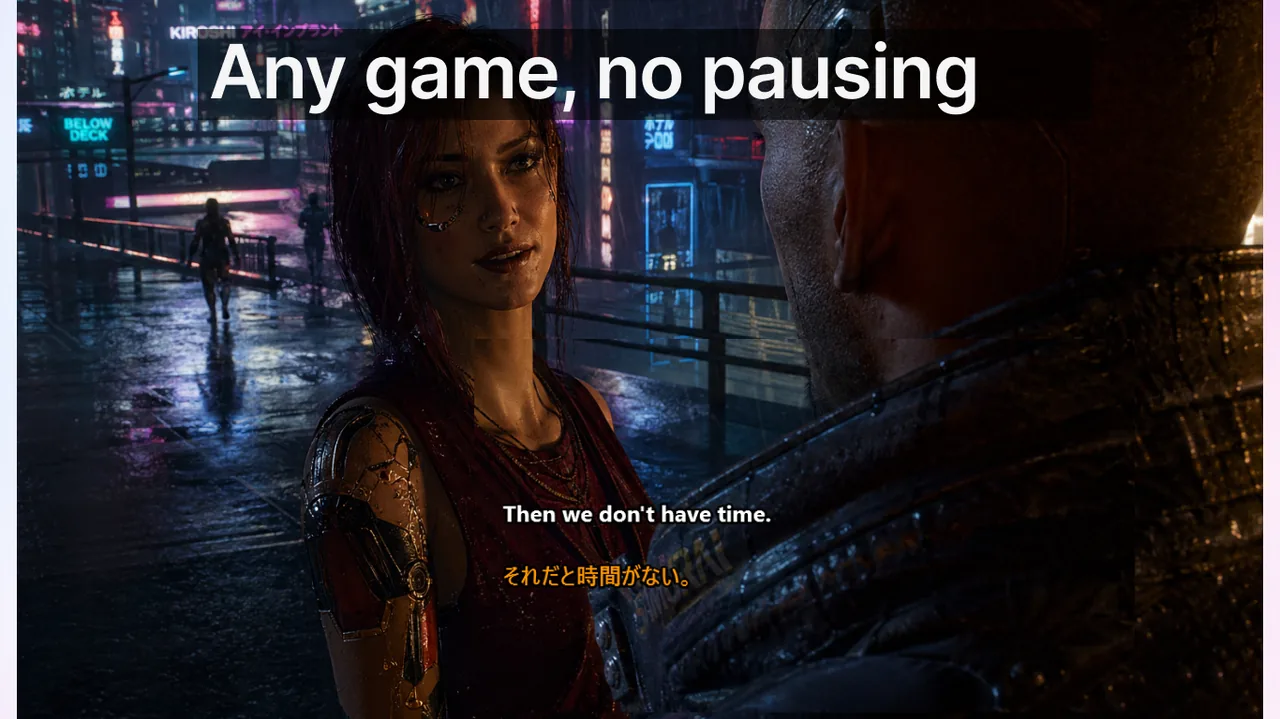
International squads lose rounds for one reason more than any other: callouts are heard but not decoded fast enough. Voice quality is rarely the bottleneck. The real problem is the extra 200–400 milliseconds a non-native listener needs to convert an accented phrase into an actionable mental map update — and ranked matches are routinely decided on margins shorter than that. Adding a real-time subtitle layer inside your Discord session eliminates that bottleneck without changing mic hardware, audio settings, or communication habits. This guide walks through the full setup, explains why subtitles outperform repeated callouts, and gives you a complete operational playbook for any multilingual squad, from two-language duos to six-player international rosters.
Contents
- Why international squads bleed rounds on communication alone
- Step-by-step: baseline subtitle setup for Discord voice sessions
- The four communication failure modes that subtitle layers eliminate
- Callout structure that maximises subtitle readability
- Building and maintaining the shared callout glossary
- Onboarding new squad members in under 20 minutes
- Latency requirements: why gaming demands faster subtitles than meetings
- Cross-language squads: the IGL's communication responsibility
- What to measure after each ranked session
- Observed results over three weeks of consistent use
- Related guides for deeper configuration
- Frequently asked questions
Why international squads bleed rounds on communication alone
Consider a six-player CS2 squad split across Germany, Brazil, and South Korea. The IGL is a native English speaker calling at around 160 words per minute. The German player processes English at 95% accuracy but needs roughly 250 ms of extra processing time per complex phrase. The Brazilian player is strong in English but any regional slang or run-on callout costs 300–500 ms of extra decode time. The Korean player competes at a high mechanical level but has the weakest listening comprehension in English under time pressure.
Over a 30-round match, those per-phrase delays accumulate to 8–15 seconds of lost reaction time — enough to flip two or three rounds in games where engagements are decided in under 500 ms. The problem compounds further because the non-native listener who misses a callout typically does not ask for a repeat immediately; they act on a partial understanding and execute the wrong rotation. The cost is not just one lost round but the downstream loss of economy and confidence that follows a cascade of mis-rotations.
Subtitles do not speed up the speaker. They give every listener a second, simultaneous channel: eyes confirm what ears just heard. Dual-modality input — receiving the same information through both audio and text at the same moment — cuts decode latency by 30–50% for non-native listeners, according to well-established findings in language processing research. For native listeners the improvement is smaller but still measurable in noisy environments where mechanical keyboards, in-game audio, and microphone bleed compete for auditory attention.
Step-by-step: baseline subtitle setup for Discord voice sessions
The following steps assume you are using the Live Subtitles app on Windows. The same principles apply to any real-time captioning tool, but the specific hotkeys and modes referenced here correspond to Live Subtitles, available from the Download free
.- Enable Game Mode (Lock Mode) before joining the voice channel. Game Mode keeps the subtitle overlay on top of the game window and prevents the overlay from capturing mouse clicks. Without it, clicking on a subtitle will defocus your game — a critical mistake mid-round.
- Assign an emergency toggle hotkey. Ctrl+Shift+L is the default. Remap it to a key you can reach without lifting your hand from WASD. A single keystroke should hide or show the overlay without interrupting movement.
- Run the game in borderless window mode, not exclusive fullscreen. Exclusive fullscreen blocks all overlay rendering. Borderless window gives you full-resolution rendering plus a stable overlay plane for subtitles, Discord UI, and any other tools you use simultaneously.
- Position the subtitle bar at the lower-center of the screen. Avoid top-center — it interrupts minimap reading in games with top-left HUDs. Avoid the right side — it conflicts with ammo and ability displays. Lower-center sits below the crosshair and above chat, readable with peripheral vision during most combat scenarios without shifting eye focus from the action.
- Set font size to 18–22 px and background opacity to 60–70%. Higher opacity blocks game context behind the bar; lower opacity makes text unreadable during bright outdoor scenes or snow maps. This range works across most AAA game color palettes.
- Verify overlay stability in a custom lobby before your first ranked session. Confirm the overlay survives a map load, a tab-out, and an alt-tab back into the game. Some overlay frameworks reset their position on scene transitions. Catch this in a five-minute practice, not in a ranked pistol round.
The four communication failure modes that subtitle layers eliminate
- Accent decode delay. Reading a callout simultaneously with hearing it cuts processing time by 30–50% for non-native listeners. The visual channel reinforces audio instead of competing with it — the listener does not need to fully parse the audio because the text already delivered the meaning.
- Acronym and jargon ambiguity. "B2" means "B site, 2 enemies" in CS2 but "rotate to B in 2 seconds" in some Valorant callout systems. Written callouts eliminate auditory ambiguity because the abbreviation's context is visually distinct from natural speech — the reader can re-parse the phrase in under 100 ms rather than asking for clarification and waiting for an answer.
- Background noise interference. Mechanical keyboards at 65 dB, in-game explosion audio bleeding through Discord, microphone clipping on loud exclamations — all of these degrade audio clarity. Subtitles render the intended phrase even when the audio signal is partially masked, because the speech recognition model works on the raw microphone input before Discord's noise suppression pipeline processes and compresses it.
- Voice-fatigue degradation. In hour four of a ranked night, voices flatten and articulation degrades. "Rotate" starts sounding like "rotat—" cut off by a cough. Subtitles stay sharp as long as the microphone is functional, regardless of how tired the caller's voice sounds.
Callout structure that maximises subtitle readability
Subtitles reproduce what was said, not what was meant. Structuring callouts for subtitle readability makes the visual channel as useful as possible during live play:
- Use action + location + timing: "Push A, 3 hit, now" rather than "guys go A there's three of them." The noun-first, number-explicit format is faster to parse visually at a glance, especially when the reader's eye is at the bottom of the screen and not centered on the subtitle bar.
- One canonical term per zone, enforced squad-wide. If the A short area is "Short" in your glossary, never call it "Top" or "A Top." Synonyms force the reader to cross-reference two possible meanings instead of pattern-matching on a single known token — and that cross-reference takes longer than the attack window that prompted the callout.
- No run-on sentences during active fights. Callouts during gunfights should be three words maximum. Save explanations for end-of-round. A subtitle rendering "okay they had an AWP in mid and two lurking B so I decided to—" is useless during the fight and distracting afterwards because it pushes prior callouts off screen.
- Acknowledge with one word. "Copy," "ack," or "on it" is sufficient. Full sentences in acknowledgement consume subtitle display space and push the original callout out of the visible window.
Building and maintaining the shared callout glossary
The squad glossary is the single highest-leverage artifact for a multilingual squad. A 20–30 row pinned Discord message with canonical terms per map zone removes synonym confusion before it starts. Here is a sample structure for CS2 — adapt the same format to any game with named zones:
| Map / context | Canonical term | Meaning (one line) | Banned synonyms |
|---|---|---|---|
| Mirage | "Connector" | Hallway between mid and A site | Mid-hall, Cat-con |
| Inferno | "Pit" | Lower position on A site near truck | A-hole, Lower A |
| Overpass | "Monster" | Lower B raised area under site | Lower B, Tunnel lower |
| Any map | "Default" | Standard opening, no contact yet | Standard, Normal |
| Any map | "Eco" | Full economy save, no buy | Save, Force-eco |
| Any map | "Force" | Partial buy with limited funds | Half-buy, Semi-eco |
The discipline of the glossary matters more than the specific terms you choose. Two synonyms for "Connector" — one player calling it "Mid-hall," another calling it "Connector" — cost more matches than having no glossary at all, because each listener must pause to resolve which meaning applies. Freeze the glossary at the start of each season. Allow revisions only during a designated post-session review, never mid-ranked-night.
Onboarding new squad members in under 20 minutes
Integrating a new member into a multilingual squad without a structured onboarding wastes at least one ranked session on callout confusion that could have been resolved beforehand. Follow this sequence:
- Share the pinned glossary and allow 10 minutes to read it. Do not assume passive absorption. Ask the new member to repeat the five most-used zone names back before the first scrim starts. If they cannot, do the scrim but extend the post-scrim review.
- Run one short scrim match (10–15 rounds). Tag every callout the new member visibly struggled with — hesitation, wrong rotation, or a "what?" — using a Discord reaction emoji in real time. A thumbs-down or a question-mark emoji per message works. Do not stop the match to explain; collect data instead.
- Review tagged callouts immediately after the scrim. For each tagged callout, determine whether the problem was a glossary ambiguity (multiple players use different terms for the same zone) or an individual familiarity gap (the new member simply did not know the term yet). These are different problems requiring different fixes.
- Update the glossary or schedule a follow-up scrim accordingly. A glossary issue means the whole squad was at risk, not just the new member. An individual familiarity gap means one more review session. Do not push to ranked until the new member has decoded every callout without a repeat request across a complete scrim.
- Confirm their subtitle overlay is positioned correctly before ranked. A new member who has never used Live Subtitles may place the bar over a critical HUD element. A 30-second screen share and positioning check costs nothing compared to a round-one complaint about not seeing their ability cooldowns.
Latency requirements: why gaming demands faster subtitles than meetings
A business meeting tolerates 1.5–2 seconds of subtitle lag with no real cost. If the speaker says "let's move the deadline to Friday" and the subtitle appears 1.8 seconds later, no decision is harmed — the meeting continues. A ranked match has no such forgiveness. A callout like "AWP mid, peek now" is actionable for roughly 600–800 ms. If the subtitle appears after 1.2 seconds, the peek window has closed or the AWP has repositioned. The information is stale and the subtitle becomes noise.
This sets a hard latency ceiling for gaming-grade subtitles: under 600 ms end-to-end, from the speaker's voice to rendered text on screen. Tools that batch audio in 2-second windows to improve accuracy are unusable for live callouts regardless of transcription quality. Live Subtitles processes audio in real time with a target latency under 500 ms, which keeps callouts actionable. You can verify your actual latency in the app settings under the diagnostic display. If latency reads consistently above 700 ms, switch to a lower-complexity language model in the settings panel or close background applications competing for CPU resources.
Cross-language squads: the IGL's communication responsibility
In a squad where four players are native English speakers and two are native Spanish speakers, the IGL must commit to one calling language for the entire match and treat that commitment as binding throughout all 30 rounds. Switching mid-round — "rotate B, vamos a B!" — does not help the non-native listener; it doubles the cognitive load on every player simultaneously parsing two language streams, including the native speakers who now must ignore the second-language version they do not need.
If the IGL is bilingual, the practical rule is: call in the language of the statistical majority, and rely on subtitles as the bridge for the minority group. A Spanish-speaking IGL calling in accented English is better served by subtitles than by language alternation. The subtitle layer makes accent variance essentially irrelevant; mid-call language switching does not.
For squads with an even language split — three native EN players and three native ES players — consider a relay caller model: one bilingual player listens to the IGL and immediately echoes critical calls in the other language. This adds 100–200 ms of relay delay but ensures both language groups receive a native-speed callout. The relay caller's output is then subtitled for everyone, making even the relay accessible regardless of the listener's proficiency in either language.
What to measure after each ranked session
Running subtitles without measuring outcomes is like training without tracking performance. Log these four metrics after each ranked night in a shared Discord note or spreadsheet:
- Repeat rate: total count of "say again?", "what?", or equivalent per map. Target: fewer than 2 per map. Consistently above 5 indicates a communication system problem, not a player skill problem — the fix is structural, not individual.
- Mis-rotation rate: rotations executed in the wrong direction or to the wrong site. Even one per match is worth a post-session review. Mis-rotations almost always trace back to a callout decode failure rather than a strategy failure.
- Glossary churn: new terms introduced mid-season outside of scheduled review sessions. Every ad-hoc new term is a temporary confusion source for every non-originating player. Track the number; keep it near zero between scheduled review sessions.
- Native-language drift: instances where a non-native speaker under pressure reverted to their first language mid-call. This is a fatigue and comfort indicator, not a performance failure. Track which players drift and at what round count — and schedule shorter sessions or more breaks for those players.
Observed results over three weeks of consistent use
Squads that maintain the full setup described in this article — shared glossary, subtitle overlay enabled and correctly positioned, callout structure enforced — consistently see the following progression across three weeks:
- Week 1: repeat rate drops by roughly half. The glossary eliminates the most common synonym confusion, and subtitles reduce accent-related decode failures. Players consistently report feeling "less stressed" on IGL calls even before their ranked stats improve.
- Week 2: mis-rotation rate drops to near zero. Consistent terminology combined with visual callout confirmation means rotations execute on the first call without requiring confirmation. This typically saves 1–2 rounds per map — a meaningful gain at any rank.
- Week 3: ranked win rate improves 5–10 percentage points depending on the squad's prior communication baseline. This improvement is not from individual mechanical skill gains. It is entirely from eliminating round losses that were previously attributed to "bad reads" or "slow reactions" but were actually failed callout decode.
The subtitle layer accelerates this progression but does not replace the discipline of the glossary, consistent callout structure, or the IGL's commitment to one language. The discipline is cheap to maintain once established, partly because players who can read a callout stop asking for repeats — which means the IGL spends more time calling and less time managing communication overhead.
Related guides for deeper configuration
For the full overlay configuration specific to competitive titles, see the Game Mode subtitle setup guide, which covers borderless window optimization, refresh rate considerations, and per-game overlay profile recommendations. If your overlay disappears on map loads or during loading screens, the fullscreen overlay troubleshooting guide covers the most common causes and fixes in detail. For HUD-specific placement differences between FPS and MOBA games, the subtitle overlay settings guide for FPS and MOBA addresses each genre's unique requirements.
For platform-level setup notes covering Discord mobile and cross-device sessions, see the Discord and Twitch subtitles platform page. The dedicated Game Mode subtitles page explains how the Windows overlay compositor layer works and why it is the most stable rendering path for competitive use.
Frequently asked questions
Will the subtitle overlay affect my FPS or game performance?
Live Subtitles runs as a lightweight transparent overlay using the Windows Desktop Window Manager compositor layer — the same layer used by Discord's own in-game overlay. In benchmark testing across CS2, Valorant, and Apex Legends at both 1080p and 1440p, the framerate impact is 0–2 FPS, which falls within measurement noise on any mid-range or higher GPU. The overlay does not inject into the game process and does not require DirectX hooks. If you observe significant FPS drops after enabling it, check whether your GPU was already running at 99% utilization before launching the overlay; the overlay cannot compensate for a GPU that is already saturated at baseline.
Can players on different operating systems benefit in the same squad?
Live Subtitles is a Windows application available from the Download free. Squadmates on macOS or Linux cannot run the same app. However, the subtitle overlay operates entirely on the individual player's machine — there is no shared server component and no squad-wide dependency. A squad where three members run Live Subtitles and two do not still benefits substantially from the three who do, because those three will ask for fewer repeats and execute callouts faster. Non-Windows squadmates can explore browser-based alternatives, but Windows players gain full integration with Lock/Game Mode.
What happens if subtitle latency spikes above acceptable levels mid-match?
If latency exceeds roughly 700 ms consistently, tactical callouts become less reliable but strategic communications — mid-round plan changes, economy calls, post-fight analysis — remain fully useful because their timing constraints are looser. To reduce latency in the moment: switch to the fastest available language model in Live Subtitles settings, close browser tabs and background applications competing for CPU, and set Discord's noise suppression to "Standard" rather than "High" — high suppression adds processing delay before the audio even reaches the recognition model. If latency spikes are intermittent rather than persistent, they are usually caused by Windows Update downloading in the background or antivirus scanning active processes.
How many languages does Live Subtitles support for Discord voice?
Live Subtitles supports real-time transcription in over 50 languages, covering all major gaming regions: English, Spanish, German, Portuguese, Korean, Japanese, French, Polish, Russian, Turkish, Arabic, and more. For international squads where the IGL calls in one language and some players prefer reading in another, Live Subtitles also offers a translation mode — subtitles can optionally render in the listener's chosen language rather than the speaker's original language. This is particularly valuable when a listener's reading speed in their first language is significantly faster than their listening comprehension in the IGL's language, as is common in squads with large language-proficiency gaps.
Do we need a Discord bot or server-level integration to use this?
No. Live Subtitles captures system audio and Discord voice output directly on each individual player's Windows machine. There is no bot, no server-side component, no server administrator permissions required, and no impact on Discord server settings or other members' experience. Each player installs and configures the app independently. This also means there is no shared point of failure: if one player's overlay crashes or encounters a performance issue, the rest of the squad's subtitle setups are completely unaffected.
Is there a way to test the setup before a real ranked session?
Yes, and you should. Discord's "User Settings > Voice & Video > Mic Test" combined with a custom lobby in your game of choice is the recommended pre-session check. Have one squadmate make callouts at normal pace and accent while you verify that subtitles appear within 500 ms, that the overlay position does not conflict with any HUD element, and that the emergency toggle hotkey works. Ten minutes of this before a ranked night is the most efficient investment a multilingual squad can make in their communication quality.
Standardize team communication — starting tonight
One stable subtitle workflow in Discord can improve every match day. Live Subtitles is free to download on Windows — no subscription, no server integration, no setup beyond five minutes per player.
Download free