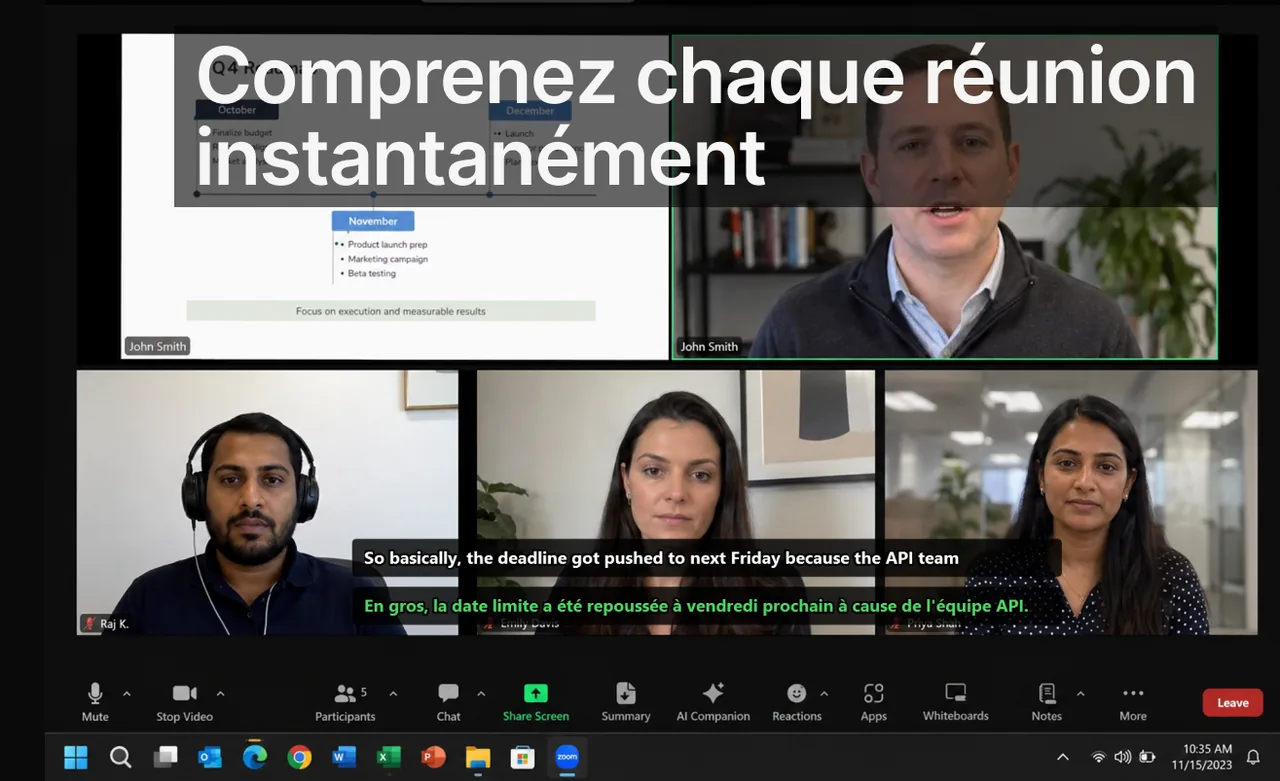
Les équipes qui cherchent des sous-titres traduits se posent souvent une question pratique : faut-il s'appuyer sur les sous-titres natifs intégrés à chaque outil de réunion, ou conserver un workflow externe unique qui couvre tous les contextes de communication ? Ce comparatif se concentre sur les décisions opérationnelles réelles — gouvernance, adoption, friction quotidienne — et non sur le marketing des fonctionnalités. Google Meet, Zoom et Microsoft Teams affichent chacun des chiffres impressionnants sur le nombre de langues prises en charge, mais c'est rarement ce critère qui détermine le succès d'un déploiement multilingue.
Si vous gérez des réunions internationales, des formations en ligne ou un support client réparti sur plusieurs fuseaux horaires, le vrai enjeu n'est pas « quelle plateforme traduit le plus de langues » mais « quel modèle de sous-titrage mes équipes vont réellement utiliser, sans hésiter, dans tous leurs outils ». Ce guide vous donne un cadre de décision concret, des indicateurs mesurables et une recommandation par type d'organisation.
Sommaire
Aperçu du marché (au 18 février 2026)
| Plateforme | Signal actuel notable | Implication opérationnelle |
|---|---|---|
| Google Meet | Google annonce la prise en charge des sous-titres traduits jusqu'à 69 langues (mise à jour du 24 juin 2025). | Option native solide pour les équipes très ancrées dans Google Workspace. |
| Zoom | Zoom indique la prise en charge des sous-titres traduits dans 46 langues. | Bonne base multilingue si Zoom est votre principale couche de réunion. |
| Microsoft Teams | Les sous-titres traduits sont disponibles, mais des contraintes de politique et d'environnement s'appliquent dans certains cas. | Une planification de déploiement plus stricte par les admins est nécessaire avant une adoption massive. |
Ces chiffres sont des plafonds théoriques, pas des garanties de qualité. La couverture linguistique annoncée mélange souvent des langues sources matures (anglais, espagnol, français) et des paires plus rares dont la précision en temps réel reste irrégulière. Avant de choisir une plateforme « parce qu'elle couvre 69 langues », vérifiez surtout les paires que vos équipes utilisent vraiment au quotidien.
Quand les sous-titres natifs suffisent
Les sous-titres intégrés à une seule plateforme constituent le choix le moins coûteux en friction dans plusieurs cas de figure clairement identifiables :
- Votre organisation est standardisée sur une seule plateforme de réunion (par exemple, tout passe par Google Meet ou tout passe par Teams).
- La majorité de la communication a lieu dans des appels planifiés, pas dans des contextes médiatiques mixtes (vidéos, streams, navigateur).
- Le service informatique peut imposer des politiques de réunion cohérentes et activer les fonctionnalités pour tous les comptes.
- Vos paires de langues principales font partie des paires matures et bien testées de la plateforme.
Dans cette configuration, les sous-titres natifs sont souvent le choix optimal : pas d'installation supplémentaire, aucune fenêtre tierce à gérer, et une activation centralisée par les administrateurs. Le coût marginal pour l'utilisateur final est quasi nul, ce qui favorise une adoption rapide.
Quand un workflow inter-apps unique l'emporte
À l'inverse, dès que la communication se fragmente entre plusieurs outils et formats, un workflow de sous-titres externe et cohérent devient le choix le plus rationnel :
- Les équipes utilisent Meet, Zoom et Teams en parallèle, selon les préférences des clients et des partenaires.
- Les utilisateurs ont aussi besoin de sous-titres dans les webinaires, les vidéos de formation, les streams ou les chats vocaux comme Discord.
- Les workflows d'apprentissage des langues et de communication doivent partager une seule et même habitude.
- Une partie des collaborateurs travaille hors des plateformes de visioconférence : lecteurs vidéo, navigateur, applications de bureau.
Quand les contextes sont fragmentés, le véritable coût de productivité n'est pas la traduction elle-même : c'est le changement d'outil. Chaque fois qu'un utilisateur doit chercher où activer les sous-titres dans une nouvelle interface, il perd quelques secondes — et, plus grave, il perd confiance dans le dispositif. Un workflow unique, identique partout, supprime cette charge cognitive. C'est précisément ce que vise une application comme Live Subtitles, qui affiche un overlay de sous-titres traduits par-dessus n'importe quelle source audio du système, indépendamment de l'application en cours.
Pour les contextes hors réunion, nos guides dédiés détaillent des cas concrets : voir par exemple les sous-titres pour le chat vocal Discord et le fonctionnement d'un traducteur vocal en temps réel comparé par cas d'usage.
Comparer au-delà du nombre de langues
Pour décider en connaissance de cause, regardez les critères qui pèsent vraiment sur l'expérience quotidienne plutôt que le seul total de langues affiché :
- Latence d'affichage : le délai entre la parole et le sous-titre traduit. Au-delà de deux à trois secondes, les participants décrochent et reviennent à la lecture labiale ou aux demandes de répétition.
- Stabilité des paires de langues : une paire anglais-français mature est nettement plus fiable qu'une paire rare. Testez vos paires réelles, pas la liste marketing.
- Couverture hors réunion : les sous-titres natifs s'arrêtent à la fenêtre de la réunion. Un overlay système couvre aussi les vidéos, les webinaires et les flux dans le navigateur.
- Contrôle administrateur : activation centralisée, conformité, journalisation. Teams exige généralement la planification de déploiement la plus stricte.
- Cohérence de l'expérience : une interface identique partout réduit la charge de formation et accélère l'adoption.
Cadre de décision pour les managers
Étape 1 : cartographier les canaux de communication réels
Ne planifiez pas à partir des feuilles de licences ; planifiez à partir de l'usage réel. Comptez les heures hebdomadaires consacrées à chaque plateforme et à chaque type de contenu : réunions internes, appels clients, webinaires, formations enregistrées, sessions de support. Vous découvrirez souvent que le « tout-Teams » supposé cache en réalité 30 % d'appels Zoom imposés par les clients.
Étape 2 : définir des indicateurs de succès
Un déploiement de sous-titres sans mesure est un acte de foi. Définissez deux ou trois indicateurs observables avant de commencer :
- Nombre de messages de clarification envoyés après les réunions (un bon proxy de la compréhension réelle).
- Latence entre la fin de l'appel et la confirmation du responsable de l'action décidée.
- Confiance déclarée des participants dans les appels multilingues, mesurée par un micro-sondage de deux questions.
- Taux d'activation effectif : combien d'utilisateurs allument réellement les sous-titres, et pas seulement combien y ont accès.
Étape 3 : faire un déploiement contrôlé de 2 semaines
Testez une équipe uniquement avec les sous-titres natifs et une autre avec un workflow unifié inter-contextes. Gardez les mêmes types de réunion et la même charge de travail pour que la comparaison reste honnête. Comparez ensuite les deltas de KPI, recueillez le ressenti qualitatif, puis industrialisez le modèle gagnant. Deux semaines suffisent généralement à faire émerger une tendance claire.
Conseil de déploiement
Lancez le pilote sur un seul groupe volontaire avant l'organisation entière. Un retour positif de quinze utilisateurs convaincus crée bien plus d'adoption qu'une directive imposée à mille comptes. Documentez la procédure d'activation en une seule capture d'écran par outil.
Risques d'implémentation à surveiller
- Désalignement de politique : les administrateurs activent les fonctionnalités, mais les utilisateurs ignorent l'existence ou l'emplacement du bouton de sous-titres. Sans communication interne, la fonctionnalité reste dormante.
- Absence de protocole de parole : les discours qui se chevauchent détruisent la valeur des sous-titres. Une règle simple — une personne parle à la fois, on attend une demi-seconde après le tour précédent — multiplie la précision perçue.
- Aucune boucle de revue : sans mesure, les équipes ne peuvent pas prouver l'amélioration de la qualité de communication, et le projet perd son sponsor au premier arbitrage budgétaire.
- Dépendance à une seule plateforme : miser entièrement sur les sous-titres natifs d'un outil vous expose à toute évolution de sa politique tarifaire ou de ses limites de fonctionnalités.
Recommandation pratique par type d'équipe
Organisation interne mono-plateforme : commencez par les sous-titres natifs, optimisez le processus (protocole de parole, formation à l'activation), puis n'étendez vers un outil externe que si de nouveaux contextes apparaissent. Si tout passe par Google Meet, par exemple, appuyez-vous d'abord sur la fonction native et consultez notre page dédiée aux sous-titres en direct dans Google Meet.
Organisation multi-plateforme orientée client : priorisez d'abord la cohérence entre outils plutôt que la performance maximale sur un seul. Une expérience identique sur Meet, Zoom et Teams réduit les erreurs et la friction de formation. Comparez ensuite les comportements par plateforme, par exemple via nos guides sur les sous-titres Zoom et les sous-titres Teams.
Apprentissage des langues couplé aux opérations : utilisez un workflow de sous-titres qui fonctionne aussi hors réunions — vidéos, podcasts, streams — pour éviter le changement de contexte. La même habitude sert alors à comprendre une réunion et à progresser dans une langue cible.
FAQ
Le nombre de langues est-il le seul critère qui compte ?
Non. La gouvernance, le comportement des utilisateurs et la cohérence inter-plateformes pèsent presque toujours plus que le total brut de langues annoncé. Une plateforme qui couvre 69 langues mais que personne n'active vaut moins qu'un outil de 30 langues utilisé systématiquement.
Peut-on combiner workflows natifs et externes ?
Oui, et c'est même fréquent. Beaucoup d'équipes utilisent les sous-titres natifs là où ils sont stables et conservent un workflow externe de secours pour les environnements mixtes et les contenus hors réunion.
En combien de temps mesure-t-on l'impact ?
La plupart des équipes constatent des évolutions directionnelles de leurs KPI en 2 à 4 semaines, à condition que l'usage soit constant et que les indicateurs aient été fixés avant le lancement.
Les sous-titres traduits remplacent-ils un interprète humain ?
Pas dans les contextes juridiques, médicaux ou contractuels critiques. Pour les réunions opérationnelles courantes, en revanche, ils suppriment l'essentiel des incompréhensions et accélèrent la prise de décision. Pour transformer un appel en compte rendu écrit, voyez aussi notre guide sur la transcription de l'audio en texte en temps réel.
Références
- Google Workspace Updates — Meet translated captions
- Zoom captions and translated captions overview
- Microsoft Teams live captions documentation
- Windows live captions support page
Articles connexes
Construisez un workflow de sous-titres fiable
Réduisez la friction de communication entre réunions, formation et collaboration en temps réel.
Télécharger gratuitement