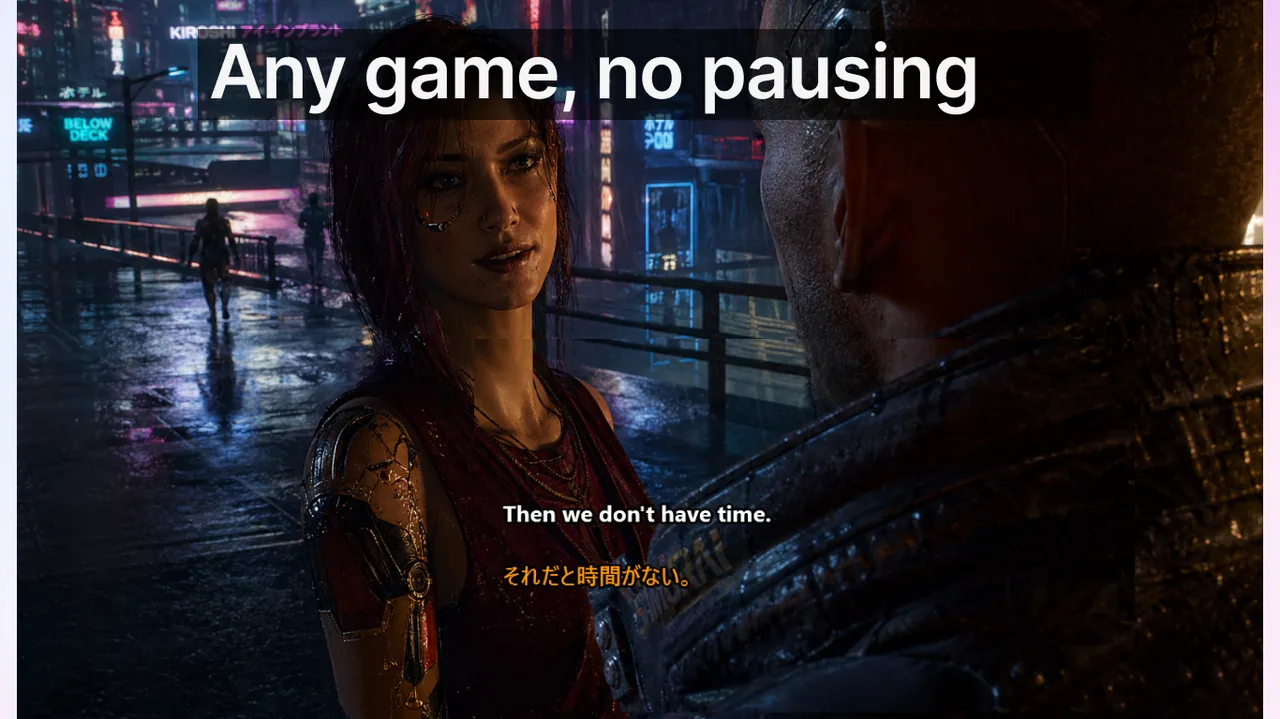
Uluslararası takımlar maçları çoğu zaman mekanik hatalar yüzünden değil, callout'ların yeterince hızlı anlaşılamaması yüzünden kaybeder. Sorun yalnızca mikrofon kalitesi değildir; asıl mesele anlamanın hızı ve tutarlılığıdır. Farklı ana dillerden oyunculardan oluşan bir kadroda, sesli iletişimin üstüne eklenen bir altyazı katmanı tekrarları azaltır ve her saniyenin önemli olduğu anlarda tepki süresini kısaltır. Bu yazıda Discord sesli sohbetinde altyazıyı nasıl kuracağınızı, callout yapısını nasıl sadeleştireceğinizi ve çok dilli bir takımı nasıl ortak bir terim setinde buluşturacağınızı anlatıyoruz.
İçindekiler
- Discord oturumları için temel kurulum
- Altyazıyla uyumlu çalışan callout yapısı
- Kadro alıştırma kontrol listesi
- Haftalık izlenecek KPI'lar
- Uluslararası ranked kadrolarda aksan farkının gizli maliyeti
- Altyazı katmanının çözdüğü dört iletişim hatası
- Kadro düzeyinde ortak sözlük şablonu
- Yeni kadro üyelerini 15 dakikada alıştırma
- Altyazı doğruluğu neden toplantılardan çok sesli sohbette önemli?
- Diller arası kadro: IGL'in rolü
- Ölçüm: her ranked gecesinin ardından neyi kaydetmeli
- Üç hafta disiplinin ardından veriler ne gösteriyor?
- İlgili kaynaklar
Discord oturumları için temel kurulum
İyi bir altyazı iş akışı sade ve tekrarlanabilir bir kurulumla başlar. Her maç gününde aynı adımları izleyin ki overlay davranışı sürpriz yapmasın.
- Sesli kanala katılmadan önce Kilit/Oyun Modunu (Lock/Game Mode) etkinleştirin.
- Acil durumda açıp kapatmak için tek bir kısayol tutun: Ctrl+Shift+L.
- Overlay kararlılığı için oyunda kenarlıksız tam ekran (borderless fullscreen) kullanın.
- Altyazı konumunu yüksek kontrastla ekranın alt-orta bölgesine ayarlayın.
Bu dört adım, altyazının oyunun en yoğun anlarında bile titremeden ve odak çalmadan görünmesini sağlar. Tam ekran overlay sorunları yaşıyorsanız tam ekran overlay sorun giderme rehberimize göz atın.
Altyazıyla uyumlu çalışan callout yapısı
Altyazı, kısa ve öngörülebilir callout'larla en iyi sonucu verir. Uzun cümleler hem ekranda taşar hem de okuma süresini uzatır.
- Kısa format kullanın: eylem + konum + zamanlama.
- Her harita bölgesi için tek bir terim belirleyin ve maç ortasında eş anlamlı sözcükleri bırakın.
- Çatışma sırasında uzun açıklamaları üst üste bindirmekten kaçının.
- Kritik çağrıları tek kelimelik bir onayla teyit edin.
Kadro alıştırma kontrol listesi
- 20 ila 30 harita teriminden oluşan ortak bir sözlük oluşturun.
- Sözlüğü Discord kanal açıklamasına sabitleyin.
- Altyazı yerleşimini kalibre etmek için kısa bir scrim yapın.
- Sürekli karışan callout'ları takip edin ve zayıf terimleri çıkarın.
Haftalık izlenecek KPI'lar
- Takım arkadaşlarının callout'u tekrar etmeyi ne sıklıkta istediği.
- Callout ile takım eyleminin gerçekleşmesi arasındaki ortalama gecikme.
- Yanlış anlaşılan sesli iletişim yüzünden oluşan yanlış dönüşler (mis-rotation).
Uluslararası ranked kadrolarda aksan farkının gizli maliyeti
Üç farklı saat diliminden ve iki farklı ana dilden oyuncudan oluşan 6 kişilik bir kadro, tipik bir ranked gecesinde mekanik hatalardan değil callout çözümleme gecikmesinden 2-3 round kaybeder. IGL ana dilinde, doğal hızda konuşur; ikinci bir dilde dinleyen bir oyuncunun her ifade için 200-400 ms ek işleme süresine ihtiyacı vardır. 30 round'luk bir maçta bu, biriken 6-12 saniyelik tepki gecikmesi demektir ve ranked maçlar bundan çok daha ince farklarla belirlenir.
Altyazı katmanının çözdüğü dört iletişim hatası
- Aksan çözümleme gecikmesi. Bir callout'u duyarken aynı anda okumak, ana dili olmayan dinleyiciler için çözümleme süresini %30-50 kısaltır. Görsel, sesle yarışmak yerine onu pekiştirir.
- Kısaltma belirsizliği. "B2", CS2'de "B bölgesi, 2 vuruş" anlamına gelebilirken Valorant'ta "2 saniye içinde B'ye dön" olabilir. Yazılı bir callout işitsel belirsizliği ortadan kaldırır çünkü kısaltmalar görsel olarak doğal sözcüklerden ayrışır.
- Arka plan gürültüsü. Mekanik klavyeler, çatışma sırasındaki nefes sesleri, mikrofon sızması. Ses kısmen bastırılsa bile altyazı amaçlanan ifadeyi gösterir.
- Ses yorgunluğu. Bir oturumun dördüncü saatinde sesler boğuklaşır. Altyazı net kalır.
Kadro düzeyinde ortak sözlük şablonu
Sözlük, çok dilli bir kadro için en yüksek getirili tek araçtır. 20-30 satırlık bir tabloyu tek bir Discord mesajına sabitleyin ve hafta ortasındaki düzenlemeleri yasaklayın. Örnek yapı:
| Harita / bağlam | Terim | Anlam (tek satır) |
|---|---|---|
| Mirage | "Connector" | Mid ile A bölgesi arasındaki koridor |
| Inferno | "Pit" | A bölgesindeki alt mevki |
| Overpass | "Monster" | B'nin alt yükseltili alanı |
| Her harita | "Default" | Standart açılış kurulumu, temas yok |
| Her harita | "Eco" | Alışveriş yok, ekonomiyi koru |
Burada disiplin içerikten daha önemlidir. "Connector" için iki eş anlamlı terim - "Mid-hall" ve "Connector" - hiç sözlük olmamasından daha fazla maç kaybettirir.
Yeni kadro üyelerini 15 dakikada alıştırma
- Sabitlenmiş sözlüğü paylaşın ve scrim öncesi bir kez okumalarını isteyin.
- Bir scrim maçı yapın. Yeni üyenin gerçek zamanlı olarak anlamadığı her callout'u işaretleyin (Discord tepki emojisi işe yarar).
- Scrim sonrası işaretlenen callout'ları gözden geçirin: terim belirsiz miydi, yoksa yeni üye mi aşina değildi?
- Ya sözlüğü düzenleyin ya da ikinci bir scrim planlayın. Yeni üye ikinci scrim'de her callout'u altyazı yardımı olmadan çözdüğünü onaylamadan ranked'a geçmeyin.
Altyazı doğruluğu neden toplantılardan çok sesli sohbette önemli?
Bir iş toplantısının yedeği vardır: slaytlar, takip e-postası, kayıtlı transkript. Bir ranked maçın hiçbiri yoktur. Kaçırılan bir callout geri sarılamaz. Bu durum altyazı gecikmesi için çıtayı "yeterince iyi"den (verimlilik araçlarında 1,5-2 sn) "fark edilmez"e (600 ms'nin altı) yükseltir. Metin üretmeden önce birkaç saniyelik sesi toplu işleyen araçlar, sonuçtaki doğruluk ne olursa olsun ranked iletişimi için kullanılamaz. Altyazı gecikmesinin neden bu kadar belirleyici olduğunu Oyun Modu kurulum rehberinde daha ayrıntılı ele alıyoruz.
Diller arası kadro: IGL'in rolü
4 oyuncusu ana dili İngilizce, 2 oyuncusu ana dili İspanyolca olan bir kadroda IGL, tek bir çağrı diline bağlanmalı ve tüm maç boyunca buna sadık kalmalıdır. Round ortasında dil değiştirmek ("rotate B, vamos a B") her dinleyicinin bilişsel yükünü iki katına çıkarır. IGL iki dilli ise maç başlamadan önce çoğunluğun dilini seçin ve bunu bağlayıcı kabul edin. Aynı kuralı yayın yaparken de uygulayın; Discord ve Twitch altyazı sayfasında izleyiciyle iletişim için ek ipuçları var.
Ölçüm: her ranked gecesinin ardından neyi kaydetmeli
- Tekrar oranı: Maç başına "tekrar et?" veya "ne?" sayısı. Hedef < 2.
- Yanlış dönüş oranı: Yanlış yöne yapılan dönüşler. Gece başına hedef 0.
- Sözlük değişkenliği: Sezon ortasında eklenen yeni terimler. Az olması daha iyidir.
- Ana dile kayma: Ana dili o dil olmayan bir oyuncunun çağrı ortasında kendi diline dönmesi. Takip edin ama cezalandırmayın; yorgunluk gerçektir.
Üç hafta disiplinin ardından veriler ne gösteriyor?
Gözlemlediğimiz kadrolardan tipik bir örüntü: tekrar oranı ilk haftada yarıya iner (sözlük işini yapıyordur), yanlış dönüşler ikinci haftada yarıya iner (kelime dağarcığı artık zihinsel haritalarla örtüşür) ve ranked kazanma oranı üçüncü haftada 5-10 puan artar (yeni iletişim temeli round'lar boyunca birikir). Altyazı katmanı bu eğriyi hızlandırır; disiplinin yerini almaz.
İpucu: Live Subtitles uygulaması Discord sesli sohbetini canlı altyazıya çevirir ve callout'ları gerçek zamanlı olarak takım arkadaşlarınızın diline yansıtabilir. Oyun Modu sayesinde overlay, tam ekran maç sırasında bile odakta kalır.
İlgili kaynaklar
- Discord ve Twitch altyazı sayfası
- Oyun Modu altyazı sayfası
- Oyun Modu kurulum rehberi
- Tam ekran overlay sorun giderme
Takım iletişimini bir kez standartlaştırın
Discord'da tek bir kararlı altyazı iş akışı her maç gününü iyileştirebilir. Live Subtitles ile hemen başlayın.
Ücretsiz indir